Loading
Get Jpay Money Order Deposit Form
How it works
-

Open form follow the instructions
-

Easily sign the form with your finger
-

Send filled & signed form or save
How to fill out the JPay Money Order Deposit Form online
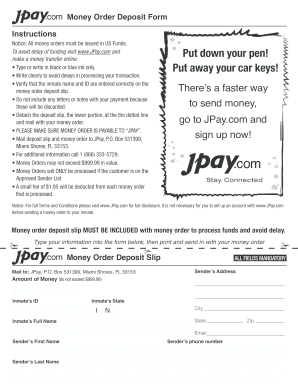
Filling out the JPay Money Order Deposit Form online is an essential step for sending funds to an inmate. This guide will provide you with a clear and supportive overview of the process, ensuring that your transaction is completed smoothly and efficiently.
Follow the steps to successfully complete the form.
- Click 'Get Form' button to access the JPay Money Order Deposit Form and begin filling it out.
- In the designated fields, enter the amount of money you wish to send, ensuring it does not exceed $999.99. This amount should be in US funds.
- Input the inmate’s ID and full name accurately. Double-check these details to prevent processing delays.
- Specify the inmate's state of residence in the relevant section of the form.
- Fill out the sender’s address, including street address, city, state, and zip code.
- Provide your first name and last name in the specified fields.
- Include your phone number and email address to ensure proper communication regarding the transaction.
- Review all information you entered to ensure accuracy and clarity. Remember to use black or blue ink if completing it manually.
- Detach the deposit slip from the form at the dotted line and mail it together with your money order to JPay, P.O. Box 531399, Miami Shores, FL 33153.
- Finally, save your changes if filling out online, then download or print a copy of the completed form for your records.
Complete your JPay Money Order Deposit Form online today and ensure a seamless transfer of funds.
On bank orders you may write prisoner's name & number somewhere (like memo area). 3) Then you fill out the envelope with your return address in the upper left corner. In the address area you write Federal Bureau of Prisons. On the second line write the inmate's full committed name.