Loading
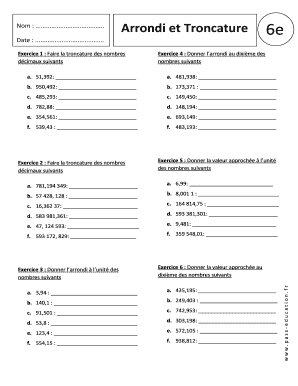
Get Arrondi Et Troncature
How it works
-

Open form follow the instructions
-

Easily sign the form with your finger
-

Send filled & signed form or save
How to fill out the Arrondi et Troncature online
The Arrondi et Troncature document is designed to assist users in learning about rounding and truncating decimal numbers. This guide will help you navigate the online form effectively, ensuring that you can complete each section with confidence.
Follow the steps to fill out the Arrondi et Troncature form online.
- Press the ‘Get Form’ button to access the Arrondi et Troncature form and open it in the online editor.
- Begin with Exercise 1, where you will truncate the provided decimal numbers. For each number, determine the truncated value based on the indicated criteria.
- Proceed to Exercise 4, where you are asked to round the given numbers to the nearest tenth. Carefully analyze each number and write the rounded result in the designated space.
- Move to Exercise 2 to continue with truncation. Follow the same approach as in Exercise 1, truncating the listed decimal figures.
- Then, complete Exercise 5 by providing the approximate value of each number to the nearest whole unit.
- Next, tackle Exercise 3 by rounding the listed decimal numbers to the nearest whole number, filling in your answers accordingly.
- Finally, in Exercise 6, round the provided numbers to the nearest tenth. Take your time to ensure accuracy as you enter your responses.
- Once all sections are completed, save your changes to the document. You may download, print, or share the filled form as needed.
Start filling out the Arrondi et Troncature document online today!