Loading
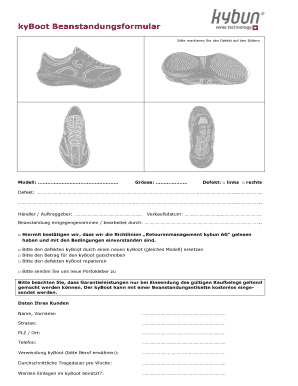
Get Kyboot Beanstandungsformular - Kybun.ch
How it works
-

Open form follow the instructions
-

Easily sign the form with your finger
-

Send filled & signed form or save
How to fill out the KyBoot Beanstandungsformular - Kybun.ch online
The KyBoot Beanstandungsformular is an essential document for addressing any defects related to your KyBoot footwear. This guide will walk you through the process of accurately filling out the form online, ensuring that your concerns are effectively communicated.
Follow the steps to complete the online form successfully.
- Click the ‘Get Form’ button to obtain the form and open it in the online editor.
- In the 'Modell' section, clearly specify the model of your KyBoot. This helps in identifying the particular footwear in question.
- Next, fill in the 'Grösse' section with the size of your KyBoot to ensure proper handling of your claim.
- Mark the appropriate checkbox under 'Defekt' to indicate whether the defect is on the left or right shoe.
- Provide a detailed description of the defect in the space provided. Clarity here will assist in expediting your claim.
- Enter the name of the dealer or the persons you corresponded with regarding your KyBoot in the 'Händler / Auftraggeber' section.
- Fill in the 'Verkaufsdatum' with the date of purchase, as this information is vital for validating your claim.
- Indicate the individual who received or processed the complaint in the 'Beanstandung entgegengenommen / bearbeitet durch' section.
- Review the confirmation statement regarding the 'Richtlinien Retourenmanagement kybun AG,' and check the box to agree if applicable.
- Choose one of the options for the resolution you seek regarding the defect, such as replacement, refund, repair, or request for new postage labels.
- Fill out your customer data: provide your name, address, postal code, city, and phone number in the respective sections.
- Describe your usage of the KyBoot, mentioning your occupation, in the 'Verwendung kyBoot' section.
- Indicate the average wearing duration per week in the respective field to assist in understanding usage patterns.
- Specify whether insoles are used in the KyBoot with a straightforward 'Yes' or 'No.'
- Once all sections of the form are filled out, save changes, and choose to download, print, or share the form as needed.
Start completing the KyBoot Beanstandungsformular online today to ensure prompt attention to your footwear concerns.