Loading
Get Fiche Signalétique
How it works
-

Open form follow the instructions
-

Easily sign the form with your finger
-

Send filled & signed form or save
How to fill out the Fiche Signalétique online
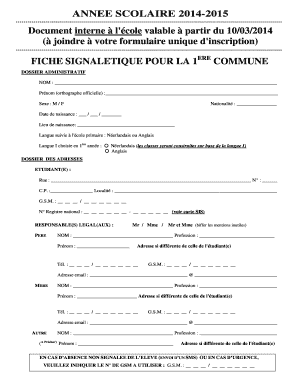
Filling out the Fiche Signalétique is an essential step in the registration process for students. This guide provides a clear and structured approach to completing the form online, ensuring that all necessary information is accurately provided.
Follow the steps to successfully complete the Fiche Signalétique online.
- Click the ‘Get Form’ button to retrieve the Fiche Signalétique and open it in the online editor.
- In the first section, provide the student's last name and official first name in the designated fields.
- Indicate the student's gender by selecting the appropriate option (M or F).
- Fill in the nationality of the student in the specified field.
- Enter the date of birth in the format day/month/year and provide the place of birth.
- Select the primary language followed in elementary school, choosing either Dutch or English.
- In the next section, select the chosen language for the first year, marking either Dutch or English.
- Complete the student’s address details including street, number, postal code, locality, and contact numbers.
- Fill in the national registration number as displayed on the SIS card.
- For legal guardians, include the father's or mother's name while indicating their professions and contact details.
- If applicable, provide details for any other legal guardian including their name, profession, and contact information.
- Complete the emergency contact section, providing a mobile number to be contacted in case of absence or emergency.
- For foreign students, indicate the legal domicile of the parents, including the country and location, as well as the expiration date of any residence permit.
- Fill out the medical and financial sections, including the primary physician's name and contact number, as well as the financial account number of the guardian.
- Provide the details regarding the previous school and date of primary education completion.
- In the miscellaneous section, enter the estimated arrival and departure times, check if the student will stay after school, and indicate preferred modes of transport.
- If relevant, specify any diagnosed learning disabilities and provide details if applicable.
- Include any additional remarks related to health, medication, or behavior.
- Indicate the location and date of completion of the Fiche Signalétique.
- Before finalizing, ensure all fields are accurately filled in, and then save the changes. Users can subsequently download, print, or share the completed form.
Complete your Fiche Signalétique online today for a smooth registration process!
Related links form
SMALL ESTATE AFFIDAVIT - Office Of The State Treasurer Of Nevada - Nevadatreasurer
SF-123 Transfer Order Surplus Personal Property - Osec Doc
February 2015) Department Of The Treasury Internal Revenue Service Part I Injured Spouse Allocation
EInvoice Frequently Asked Questions - Maricopa County - Maricopa
N'oubliez pas qu'une fiche projet doit être synthétique : 1 à 2 pages maximum. Il s'agit d'un référentiel rapide expliquant le projet. Le détail est réservé à d'autres documents contractuels, tels que la charte de projet, ou le plan projet. Utiliser du jargon technique ou des sigles.
Industry-leading security and compliance
US Legal Forms protects your data by complying with industry-specific security standards.
-
In businnes since 199725+ years providing professional legal documents.
-
Accredited businessGuarantees that a business meets BBB accreditation standards in the US and Canada.
-
Secured by BraintreeValidated Level 1 PCI DSS compliant payment gateway that accepts most major credit and debit card brands from across the globe.