Loading
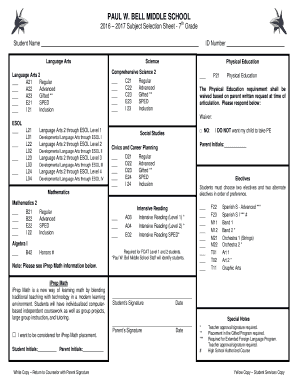
Get Student Name Id Number - Paul Bell Middle - Pwbell Dadeschools
How it works
-

Open form follow the instructions
-

Easily sign the form with your finger
-

Send filled & signed form or save
How to fill out the Student Name ID Number - Paul Bell Middle - Pwbell Dadeschools online
Filling out the Student Name ID Number form for Paul Bell Middle School is an essential step in the school enrollment process. This guide provides a clear, step-by-step approach to assist users in completing the form online, ensuring all necessary information is accurately recorded.
Follow the steps to easily complete the online form.
- Click the ‘Get Form’ button to obtain the form and open it in the online editor.
- Begin by entering the student's full name in the designated field titled 'Student Name'. Ensure the spelling is correct as it will be used for official documentation.
- In the next field, enter the student's ID number. This number is unique to each student and is necessary for identification within the school system.
- Proceed to select the preferred courses for Language Arts. You will find options such as Regular, Advanced, Gifted, SPED, and Inclusion. Select the appropriate course by checking the corresponding box.
- Continue to the science section and choose the desired level of the Comprehensive Science course. Options are similar to Language Arts. Make your selection by checking the desired box.
- For Physical Education, indicate whether the requirement is waived by providing a written request in the designated waiver section, if applicable.
- Fill out the ESOL section by selecting the appropriate levels based on the student's needs. Ensure that you check all relevant boxes.
- Select the Social Studies and Mathematics courses in the same manner as the previous sections, ensuring you check the boxes for the chosen options.
- If the student is applying for iPrep Math placement, please check the corresponding box. Initials for both student and parent are required in the designated spaces.
- Choose two electives along with two alternate electives in order of preference, checking the relevant boxes for each choice.
- After completing all sections, review the entire form for accuracy. Ensure that all required fields are filled appropriately.
- Once satisfied, save changes, and proceed to download or print the form. Finally, share the completed form with the necessary parties, such as the school counselor.
Complete the Student Name ID Number form online today to ensure your student's enrollment at Paul Bell Middle School!
Miami-Dade County Public Schools.
Industry-leading security and compliance
US Legal Forms protects your data by complying with industry-specific security standards.
-
In businnes since 199725+ years providing professional legal documents.
-
Accredited businessGuarantees that a business meets BBB accreditation standards in the US and Canada.
-
Secured by BraintreeValidated Level 1 PCI DSS compliant payment gateway that accepts most major credit and debit card brands from across the globe.