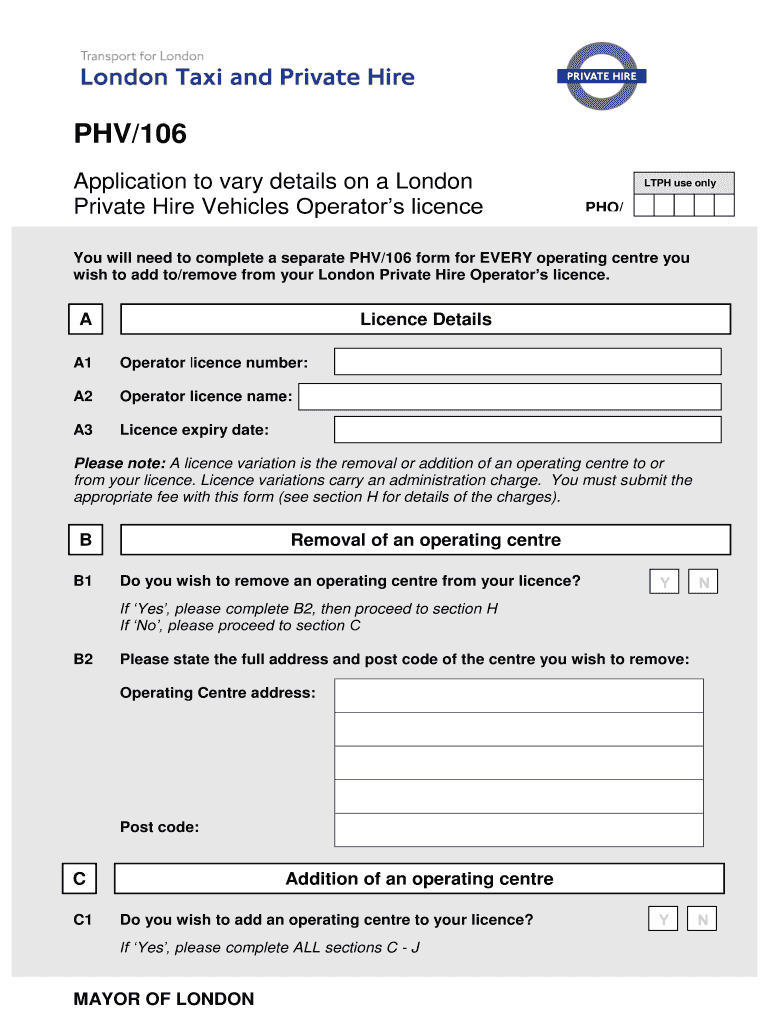
Sh to add to/remove from your London Private Hire Operator’s licence. A Licence Details A1 Operator licence number: A2 Operator licence name: A3 Licence expiry date: Please note: A licence variation is the removal or addition of an operating centre to or from your licence. Licence variations carry an administration charge. You must submit the appropriate fee with this form (see section H for details of the charges). B B1 Removal of an operating centre Do you wish to remove an operat.
Loading

Open form follow the instructions

Easily sign the form with your finger

Send filled & signed form or save
How to fill out the UK PHV/106 online
This guide provides a detailed walkthrough for completing the UK PHV/106 form online, which is essential for varying the details of a London Private Hire Vehicles Operator’s licence. Follow these instructions to ensure that you fill out the application accurately and efficiently.
Follow the steps to effectively complete the UK PHV/106 form online.
- Press the ‘Get Form’ button to access the UK PHV/106 form and open it in your online document editor.
- Begin by filling in your licence details in section A. Enter your operator licence number, operator licence name, and the expiry date of your licence.
- Proceed to section B if you wish to remove an operating centre. Indicate your choice by selecting 'Yes' or 'No'. If 'Yes', provide the full address and postcode of the centre you want to remove in the corresponding fields.
- If you choose not to remove any centres, proceed to section C to add a new operating centre. Again, indicate 'Yes' or 'No'. If 'Yes', fill in all required fields, including trading names, address, postcode, contact number, and contact person.
- In section D, assess the type of operating centre premises. Answer questions about occupancy, postal address, and restricted access as applicable. For each question, select 'Yes' or 'No' for the relevant criteria.
- Continue to section E to provide further details about operating centre premises. Confirm the presence of designated areas for bookings and securing records, as well as meaningful signage in case of public access.
- Review section F regarding planning permission and indicate which criteria applies to your operating centre. Ensure that required documentation supporting your application is ready for submission.
- Complete section G, where you will provide information about any two-way radio operation and insurance policy numbers. Ensure all information entered is relevant to your operating centre.
- In section H, prepare to include your payment details. Review the fee structure for adding or removing operating centres and complete the payment slip for the fees due.
- Understand the next stages of the application process in section I, which includes a pre-licensing inspection and consideration of your compliance history.
- Conclude by filling out section J, the declaration. Ensure it is signed and dated by the appropriate person representing your business.
- After completing the form, ensure all sections are filled correctly. Save your changes, download a copy, and print the form for your records or submission.
Start completing your application by obtaining the UK PHV/106 form online today!
Experience a faster way to fill out and sign forms on the web. Access the most extensive library of templates available.
Related content
by NO Retzepis · 2025 · Cited by 1 — It is found that strength and power are...
by SGR Kronenthal — 106 Groups representing domestic beef producers generally supported...
Page 106. Greater Manchester Transport Strategy 2040. 106. A Liveable Regional Centre. The...
Get answers to your most pressing questions about US Legal Forms API.
How to fill out a visa for UK?
Filling out a UK visa application requires you to have your identification and travel documents handy. Carefully follow the instructions provided on the application form, ensuring all sections are completed accurately. If your situation involves any specific requirements under the UK PHV/106, be sure to include this information. For a seamless experience, consider accessing uslegalforms, which offers resources tailored for visa applications.
How do I write a job application in the UK?
Writing a job application in the UK begins with addressing the hiring manager by name if possible. Clearly state your interest in the position and highlight your relevant experiences and skills. Make sure to relate your application back to the qualifications required, such as aspects linked to the UK PHV/106. You might consider using resources from uslegalforms to refine your application and increase your chances of success.
How to fill driving licence form UK?
When filling out a driving licence form in the UK, it is crucial to have your personal details ready, such as your name and address. Follow the instructions carefully, as any errors may delay your application. If applicable, include any information related to the UK PHV/106. Using uslegalforms can simplify the process and ensure you have all necessary documentation in order.
How to fill out a D11 form UK?
To fill out a D11 form in the UK, begin by reviewing the instructions provided with the form. You'll need to provide personal details and any necessary information about your driving history. Make sure to check that all information aligns correctly with your records, especially when it relates to the UK PHV/106. If you find the process overwhelming, consider using uslegalforms for guided assistance.
How do I fill out an application form?
Filling out an application form is straightforward. First, gather all necessary information, such as your personal details and any relevant identifiers. Typically, you will find sections asking for your experience, qualifications, or references related to the UK PHV/106. Take your time to ensure accuracy, as this form can impact your application process.
How many PHV drivers are there in the UK?
The number of PHV drivers in the UK continually changes, but estimates suggest there are thousands actively working. This growing workforce highlights the increasing demand for flexible transportation options. As cities expand, more individuals are turning to PHVs for their journeys. If you want to ensure compliance with UK PHV/106, consider the guidance available through US Legal Forms.
What does PHV stand for?
PHV stands for Private Hire Vehicle. This designation applies to taxis that must be booked ahead of time, distinguishing them from regular taxis. Understanding this terminology is essential, especially if you are looking to navigate the legal requirements tied to UK PHV/106. The US Legal Forms platform simplifies accessing relevant legal forms related to this vehicle type.
What is PHV in UK?
In the UK, PHV refers to a private hire vehicle that operates under specific laws and regulations. These vehicles must be licensed and can only carry passengers who have made a booking in advance. This system ensures that both drivers and passengers enjoy a safe travel experience. If you're interested in getting started with UK PHV/106, US Legal Forms offers helpful resources.
What is PHV in transportation?
In transportation, PHV refers to a type of vehicle that is not permitted to pick up passengers without a prior booking. This system helps regulate public transport, ensuring safety and reliability. PHV services operate in various cities across the UK, and they are an integral part of the transportation network. Utilizing US Legal Forms can help you understand how UK PHV/106 operates effectively.
What is PHV used for?
PHV, or Private Hire Vehicle, is primarily used for pre-booked transportation. It allows passengers to hire vehicles for private journeys, offering convenience and flexibility. Many people in the UK prefer PHVs for their ability to provide customizable transport options. With platforms like US Legal Forms, you can easily navigate the regulations associated with UK PHV/106.
Use professional pre-built templates to fill in and sign documents online faster. Get access to thousands of forms.
If you believe that this page should be taken down, please follow our DMCA take down process here.