Loading
Form preview
  • US Legal Forms
  • Other Templates
  • More Forms
  • More Multi-State Forms
  • Gsa Sf 344 1993

Get Gsa Sf 344 1993-2026

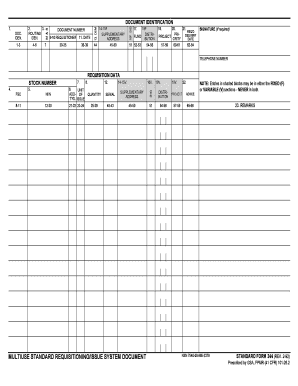
3. ROUTING IDEN. M&S 1. 17. 19. 20. 21. REQ'D PRIDELIVERY PROJECT ORITY DATE 57-59 60-61 62-64 SIGNATURE (If required) TELEPHONE NUMBER FSC 8-11 5. REQUISITION DATA 7. 8. 12. 14-15V. 16V. NIIN 6. UNIT ADD- OF T'N'L ISSUE QUANTITY SERIAL SUPPLEMENTARY ADDRESS 12-20 21-22 23-24 25-29 40-43 45-50 MULTIUSE STANDARD REQUISITIONING/ISSUE SYSTEM DOCUMENT 18V. 19V. 22. SIG 4. STOCK NUMBER DISTRIBUTION PROJECT ADVICE 51 54-56 57-59 65-66 NOTE: Entries in shaded blo.

How it works

  1. Open form

    Open form follow the instructions

  2. Easily sign form

    Easily sign the form with your finger

  3. Share form

    Send filled & signed form or save

How to fill out the GSA SF 344 online

Filling out the GSA SF 344 form online can streamline your requisitioning process and ensure accurate submissions. This guide will provide you detailed, step-by-step instructions for completing each section of the form effectively.

Follow the steps to complete the GSA SF 344 form online.

  1. Click ‘Get Form’ button to access the GSA SF 344 form and open it in your chosen editor.
  2. Begin by entering your requisitioner's information. This includes filling in your name, organization, and contact details in the designated fields.
  3. In the date field, specify the date when the requisition is being submitted. Ensure the format aligns with the requirements.
  4. Input the Document Identification number and Routing Information. This usually includes the document number relevant to your requisition.
  5. Fill out the requisition data section, which requires information like Stock Number, Quantity, and Serial. Double-check for accuracy in these entries.
  6. If applicable, provide Supplementary Address details in the specified fields to ensure proper handling and delivery of your request.
  7. Add any remarks or additional instructions in the remarks section to provide context or special instructions regarding the requisition.
  8. Finally, sign the document where required. If a signature is needed, provide your electronic signature in the designated area.
  9. Once all fields are completed and reviewed, you have options to save your changes, download the form, print it, or share it as necessary.

Take the next step in your requisitioning process by completing the GSA SF 344 form online today.

Get form

Experience a faster way to fill out and sign forms on the web. Access the most extensive library of templates available.
Get form

Related content

SF 344-Rotated - GSA
MULTIUSE STANDARD REQUISITIONING/ISSUE SYSTEM DOCUMENT. NSN 7540-00-965-2379. STANDARD...
Learn more
SF 344-Rotated - GSA
MULTIUSE STANDARD REQUISITIONING/ISSUE SYSTEM DOCUMENT. NSN 7540-00-965-2379. STANDARD...
Learn more
Funds Control Manual - UserManual.wiki
1-2 C. General Services Administration (GSA). ... L. 93–344, found at 2 U.S.C...
Learn more

Related links form

KY CINICO Home Health Care (HHC) Application Guidelines & Checklist 2022 KY CINICO Home Health Care (HHC) Application Guidelines & Checklist 2012 Southern California Edison Form 14-957 2024 MD Fulton Armory Service Request Form 2022

Questions & Answers

Get answers to your most pressing questions about US Legal Forms API.

Contact support

The requirements for GSA include having a registered business, a valid DUNS number, and compliance with federal regulations. Additionally, your business must demonstrate relevant experience and capabilities. Familiarizing yourself with the requirements can streamline your application for a GSA SF 344.

To obtain a GSA number, start by completing your registration on the SAM website. After your registration is approved, you can apply for GSA contracts, which will assign your GSA number. Consider using US Legal Forms for guidance and to access the necessary documentation.

Setting up a GSA account requires you to register on the SAM website. You will need to provide your business details, including your DUNS number and banking information. After registration, you can apply for a GSA SF 344 and manage your account through the GSA portal.

Getting a GSA number involves registering your business in the GSA's databases, particularly through SAM. Once registered, you can apply for a GSA contract, which will lead to your GSA number assignment. Utilizing resources like US Legal Forms can simplify this process, guiding you through the necessary steps.

To obtain a GSA fas ID, you need to visit the GSA's System for Award Management (SAM) website. After creating an account, follow the prompts to register your business information. It's essential to ensure that your details are accurate, as this ID is crucial for obtaining a GSA SF 344.

To get a quote from GSA Advantage, first, visit the GSA Advantage website and search for the products or services you need. Once you find what you are looking for, you can request a quote directly from the vendor listed. If you need further assistance with the GSA SF 344, consider using platforms like USLegalForms to streamline the process.

Your GSA number is a unique identifier assigned to you as a registered vendor within the GSA system. This number is crucial for participating in government contracts and accessing GSA services. If you are unsure about your GSA number, you can verify it through the GSA website or contact their support team for assistance.

The contracting activity code identifies the specific government entity responsible for procurement actions. This code is essential for tracking contracts and ensuring compliance with federal regulations. When submitting a GSA SF 344, including the correct contracting activity code facilitates a smoother procurement process.

The GSA activity address code is a unique code assigned to each government activity for procurement purposes. It helps in identifying the location where supplies should be delivered. When filling out the GSA SF 344, using the correct activity address code is crucial for ensuring timely deliveries.

The GSA activity access code is a specific identifier that grants users access to GSA services and resources. This code is essential for navigating the GSA systems effectively. When utilizing GSA SF 344 for your procurement needs, ensure you have the correct access code for seamless transactions.

Get This Form Now!

Use professional pre-built templates to fill in and sign documents online faster. Get access to thousands of forms.
Get form
If you believe that this page should be taken down, please follow our DMCA take down processhere.
Get GSA SF 344
Get form
  • Adoption
  • Bankruptcy
  • Contractors
  • Divorce
  • Home Sales
  • Employment
  • Identity Theft
  • Incorporation
  • Landlord Tenant
  • Living Trust
  • Name Change
  • Personal Planning
  • Small Business
  • Wills & Estates
  • Packages A-Z
  • Affidavits
  • Bankruptcy
  • Bill of Sale
  • Corporate - LLC
  • Divorce
  • Employment
  • Identity Theft
  • Internet Technology
  • Landlord Tenant
  • Living Wills
  • Name Change
  • Power of Attorney
  • Real Estate
  • Small Estates
  • Wills
  • All Forms
  • Forms A-Z
  • Other Templates
  • Legal Hub
  • About Us
  • Help Portal
  • Legal Resources
  • Blog
  • Affiliates
  • Contact Us
  • Delete My Account
  • Site Map
  • Industries
  • Forms in Spanish
  • Localized Forms
  • State-specific Forms
  • Forms Kit
  • Real Estate Handbook
  • All Guides
  • Notarize
  • Incorporation services
  • For Consumers
  • For Small Business
  • For Attorneys
  • USLegal
  • FormsPass
  • pdfFiller
  • signNow
  • altaFlow
  • DocHub
  • Instapage
Form Packages
  • Adoption
  • Bankruptcy
  • Contractors
  • Divorce
  • Home Sales
  • Employment
  • Identity Theft
  • Incorporation
  • Landlord Tenant
  • Living Trust
  • Name Change
  • Personal Planning
  • Small Business
  • Wills & Estates
  • Packages A-Z
Form Categories
  • Affidavits
  • Bankruptcy
  • Bill of Sale
  • Corporate - LLC
  • Divorce
  • Employment
  • Identity Theft
  • Internet Technology
  • Landlord Tenant
  • Living Wills
  • Name Change
  • Power of Attorney
  • Real Estate
  • Small Estates
  • Wills
  • All Forms
  • Forms A-Z
  • Other Templates
Customer Service
  • Legal Hub
  • About Us
  • Help Portal
  • Legal Resources
  • Blog
  • Affiliates
  • Contact Us
  • Delete My Account
  • Site Map
  • Industries
  • Forms in Spanish
  • Localized Forms
  • State-specific Forms
  • Forms Kit
Legal Guides
  • Real Estate Handbook
  • All Guides
Prepared for you
  • Notarize
  • Incorporation services
Our Customers
  • For Consumers
  • For Small Business
  • For Attorneys
Our Sites
  • USLegal
  • FormsPass
  • pdfFiller
  • signNow
  • altaFlow
  • DocHub
  • Instapage
Social Media
Call us now toll free:
+1 833 426 79 33
As seen in:
© Copyright 1999-2026 airSlate Legal Forms, Inc. 17 Station Street, Suite 303, Brookline, MA 02445
  • Your Privacy Choices
  • Terms of Service
  • Privacy Notice
  • Content Takedown Policy
  • Bug Bounty Program