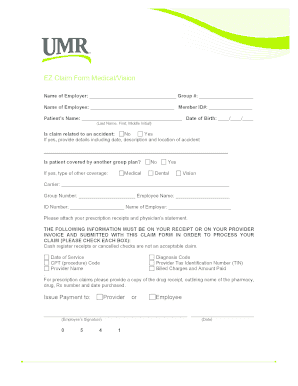
THE FOLLOWING INFORMATION MUST BE ON YOUR RECEIPT OR ON YOUR PROVIDER INVOICE AND SUBMITTED WITH THIS CLAIM FORM IN ORDER TO PROCESS YOUR CLAIM PLEASE CHECK EACH BOX Cash register receipts or cancelled checks are not an acceptable claim. Diagnosis Code Provider Tax Identification Number TIN Billed Charges and Amount Paid Date of Service CPT procedure Code Provider Name. For prescription claims please provide a copy of the drug receipt outlining name of the pharmacy drug Rx number and date purchased. Issue Payment to Provider or Employee Employee s Signature 855-444-2896 Date Mail the claims to UMR PO Box 30541 Salt Lake City UT 84130-0541 Email a. EZ Claim Form Medical/Vision Name of Employer Group Patient s Name Date of Birth // Last Name First Middle Initial No Yes Is claim related to an accident If yes provide details including date description and location of accident Is patient covered by another group plan If yes type of other coverage Medical Dental Vision Carrier Group Number ....
Open form follow the instructions
Easily sign the form with your finger
Send filled & signed form or save
How to fill out the UMR EZ Claim Form Medical/Vision online
The UMR EZ Claim Form Medical/Vision is designed to help users easily submit medical and vision claims. This guide provides clear step-by-step instructions to ensure you successfully complete the form online, facilitating a smooth claims process.
Follow the steps to complete your claim form online.
- Press the ‘Get Form’ button to access the UMR EZ Claim Form Medical/Vision. This will allow you to open the form in an online editor.
- Fill in the Employer's name and the Group number in the designated fields.
- Enter your full name as the employee along with your Member ID number.
- Provide the patient's name and date of birth, clearly separating the last name, first name, and middle initial.
- Indicate whether the claim is related to an accident by selecting 'Yes' or 'No'. If 'Yes', describe the details of the accident, including the date, description, and location.
- Next, state if the patient has coverage under another group plan by selecting 'Yes' or 'No'. If 'Yes', fill out the type of coverage and complete the section for carrier information.
- Ensure to attach the required prescription receipts and a physician’s statement, as specified. Verify that the necessary information is included on your receipts for processing.
- Complete the 'Issue Payment to' section, choosing either the provider or employee.
- Sign the form with your name and date.
- Once you have filled out the form completely, save any changes, and then download or print the form as necessary. You can also share it as needed.
Complete your UMR EZ Claim Form Medical/Vision online today for a streamlined claims process.
Experience a faster way to fill out and sign forms on the web. Access the most extensive library of templates available.
Related content
To be considered a valid claim, submit your receipt or itemized statement along with this...
... Vision Denver Health Medical Plan Denver Health Medical Plan Inc. - Medicare ... 2 2...
Get answers to your most pressing questions about US Legal Forms API.
How to submit a UnitedHealthcare vision claim?
Submitting a UnitedHealthcare vision claim typically involves completing the UMR EZ Claim Form Medical/Vision. Once filled out, ensure you have included all relevant receipts or documentation related to your vision care. Mail everything to the address provided on the form, and keep a copy for your records to track your submission.
Is vision covered under UnitedHealthcare?
Yes, vision coverage is included under many UnitedHealthcare plans. This coverage often allows for routine eye exams, glasses, and contact lenses. However, it's wise to review your specific policy details to understand your coverage limits and any applicable deductibles.
How do I submit a vision claim to UnitedHealthcare?
To submit a vision claim to UnitedHealthcare, you need to fill out the UMR EZ Claim Form Medical/Vision accurately. Attach any necessary documentation, such as receipts or notes from your eye care provider. After completing the form, send it to the specified address for processing, as indicated on the form.
What is the phone number for UnitedHealthcare vision Department?
You can reach the UnitedHealthcare vision department at 1-800-638-3120. This number is available for questions related to your vision insurance, including inquiry regarding claims and coverage. It's always a good idea to have your policy information handy when you call to streamline the process.
How do I submit a reimbursement claim?
Submitting a reimbursement claim involves a few simple steps. First, complete the UMR EZ Claim Form Medical/Vision with all required details. Next, gather your receipts and any supporting documentation. Finally, send your claim to the appropriate UnitedHealthcare address provided during the submission process for timely consideration.
How do I fill out a medical reimbursement?
To fill out a medical reimbursement, start by obtaining the UMR EZ Claim Form Medical/Vision. Provide all necessary details, including your personal information, the date of service, and the type of medical expenses you're claiming. Ensure that you keep copies of your receipts and any other required documents. Once completed, you can submit the form according to the outlined instructions.
How do you submit claims to UMR?
To submit claims to UMR, you will first need to fill out the UMR EZ Claim Form Medical/Vision. Make sure to include all relevant details like dates of service, provider information, and the total claim amount. Once completed, you can send your form via mail or online through the UMR website. Remember, using the UMR EZ Claim Form Medical/Vision helps streamline the claims process, ensuring you get your reimbursement promptly.
How to fill out a claim for health insurance?
To fill out a claim for health insurance using the UMR EZ Claim Form Medical/Vision, first gather all necessary documents, such as receipts and itemized bills. Next, complete the form by entering your personal information, policy details, and the services received. Be sure to sign and date the form before submitting it to ensure your claim is processed smoothly.
Is UMR insurance the same as UnitedHealthcare?
As a UnitedHealthcare company, UMR has long been a pioneer in revolutionizing self-funding. We focus on delivering customer solutions that meet their goals and strategies. This includes supporting member health and helping to interpret changes in the insurance landscape along the way.
How do I file a reimbursement claim with United Healthcare?
How to submit claims in 2 steps Sign in to your health plan account to find your submission form. Sign in to your health plan account and go to the “Claims & Accounts” tab, then select the “Submit a Claim” tab. ... Submit your claim by mail.
Use professional pre-built templates to fill in and sign documents online faster. Get access to thousands of forms.
If you believe that this page should be taken down, please follow our DMCA take down process here.