ENT PURCHASE IS THIS ADDITIONAL EQUIPMENT? YES IF YES, JUSTIFY EXPANSION OF FLEET NO NO. OF TRACTORS/TRUCKS BEFORE CURRENT PURCHASE # LEASED #OWNED #OWNER OPERATORS TOTAL AVERAGE AGE OF TRACTOR/TRUCK FLEET (YEARS) TOTAL AVERAGE AGE OF TRAILER FLEET NO. OF TRAILERS BEFORE CURRENT PURCHASE # LEASED #OWNED #OWNER OPERATORS BUSINESS TYPE? SEASONAL YEAR ROUND BALANCE SHEET (ATTACH ADDITIONAL SHEETS IF NECESSARY) ASSETS (WHAT YOU OWN) CURRENT VALUE LIABILITIES (WHAT YOU OWE) CASH ON .
Loading

Open form follow the instructions

Easily sign the form with your finger

Send filled & signed form or save
How to fill out the PACCAR Credit App online
Filling out the PACCAR Credit App online is a straightforward process that allows you to apply for credit efficiently. This guide will provide you with detailed instructions on how to complete each section of the application with confidence.
Follow the steps to complete your application successfully.
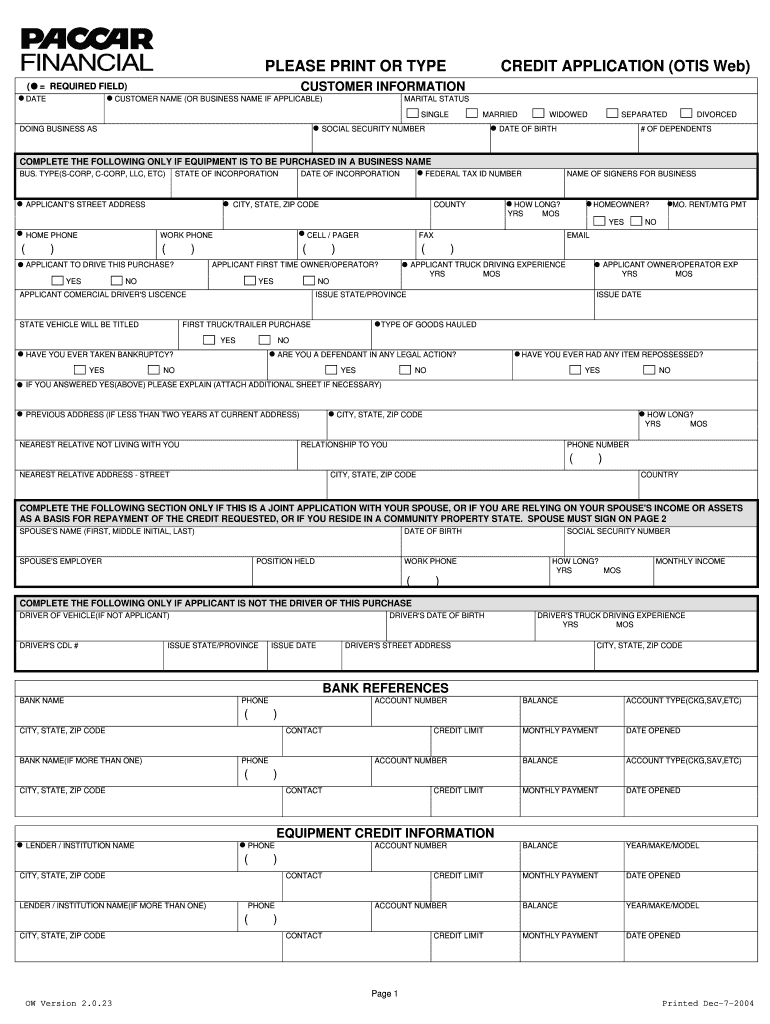
- Click the ‘Get Form’ button to access the PACCAR Credit App and open it in the online editor.
- Begin by entering the date at the top of the form. This establishes the timestamp for your application.
- Fill in your customer name or business name in the respective field. Ensure that the name matches official documents for accuracy.
- Indicate your marital status by selecting one of the available options: single, married, widowed, or separated.
- Provide your Social Security number, date of birth, and the number of dependents in the designated fields.
- If applicable, complete the business information section, including business type, state of incorporation, date of incorporation, and federal tax ID number.
- Enter your current street address, city, state, and zip code. Include your county, and if applicable, the name of signers for the business.
- Indicate whether you are a homeowner and provide relevant phone numbers along with other requested personal information.
- If you are purchasing the equipment through a business name, fill out the detailed fields about the business and your driving experience.
- Disclose any bankruptcy history, and indicate if you have ever had any items repossessed, along with relevant explanations if necessary.
- If applying jointly with your partner or relying on their income, fill out the spouse's details, including their income and other necessary information.
- Provide information about your bank references, including bank name, contact information, account number, and balance.
- Fill out the income sources, detailing your employer's name, contact person, gross monthly income, and percentage of total revenue.
- Review the equipment credit information section and any additional spaces for equipment purchase justification if applicable.
- Complete the balance sheet section by itemizing your assets and liabilities, ensuring that all totals are accurately calculated.
- Finally, review all entries for accuracy before adding your signature and the date. Save your changes, download or print the form, or share it as required.
Complete your PACCAR Credit App online today and take the first step toward securing the credit you need.
Experience a faster way to fill out and sign forms on the web. Access the most extensive library of templates available.
Related content
Feb 22, 2023 — PACCAR's A+/A1 credit rating supported PACCAR Financial Services' record...
by GT McLaughlin · 1993 · Cited by 15 — The main way in which courts weaken the inde...
The latest exciting introduction is the PACCAR Transmission, a 12-speed automated...
Get answers to your most pressing questions about US Legal Forms API.
Is creditapp legit?
Yes, the PACCAR Credit App is a legitimate tool that accurately assists businesses in applying for credit. It provides clear processes and reliable information, ensuring your application reaches potential lenders efficiently. By choosing the PACCAR Credit App, you can trust that you are using a secure and credible financial resource.
What is the use of a credit app?
A credit app is used to apply for credit, helping businesses secure financing or other payment arrangements. It gathers essential details, allowing lenders to assess risk and approve applications. By using the PACCAR Credit App, you gain access to faster processing and potentially better financing offers tailored to your needs.
What is a credit app?
A credit app is a formal request for credit made by an individual or business. This application provides lenders with the information they need to evaluate your credit history and financial stability. Using the PACCAR Credit App, you can simplify your application process and enhance your chances of obtaining credit.
What is a credit app for a vendor?
A credit app for a vendor is a document that allows vendors to assess the creditworthiness of a potential customer. This application typically includes important financial information about the business seeking credit. The PACCAR Credit App can streamline this process, making it easier for you to obtain the necessary credit terms.
What are the terms for semi-truck financing?
Terms for semi-truck financing can vary based on factors such as credit score and lender policies. Generally, you might expect financing terms between 3 to 7 years. With the PACCAR Credit App, you can find competitive rates and flexible options that suit your business needs.
Is PACCAR Credit App legit?
Yes, the PACCAR Credit App is a legitimate tool widely used by businesses looking to secure financing. It offers a reliable process for credit evaluation and is backed by PACCAR's strong reputation. Confidence in this app is enhanced by its efficient design and the positive experiences of numerous users.
What is the credit rating of PACCAR?
PACCAR generally holds a strong credit rating, reflecting its stability and reliability in the industry. This rating indicates PACCAR's ability to meet its financial obligations. A solid credit rating enhances the confidence of customers and vendors alike when considering the PACCAR Credit App for financing options.
What is the outlook for PACCAR 2025?
The outlook for PACCAR in 2025 appears optimistic. Analysts predict steady growth fueled by demand for commercial vehicles and innovative technologies. By utilizing the PACCAR Credit App, prospective investors can assess their financial readiness to engage with PACCAR and capitalize on future opportunities.
Who are the top 3 credit rating agencies?
The top three credit rating agencies are Standard & Poor’s (S&P), Moody’s, and Fitch Ratings. These agencies assess creditworthiness and provide insights into financial viability. For those looking into financing options, using the PACCAR Credit App offers a streamlined way to determine what your credit score means in this context.
Which company has the highest credit rating?
As of now, the company with the highest credit rating is typically seen as Microsoft. Well-regarded for its robust financial health, Microsoft demonstrates strong revenue streams and effective fiscal management. Utilizing platforms like the PACCAR Credit App can help businesses evaluate their own credit standings and make informed financial decisions.
Use professional pre-built templates to fill in and sign documents online faster. Get access to thousands of forms.
If you believe that this page should be taken down, please follow our DMCA take down process here.