Loading
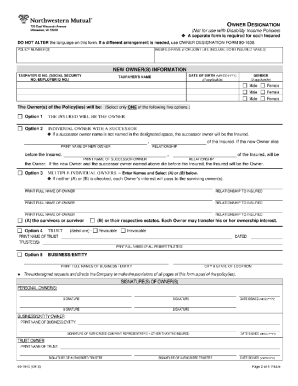
Get Wi Northwestern Mutual Form 90-1940 2010-2026
How it works
-

Open form follow the instructions
-

Easily sign the form with your finger
-

Send filled & signed form or save
How to fill out the WI Northwestern Mutual Form 90-1940 online
Filling out the WI Northwestern Mutual Form 90-1940 online is a straightforward process that allows users to efficiently complete their submissions. This guide will walk you through each step, ensuring that you are well-prepared to fill out the form accurately and easily.
Follow the steps to complete the form online:
- Click the ‘Get Form’ button to access the form and open it in the designated editor.
- Review the introduction section of the form where you will find important instructions regarding the purpose of the form and specific requirements.
- Complete the personal information section, providing details such as your full name, address, date of birth, and any pertinent identification information.
- Fill out the financial information section accurately, ensuring that all figures are correct and reflect your current financial situation.
- Review the designated fields related to your employment or business information, making sure to include the correct company names and addresses.
- Provide any additional information that may be required in the supplementary sections, ensuring that you check for completeness.
- Once all fields are filled, carefully review your entries for any errors or omissions.
- Save your changes, and choose to download, print, or share the form as necessary for your records or submission.
Start completing your documents online today.
Northwestern Mutual was formerly known as the Mutual Life Insurance Company of the State of Wisconsin. This name was in use until 1969 when the company rebranded. The rebranding reflected the company's evolution and expansion within the insurance and financial services sectors. For historical documents or forms like the WI Northwestern Mutual Form 90-1940, use reliable sources such as uslegalforms.