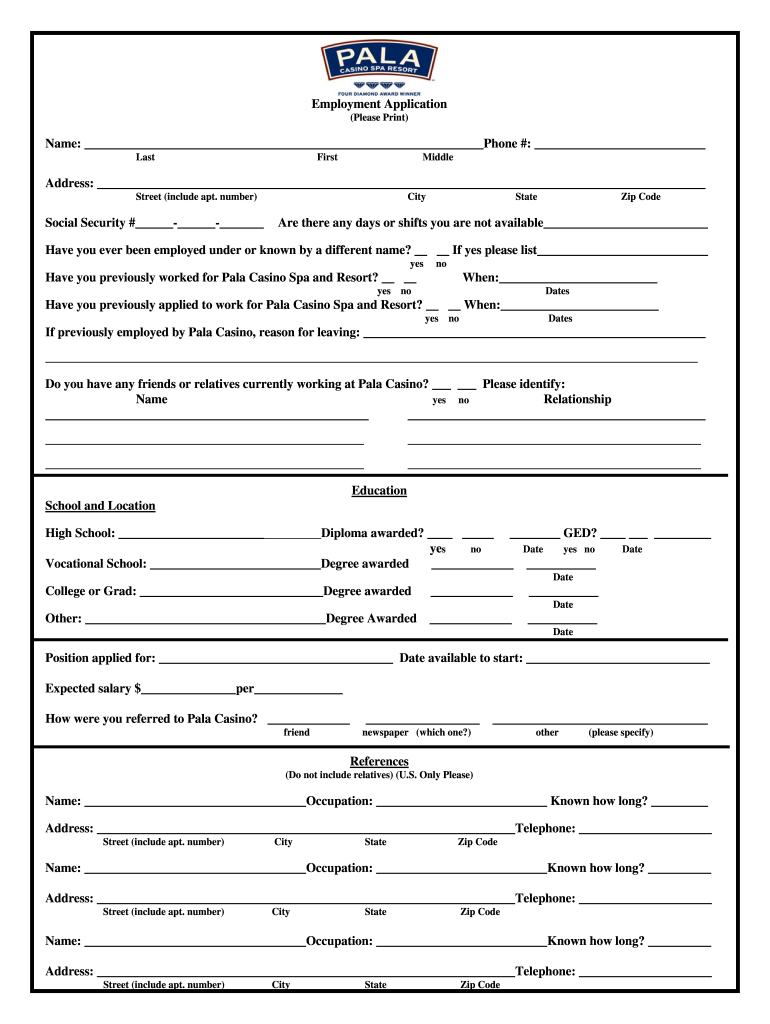
______________________________________________________________________ Street (include apt. number) Social Security #______-______-_______ City State Zip Code Are there any days or shifts you are not available__________________________ Have you ever been employed under or known by a different name? __ __ If yes please list___________________________ yes no Have you previously worked for Pala Casino Spa and Resort? __ __ When:_________________________ yes no Dates Have you previously .
Loading

Open form follow the instructions

Easily sign the form with your finger

Send filled & signed form or save
How to fill out the PALA Employment Application online
Completing the PALA Employment Application online can seem overwhelming, but following a systematic approach will help you navigate the process efficiently. This guide will provide step-by-step instructions to ensure you fill out the application completely and accurately.
Follow the steps to accurately complete your employment application.
- Click ‘Get Form’ button to access the application and open it in the designated editor.
- Begin with the personal information section. Provide your full name, including your last name, first name, and middle initial. Enter your phone number and complete the address section, including street, city, state, and zip code. Ensure each field is filled out accurately.
- Fill in your Social Security number in the designated field. This information is critical for employment verification purposes.
- In the education section, list your educational background. Include high school, vocational school, college, or any other relevant education. Indicate if you received a diploma or degree and provide the dates awarded.
- Move on to provide references. List three individuals who can verify your professional experience, excluding relatives. Fill in their names, occupations, how long you have known them, their addresses, and telephone numbers.
- Document your employment history by starting with your most recent employer and working backwards. Include details such as company name, address, position held, supervisor name, and employment dates. Provide a brief description of your duties and the reason for leaving each position.
- Complete the general information section. Declare if you possess a valid driver’s license or gaming license and address any questions related to prior gaming licenses or military service.
- In the special skills and qualifications section, list any foreign languages you speak, office machines you can operate, and relevant computer systems or software knowledge.
- Read and understand the certification section. You must sign and date the application to confirm your agreement with the terms outlined. Ensure that the final declaration is accurate and free of omissions or misrepresentations.
- Finally, review your completed application for accuracy and completeness. Save your changes, and you can choose to download, print, or share the application as necessary.
Take the next step in your career by completing your application online today!
Experience a faster way to fill out and sign forms on the web. Access the most extensive library of templates available.
Related content
eligibility of a key employee or primary management official for employment in a gaming...
Essay Questions: To complete this application, you must answer the following essay...
In 2012, Reeve Collins co-founded Pala Interactive, a full-service real-money, and social...
Get answers to your most pressing questions about US Legal Forms API.
How to fill an employment application?
To effectively fill out a PALA Employment Application, start by carefully reading the instructions provided. Input your personal information accurately, including education and work history. Utilize clear and concise language, and highlight your skills that are relevant to the position. Preparing thoroughly will enhance your chances of securing an interview.
What are four things that cannot be asked on a job application?
Certain questions are off-limits on a job application, including inquiries about your age or marital status. Employers also cannot ask about your race or religion. Additionally, questions regarding disabilities are prohibited unless they pertain directly to job performance. This protects your rights while completing your PALA Employment Application.
How to fill out an employment application?
Filling out a PALA Employment Application is straightforward. Begin by gathering all necessary documents, such as your resume and references. Carefully follow the instructions, ensuring accuracy in each section. Finally, review the application for any errors before submitting it, as attention to detail reflects your professionalism.
What are three things to avoid when filling out a job application?
When completing your PALA Employment Application, avoid using vague language. This can lead to misunderstandings and may hurt your chances. Additionally, do not leave sections blank unless instructed; missing information can raise red flags. Finally, stay away from false information; honesty is crucial in presenting your qualifications.
How do you respond to employment verification?
When responding to an employment verification request, give truthful and complete information regarding your job title, employment duration, and responsibilities. This is especially important in the context of the PALA Employment Application, where accuracy boosts your chances of securing a position. If you're unsure of details, consult your past employer or HR team for clarification. A thoughtful and thorough response can reflect your professionalism.
How to fill out employment verification form?
Filling out an employment verification form typically requires you to specify your job history and provide consent for your current or previous employer to share your information. Be clear and concise, as the PALA Employment Application often includes integrated tools to facilitate this process. Ensure you review the form for accuracy before sending it to enhance your credibility. A complete and clear form can expedite your job application.
How do I fill out an employment record?
To fill out your employment record, list your previous jobs in chronological order, including job titles, dates of employment, and key responsibilities. The PALA Employment Application can help streamline this process by offering guided prompts for each section. Remember to highlight any achievements or skills relevant to the position you are applying for. Accurate records increase your chances of a positive evaluation.
How do I fill out an employment verification?
Filling out an employment verification form involves requesting confirmation of your previous job details, such as your role, dates of employment, and salary. You can obtain this information from your former employer or HR department. It’s essential to provide accurate details in the PALA Employment Application process to avoid any discrepancies. Be sure to follow the guidelines provided for submitting this request.
What is the gambling age in San Diego?
California drinking age is 21. Some s offer full alcohol service. Contact the of interest directly to find out their policies. San Diego's s are open to the public 24 hours a day, seven days a week.
When did Pala open?
In March 2000, construction began on the $115 million Pala , which opened in April, 2001. On August 19, 2003, the Pala Spa and Resort opened with 500 rooms, a spa, and a conference center.
Use professional pre-built templates to fill in and sign documents online faster. Get access to thousands of forms.
If you believe that this page should be taken down, please follow our DMCA take down process here.