Loading
Get Junior High And High School Student Questionnaire - Solution Tree - Transitions Wiki Conestogavalley
How it works
-

Open form follow the instructions
-

Easily sign the form with your finger
-

Send filled & signed form or save
How to fill out the Junior High And High School Student Questionnaire - Solution Tree - Transitions Wiki Conestogavalley online
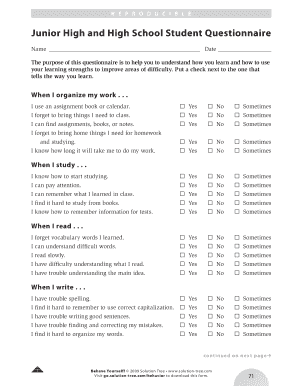
This guide provides you with clear, step-by-step instructions for completing the Junior High And High School Student Questionnaire. This questionnaire is designed to help you understand your learning styles and strengths.
Follow the steps to effectively complete the questionnaire.
- Press the ‘Get Form’ button to obtain the questionnaire and open it for editing.
- Begin by filling in your name and the date at the top of the form. This information helps to identify your submission.
- In the first section labeled 'When I organize my work,' assess your organizational skills by checking the appropriate response for each statement (yes, no, sometimes).
- Proceed to the 'When I study' section, where you will evaluate your study habits. Again, mark the response that you feel best represents your experience for each statement.
- Continue with the 'When I read' section. Reflect on your reading comprehension and vocabulary, and check the corresponding boxes.
- Move on to 'When I write.' Assess your writing skills and check the responses that apply.
- In the 'When I take tests' section, evaluate your testing capabilities and indicate your responses accordingly.
- Finally, in the 'When I am in class' section, take a moment to reflect on your classroom behavior and interaction, marking the responses that fit your experiences.
- After completing all sections, review your entries for accuracy. Once satisfied, you can save your changes, download, print, or share the completed questionnaire.
Complete the questionnaire online to better understand your learning preferences and improve your academic experience.