Loading
Form preview
  • US Legal Forms
  • Form Library
  • Independent Agency Forms
  • Independent Agency USPS Forms
  • Usps Ps 1093-a 2012

Get Usps Ps 1093-a 2012-2026

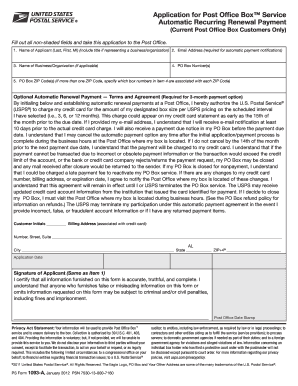
1. Name of Applicant (Last, First, MI) (include title if representing a business/organization) 2. Email Address (required for automatic payment notifications) 3. Name of Business/Organization (if applicable) 4. PO Box Number(s) 5. PO Box ZIP Code(s) (if more than one ZIP Code, specify which box numbers in item 4 are associated with each ZIP Code) Optional Automatic Renewal Payment — Terms and Agreement (Required for 3-month payment option) By initialing below and establishing automa.

How it works

  1. Open form

    Open form follow the instructions

  2. Easily sign form

    Easily sign the form with your finger

  3. Share form

    Send filled & signed form or save

How to fill out the USPS PS 1093-A online

The USPS PS 1093-A form is essential for individuals seeking a Post Office Box™ service via automatic recurring renewal payments. This guide will assist users in navigating the online filling process, ensuring all necessary fields are accurately completed.

Follow the steps to fill out the USPS PS 1093-A online

  1. Click ‘Get Form’ button to obtain the form and open it in the editor.
  2. Enter the name of the applicant in the designated fields, including the last name, first name, and middle initial. If the application is for a business or organization, include the appropriate title.
  3. Provide a valid email address in the required field. This information is necessary for receiving notifications about automatic payment.
  4. If applicable, enter the name of the business or organization associated with the applicant.
  5. Enter the PO Box number(s) for which the application is being submitted.
  6. Fill in the PO Box ZIP Code(s). If multiple ZIP Codes are associated with different box numbers, specify which box corresponds to each ZIP Code.
  7. Read the terms and agreement for optional automatic renewal payments. If you agree, initial in the space provided.
  8. Complete the billing address associated with your credit card, including the number, street, suite, city, state, and ZIP+4.
  9. Sign the application in the designated signature field. This signature must match the name provided in the applicant section.
  10. Review all entered information for accuracy and completeness, then save changes, download, print, or share the completed form as needed.

Complete your USPS PS 1093-A online today to ensure your Post Office Box™ service needs are met efficiently.

Get form

Experience a faster way to fill out and sign forms on the web. Access the most extensive library of templates available.
Get form

Related content

PS Form 1093 - How to apply for a PO Box
Across the U.S., Postal Service™ PO Boxes are available in five sizes. However, not all...
Learn more
PSForm 1093 - How To Apply for a PO BOX
Applicant must select and enter the ID Number for two separate forms of valid...
Learn more
DS3408 Product Reference Guide | Zebra
The software is provided strictly on an “as is” basis. All software, including...
Learn more

Related links form

APCU ACH FORM 2010 Application for Defense to Repayment Application for Entitlement to Reduced Tax Rate on Domestic Source Income ( for Foreign Corporation) 2012 Argos Group Inc New Business Check by Fax

Questions & Answers

Get answers to your most pressing questions about US Legal Forms API.

Contact support

A Certified Mail slip is a specialized mailing label and receipt that you attach to your mail for tracking and delivery confirmation. It is part of the USPS PS 1093-A form, allowing you to monitor your mailing's journey until it reaches its destination. Understanding this slip helps you send important documents with confidence. Consider exploring the US Legal Forms platform for additional resources and templates regarding Certified Mail.

Yes, there is a designated form for Certified Mail, called USPS PS 1093-A. This form is crucial for tracking your mail and confirming its delivery status. When you fill out this form, it records essential details about your mailing, such as the recipient's information and mailing date. Utilizing this form simplifies the process of sending important documents securely.

Filling out a USPS address involves including specific information in the correct format for efficient delivery. Start with the recipient's full name, followed by their street address, including any apartment or unit numbers. Next, include the city, state, and ZIP code; this ensures the USPS can accurately deliver your certified mail. Using the USPS PS 1093-A helps standardize your mailing process.

The Return Receipt for Certified Mail is signed by the person who receives the mail. Typically, the recipient or an authorized agent can provide their signature upon delivery. This signature serves as proof that the addressee received the item, giving you peace of mind about your correspondence. You can track this receipt using the USPS PS 1093-A form for your records.

To fill out a certified mail slip with the USPS, you will need to complete the USPS PS 1093-A form, which guides you through the necessary steps. Start by writing the recipient's name and address clearly in the designated boxes. You should also include your return address in the space provided. Finally, be sure to sign the certification at the bottom to confirm the mail is being sent as certified.

Yes, the Post Office does replace mailbox keys, but the process may vary depending on your location. When you need a replacement, you should visit your local post office and inquire about the specific steps. They will likely ask you to fill out the USPS PS 1093-A to initiate the replacement process. This service ensures you regain access to your mailbox quickly and securely.

To obtain a replacement mailbox key from USPS, you should first contact your local post office. They will guide you on the required documents and fees involved in the process. Typically, you may need to fill out a USPS PS 1093-A or a similar form, and provide identification to verify your address. Be prepared for a brief wait, as replacement keys can take some time to process.

The USPS PS form 1093 is a key document that facilitates the application for a new mailbox. This form helps ensure that you receive your mail securely and efficiently. By using the USPS PS 1093-A, you streamline the process of handling your mailbox needs. It is essential for anyone setting up a new address or replacing an existing mailbox.

Yes, you can send insured mail to a PO Box. Use USPS services that include insurance options, securing your items up to a specified value. When sending insured mail, always adhere to USPS PS 1093-A guidelines to ensure smooth handling and delivery.

To send secure mail to a PO Box, consider using services that offer added levels of security, like Registered Mail or Insured Mail. These options provide compensation against loss or damage, which is vital for valuable correspondence. Consulting the USPS PS 1093-A will guide you in choosing the right service for your secure mailing needs.

Get This Form Now!

Use professional pre-built templates to fill in and sign documents online faster. Get access to thousands of forms.
Get form
If you believe that this page should be taken down, please follow our DMCA take down processhere.

Industry-leading security and compliance

US Legal Forms protects your data by complying with industry-specific security standards.
  • In businnes since 1997
    25+ years providing professional legal documents.
  • Accredited business
    Guarantees that a business meets BBB accreditation standards in the US and Canada.
  • Secured by Braintree
    Validated Level 1 PCI DSS compliant payment gateway that accepts most major credit and debit card brands from across the globe.
Get USPS PS 1093-A
Get form
  • Adoption
  • Bankruptcy
  • Contractors
  • Divorce
  • Home Sales
  • Employment
  • Identity Theft
  • Incorporation
  • Landlord Tenant
  • Living Trust
  • Name Change
  • Personal Planning
  • Small Business
  • Wills & Estates
  • Packages A-Z
  • Affidavits
  • Bankruptcy
  • Bill of Sale
  • Corporate - LLC
  • Divorce
  • Employment
  • Identity Theft
  • Internet Technology
  • Landlord Tenant
  • Living Wills
  • Name Change
  • Power of Attorney
  • Real Estate
  • Small Estates
  • Wills
  • All Forms
  • Forms A-Z
  • Form Library
  • Legal Hub
  • About Us
  • Help Portal
  • Legal Resources
  • Blog
  • Affiliates
  • Contact Us
  • Delete My Account
  • Site Map
  • Industries
  • Forms in Spanish
  • Localized Forms
  • State-specific Forms
  • Forms Kit
  • Real Estate Handbook
  • All Guides
  • Notarize
  • Incorporation services
  • For Consumers
  • For Small Business
  • For Attorneys
  • USLegal
  • FormsPass
  • pdfFiller
  • signNow
  • altaFlow
  • DocHub
  • Instapage
Form Packages
  • Adoption
  • Bankruptcy
  • Contractors
  • Divorce
  • Home Sales
  • Employment
  • Identity Theft
  • Incorporation
  • Landlord Tenant
  • Living Trust
  • Name Change
  • Personal Planning
  • Small Business
  • Wills & Estates
  • Packages A-Z
Form Categories
  • Affidavits
  • Bankruptcy
  • Bill of Sale
  • Corporate - LLC
  • Divorce
  • Employment
  • Identity Theft
  • Internet Technology
  • Landlord Tenant
  • Living Wills
  • Name Change
  • Power of Attorney
  • Real Estate
  • Small Estates
  • Wills
  • All Forms
  • Forms A-Z
  • Form Library
Customer Service
  • Legal Hub
  • About Us
  • Help Portal
  • Legal Resources
  • Blog
  • Affiliates
  • Contact Us
  • Delete My Account
  • Site Map
  • Industries
  • Forms in Spanish
  • Localized Forms
  • State-specific Forms
  • Forms Kit
Legal Guides
  • Real Estate Handbook
  • All Guides
Prepared for you
  • Notarize
  • Incorporation services
Our Customers
  • For Consumers
  • For Small Business
  • For Attorneys
Our Sites
  • USLegal
  • FormsPass
  • pdfFiller
  • signNow
  • altaFlow
  • DocHub
  • Instapage
Social Media
Call us now toll free:
+1 833 426 79 33
As seen in:
© Copyright 1999-2026 airSlate Legal Forms, Inc. 3720 Flowood Dr, Flowood, Mississippi 39232
  • Your Privacy Choices
  • Terms of Service
  • Privacy Notice
  • Content Takedown Policy
  • Bug Bounty Program