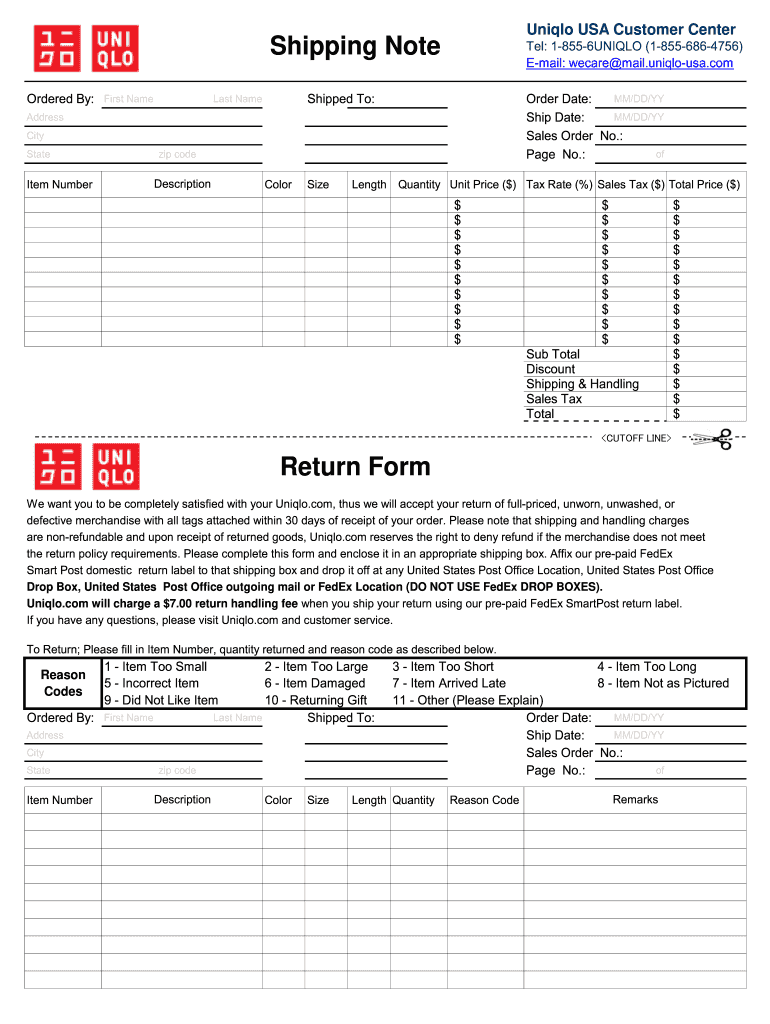
Uniqlo USA Customer Center Shipping Note Ordered By First Name Tel 1-855-6UNIQLO 1-855-686-4756 E-mail wecare mail.uniqlo-usa.com Shipped To Last Name MM/DD/YY Order Date Ship Date Sales Order No. of Page No. Address City State zip code Description Item Number Color Size Length Quantity Unit Price Tax Rate Sales Tax Total Price Sub Total Discount Shipping Handling Sales Tax Total CUTOFF LINE Return Form We want you to be completely satisfied with your Uniqlo. Please complete this form and enclose it in an appropriate shipping box. Affix our pre-paid FedEx Smart Post domestic return label to that shipping box and drop it off at any United States Post Office Location United States Post Office Drop Box United States Post Office outgoing mail or FedEx Location DO NOT USE FedEx DROP BOXES. Uniqlo. com will charge a 7. 00 return handling fee when you ship your return using our pre-paid FedEx SmartPost return label. If you have any questions please visit Uniqlo. Please note that shipping ....
Loading

Open form follow the instructions

Easily sign the form with your finger

Send filled & signed form or save
How to fill out the Uniqlo Shipping Note/Return Form online
This guide provides a clear and detailed overview of the Uniqlo Shipping Note/Return Form, designed to assist users in completing their return process online. Whether you are new to online forms or looking for specific guidance, this instructional overview is here to help you through each step effectively.
Follow the steps to fill out the Uniqlo Shipping Note/Return Form with ease.
- Press the ‘Get Form’ button to access the Shipping Note/Return Form and open it in your chosen form editor.
- In the 'Ordered By' section, enter your first name in the designated field.
- Provide your contact information by entering your telephone number in the 'Tel' field and your email address in the 'E-mail' section.
- In the 'Shipped To' section, fill in the last name, along with the shipping address, including address line, city, state, and zip code.
- Record the order date and ship date by entering the respective dates in the MM/DD/YY format.
- Input the sales order number in the designated field.
- Next, list the items you are returning by filling in the 'Item Number', 'Description', 'Color', 'Size', and 'Quantity' for each item.
- For each item, add the unit price, tax rate, sales tax, and total price, ensuring accuracy across all fields.
- Calculate the subtotal, discounts, shipping and handling fees, sales tax, and the final total, entering these amounts in the provided fields.
- Complete the return form by indicating the reason for returning each item. Choose the appropriate reason code from the options provided.
- Add any remarks or explanations if necessary, particularly if you selected 'Other' as your reason.
- Once all fields are completed, save your changes, then download, print, or share the filled-out form according to your needs.
Begin completing your Uniqlo Shipping Note/Return Form online for a seamless return experience.
Experience a faster way to fill out and sign forms on the web. Access the most extensive library of templates available.
Related content
Table of Contents. SPECIAL NOTE REGARDING FORWARD-LOOKING STATEMENTS. This Annual Report...
by A HABERMAN · 2025 — First, note that for any mech- anism that involves returns in...
Mar 30, 2016 — Financial Statements of the Company (including the notes thereto)...
Get answers to your most pressing questions about US Legal Forms API.
When did UNIQLO change its return policy?
UNIQLO revises its return policy periodically to better serve its customers. Any significant changes are typically announced on their official website. To stay updated, regularly check their announcements or the Uniqlo Shipping Note/Return Form for the latest return guidelines and conditions.
Is UNIQLO strict with returns?
UNIQLO maintains clear return guidelines to ensure fairness for all customers. While they aim to accommodate customer needs, returning items must meet specific conditions. It's advisable to familiarize yourself with the return policy and complete the Uniqlo Shipping Note/Return Form accurately to enhance your return experience.
Can you return an UNIQLO item without a tag?
Unfortunately, returning an UNIQLO item without a tag may complicate the process. As a general rule, items should include all original tags to meet return conditions. If you find yourself in this situation, consider consulting the guidelines on the Uniqlo Shipping Note/Return Form for specific instructions.
What are the return conditions for UNIQLO?
UNIQLO's return conditions focus on ensuring customer satisfaction. Items should be unworn, unwashed, and include all original tags for a successful return. Keep in mind that certain promotional items might have different return conditions, so always check their policy to avoid surprises.
Does UNIQLO require a return label?
Yes, UNIQLO requires a return label for online returns. You can print this label after completing the Uniqlo Shipping Note/Return Form. Make sure to affix it securely to your return package to ensure smooth processing once it reaches their facility.
How do I return a UNIQLO online order?
Returning a UNIQLO online order requires a few steps. Start by filling out the Uniqlo Shipping Note/Return Form found on their website. After packing your items and including this form, you can drop off your package at a mail service or return it directly to a UNIQLO store for convenience.
How do I return my online order?
To return your online order, begin by completing the Uniqlo Shipping Note/Return Form on their website. You will need to pack your items securely, including the completed return form inside the package. Once ready, choose a return method, either by mailing it back or taking it to a nearby store.
How to fill out UNIQLO online return form?
Filling out the UNIQLO online return form is straightforward. First, gather your order details such as order number and item description. Next, visit the UNIQLO website and locate the return section. Finally, follow the prompts to complete the Uniqlo Shipping Note/Return Form, ensuring you provide accurate information for a smooth return process.
Can you return UNIQLO items without a tag?
Returning UNIQLO items without a tag can be problematic. However, it may be possible if you have the original receipt and complete the Uniqlo Shipping Note/Return Form. UNIQLO typically prefers items to have tags, so checking the specific return policies before proceeding is advisable. Understanding the rules makes the process smoother.
Is UNIQLO easy to return?
UNIQLO aims to make the return process as easy as possible for customers. With clear guidelines and the Uniqlo Shipping Note/Return Form, you can initiate returns without confusion. Many customers report satisfaction with the straightforward steps involved. Overall, UNIQLO prioritizes your convenience.
Use professional pre-built templates to fill in and sign documents online faster. Get access to thousands of forms.
If you believe that this page should be taken down, please follow our DMCA take down process here.