Loading
Get Cid Complaint Form - Cobb Co Sheriff
How it works
-

Open form follow the instructions
-

Easily sign the form with your finger
-

Send filled & signed form or save
How to fill out the CID COMPLAINT FORM - Cobb Co Sheriff online
The CID Complaint Form for the Cobb County Sheriff’s Office is a crucial document for reporting incidents and seeking assistance. This guide will provide you with step-by-step instructions on how to complete the form accurately and efficiently online.
Follow the steps to successfully complete the form.
- Click ‘Get Form’ button to obtain the form and open it in the editor.
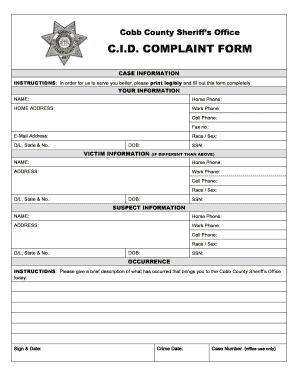
- Begin by filling in your personal information in the 'Your Information' section. Include your full name, home phone number, home address, work phone number, cell phone number, fax number, email address, driver's license information, race, sex, and date of birth. Ensure all details are accurate.
- Next, provide the 'Victim Information.' If the victim is different from yourself, fill out the relevant fields that include the victim's name, phone numbers, address, driver's license information, race, sex, date of birth, and social security number.
- Proceed to the 'Suspect Information' section. If you are aware of any suspect details, provide the name, phone numbers, address, driver's license information, race, sex, date of birth, and social security number.
- In the 'Occurrence' section, describe the incident briefly but clearly. Include any relevant details that led you to contact the Cobb County Sheriff's Office today.
- Lastly, sign and date the form. Ensure you acknowledge the information regarding false swearing and false statements as indicated, and provide a crime date if applicable.
- After completing the form, you can save changes, download, print, or share the document as necessary.
Complete your CID complaint form online today and ensure your concerns are addressed promptly.
Reach out to us at CCSORecruiting@CobbCounty. Org or visit CobbSheriff.org to learn more!