Loading
Get Rlinz
How it works
-

Open form follow the instructions
-

Easily sign the form with your finger
-

Send filled & signed form or save
How to fill out the Rlinz online
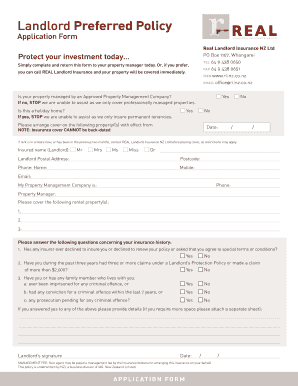
Completing the Rlinz application form is an essential step to secure your landlord insurance. This guide provides you with detailed instructions on how to effectively fill out the form online, ensuring that you have all necessary information ready for submission.
Follow the steps to successfully complete the Rlinz application form.
- Press the ‘Get Form’ button to obtain the Rlinz application form and open it in your preferred online editor.
- Provide your insured name (landlord) by selecting the appropriate title such as Mr, Mrs, Ms, Miss, or Dr, followed by entering your full name.
- Enter your postal address and postcode in the designated fields to ensure the insurer can contact you.
- Fill in your contact details, including your home and mobile phone numbers, along with your email address.
- Indicate whether your property is managed by an approved property management company. If 'no,' you must cease filling out the form as they only cover professionally managed properties.
- Select the effective date for your insurance cover. Note that insurance cover cannot be back-dated.
- If applicable, answer questions regarding your insurance history, including any past declined policies or significant claims.
- Provide details if you answered yes to any of the insurance history questions. If more space is required, attach a separate sheet.
- Complete the required section for the rental property or properties that require coverage, listing them as needed.
- Sign and date the application form, confirming your acceptance of the terms before submitting.
- Once all information is complete, save your changes, and choose to download, print, or share the application form as required.
Take the next steps to protect your property investment by completing the Rlinz application form online today.
0:24 4:27 Fix columns or rows in any spreadsheet - YouTube YouTube Start of suggested clip End of suggested clip Click and drag to fix the column that I want now notice when I scroll through here my column staysMoreClick and drag to fix the column that I want now notice when I scroll through here my column stays fixed. So I have my row fixed. And have my column fixed.