Loading
Get Form Meeting Minutes
How it works
-

Open form follow the instructions
-

Easily sign the form with your finger
-

Send filled & signed form or save
How to fill out the Form Meeting Minutes online
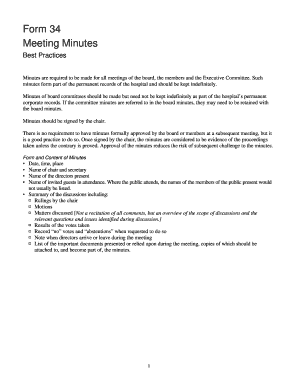
Filling out the Form Meeting Minutes is an essential task for accurately documenting the proceedings of meetings held by boards and committees. This guide provides a detailed, step-by-step approach to assist users in completing the form effectively, ensuring compliance with best practices.
Follow the steps to fill out the Form Meeting Minutes online.
- Click ‘Get Form’ button to access the form and open it in an online editor.
- Begin by entering the date, time, and place of the meeting in the designated fields. This information is crucial for record-keeping.
- Provide the names of the chair and secretary in their respective sections to ensure accountability and traceability.
- List the names of the directors present and, if necessary, any invited guests in attendance. Note that public attendees typically do not need to be listed.
- Summarize the discussions that took place during the meeting. Include rulings made by the chair, motions presented, and an overview of significant matters discussed without detailing every comment.
- Record the results of any votes taken, making sure to note any 'no' votes and 'abstentions' when requested.
- Document any instances where directors arrive or leave during the meeting to maintain transparency.
- List important documents that were presented during the meeting and ensure that copies are attached, forming part of the minutes.
- After filling out all the sections, review the document for accuracy and completeness. Ensure that the chair signs the minutes to validate them.
- Finally, save your changes, and choose to download, print, or share the completed form as necessary.
Complete your documents online today to maintain accurate meeting records.
What to include when writing meeting minutes? Meeting basics like name, place, date and time ... List of meeting participants. ... Meeting purpose. ... Agenda items. ... Next meeting date and place. ... Documents to be included in the meeting report. ... Key action items.
Industry-leading security and compliance
US Legal Forms protects your data by complying with industry-specific security standards.
-
In businnes since 199725+ years providing professional legal documents.
-
Accredited businessGuarantees that a business meets BBB accreditation standards in the US and Canada.
-
Secured by BraintreeValidated Level 1 PCI DSS compliant payment gateway that accepts most major credit and debit card brands from across the globe.