Loading
Get Cp1460
How it works
-

Open form follow the instructions
-

Easily sign the form with your finger
-

Send filled & signed form or save
How to fill out the Cp1460 online
Filling out the Cp1460 form online can be straightforward with the right guidance. This comprehensive guide provides step-by-step instructions to help you navigate through the form effectively.
Follow the steps to complete the Cp1460 form online.
- Press the ‘Get Form’ button to access the form and open it in an online editor.
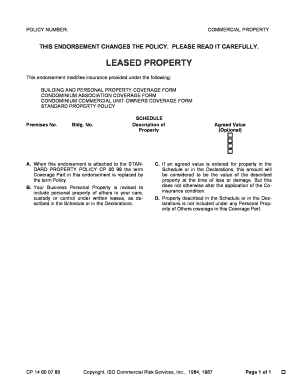
- Enter your policy number in the designated field at the top of the form to ensure proper identification of your insurance coverage.
- Fill in the premises number and building number to specify the exact location of the property concerned in the policy.
- In the schedule section, describe the property clearly, including details such as type, size, and any relevant unique identifiers.
- If you choose an agreed value for the property in the schedule, enter that amount. This value will be used to determine compensation in the event of loss or damage.
- Review the coverage terms mentioned in the endorsement to confirm your understanding of how they modify your existing policy.
- Once you have completed all fields, save your changes through the online editor, and you may choose to download, print, or share the form as needed.
Complete your documents online today for a seamless experience.