Loading
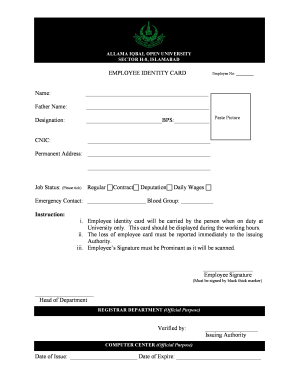
Get Employee Identity Card Name - Allama Iqbal Open University
How it works
-

Open form follow the instructions
-

Easily sign the form with your finger
-

Send filled & signed form or save
How to fill out the EMPLOYEE IDENTITY CARD Name - Allama Iqbal Open University online
Filling out the employee identity card is a straightforward process that ensures your identification at Allama Iqbal Open University. This guide provides step-by-step instructions to complete the form accurately and efficiently online.
Follow the steps to fill out your employee identity card successfully.
- Click ‘Get Form’ button to obtain the form and open it in the editor.
- Enter your employee number in the designated field labeled 'Employee No'. Make sure this number is accurate, as it is crucial for identification within the university system.
- Fill in your full name in the 'Name' section. Ensure that the spelling matches your official documents to avoid any discrepancies.
- Input your father's name in the 'Father Name' field. This is typically required for identification purposes.
- Indicate your designation in the 'Designation' section, along with your Basic Pay Scale (BPS) next to it. This information helps in clarifying your role in the university.
- Provide your Computerized National Identity Card (CNIC) number in the corresponding field. This forms a part of your official identification details.
- Complete your permanent address in the space provided. Be sure to include all necessary details for effective communication and verification.
- Select your job status by ticking the appropriate option: Regular, Contract, Deputation, or Daily Wages. This information is essential for administrative purposes.
- Fill in your emergency contact details and blood group. This information is important for ensuring your safety while on duty.
- Sign the card in the designated signature field using a black thick marker. Your signature will be scanned, thus it needs to be prominent and clear.
- Ensure that the head of the department has signed the card in the specified section and that the issuing authority has verified the information.
- Finally, enter the date of issue and the date of expiry in the relevant fields.
- After all fields are filled, review the information for accuracy. Once confirmed, save the changes, and you may download, print, or share the form as necessary.
Complete your employee identity card online today to ensure you are properly identified while on duty!
Related links form
please contact back at our email overseas@aiou.edu.
Industry-leading security and compliance
US Legal Forms protects your data by complying with industry-specific security standards.
-
In businnes since 199725+ years providing professional legal documents.
-
Accredited businessGuarantees that a business meets BBB accreditation standards in the US and Canada.
-
Secured by BraintreeValidated Level 1 PCI DSS compliant payment gateway that accepts most major credit and debit card brands from across the globe.