Terpretation. 5. All payment instructions, once transmitted, shall be deemed finalised. Any request for cancellation / recall of a payment instruction must be made in writing and shall only be cancelled / recalled at the Bank's sole option and discretion and provided that such payment instruction has not yet been transmitted by the Bank. 6. In the absence of any specific instructions to the contrary the Telegrahic Transfer will be effected in the currency in which payment is to be made.
Loading

Open form follow the instructions

Easily sign the form with your finger

Send filled & signed form or save
How to fill out the HSBC Telegraphic Transfer Application Form online
Filling out the HSBC Telegraphic Transfer Application Form online can seem complex, but with the right guidance, the process becomes straightforward. This guide will walk you through each section step by step to ensure accurate completion of the form.
Follow the steps to successfully complete the application form.
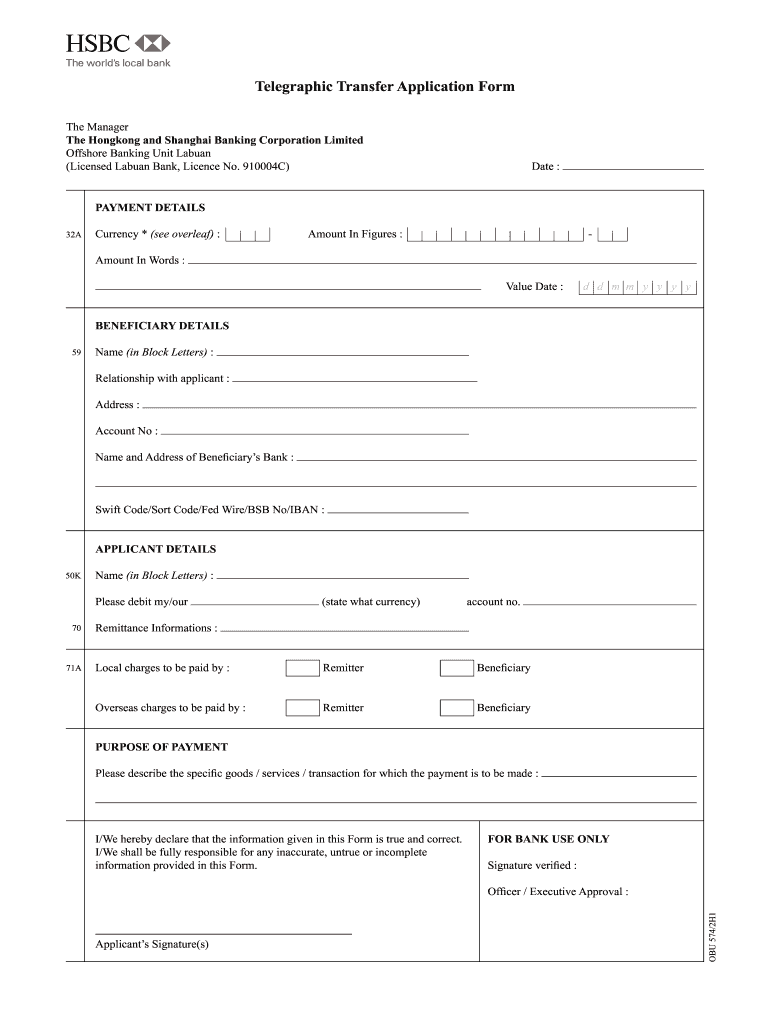
- Click ‘Get Form’ button to access the HSBC Telegraphic Transfer Application Form and open it in your preferred editing environment.
- Enter the date in the designated section at the top of the form. This should reflect the date of the application.
- In the payment details section, select the currency you wish to use for the transfer. Provide the amount in figures and spell it out in words to avoid discrepancies.
- Specify the value date for the transfer, using the designated day, month, and year formats.
- Proceed to the beneficiary details section. Enter the beneficiary's name in block letters, their relationship with you, and their address.
- Input the beneficiary's account number and the name and address of their bank. Include the bank's swift code or other relevant codes for the transaction.
- Next, fill out your own details in the applicant section. Include your name in block letters and specify the account from which funds will be debited.
- Indicate who will cover the local charges and the overseas charges by selecting either remitter or beneficiary.
- State the purpose of the payment. Describe the specific goods or services associated with this transaction to provide clarity.
- Review the declaration statement at the bottom of the form. By signing, you confirm that the information provided is accurate and understandable.
- Finally, you can save changes, download, print, or share the completed form as needed.
Take the next step by completing your HSBC Telegraphic Transfer Application Form online.
Experience a faster way to fill out and sign forms on the web. Access the most extensive library of templates available.
Related content
May 22, 2025 — If your bank is able to transfer money to the U.S., it will ask you to...
Dec 30, 2019 — Send T/T(Telegraphic Transfer) copy with application for reference...
Aug 14, 2025 — Dollars received in this way can be exchanged for won with a 50%...
Get answers to your most pressing questions about US Legal Forms API.
What documents are required for TT payment?
For a telegraphic transfer payment, you typically need a valid ID, proof of address, and the recipient's bank information. These documents help verify your identity and prevent fraud during the transfer process. Using the HSBC Telegraphic Transfer Application Form prompts you to gather all necessary documentation required for your transaction.
How to make an international transfer from HSBC?
To make an international transfer from HSBC, you can use online banking or visit a local branch. Begin by providing the necessary recipient details and the amount you wish to send. Completing the HSBC Telegraphic Transfer Application Form simplifies the process and ensures your transfer is secure.
What details are needed for a bank transfer at HSBC?
To complete a bank transfer at HSBC, you typically need the recipient's name, account number, bank name, and international bank code, such as SWIFT/BIC. These details ensure that your funds are directed to the correct account. The HSBC Telegraphic Transfer Application Form includes fields to collect all necessary information seamlessly.
How do I fill out an international wire transfer form?
Filling out an international wire transfer form requires specific details like your account information and the recipient's international bank credentials. Use the HSBC Telegraphic Transfer Application Form to make this process easier; it is designed to capture all necessary information clearly. Always verify the accuracy of every detail to ensure your funds reach their destination without any issues.
What details are needed for a bank transfer HSBC?
For a bank transfer with HSBC, you will need your account information, the recipient’s name, account number, and bank details, including the SWIFT/BIC code. When using the HSBC Telegraphic Transfer Application Form, ensure that you provide all relevant information clearly to facilitate a smooth transaction. It's also a good idea to keep a record of the transfer details for your reference.
How do I fill out an outgoing wire transfer form?
Filling out an outgoing wire transfer form involves entering your account details, the amount to send, and the recipient’s banking information. Make sure to use the HSBC Telegraphic Transfer Application Form for this purpose to streamline the process. Remember to review the form for accuracy before submitting it to avoid complications.
What information is needed for telegraphic transfer?
When preparing for a telegraphic transfer, you will need your bank account information, the recipient’s banking details, and the amount to transfer. For the HSBC Telegraphic Transfer Application Form, it's vital to include the recipient's name, account number, and bank's SWIFT code. Double-checking these details helps ensure smooth processing of your transfer.
How to fill out a bank form?
To fill out a bank form correctly, start by gathering all necessary information, such as your personal identification, account details, and any specific instructions. Carefully read the form to understand each section before entering your data. If you are completing the HSBC Telegraphic Transfer Application Form, ensure that you input accurate beneficiary details and the transfer amount to prevent any delays.
How do you arrange a telegraphic transfer?
To arrange a telegraphic transfer, start by contacting your bank, or consider using online solutions like uslegalforms. You will typically need to complete the HSBC Telegraphic Transfer Application Form, providing details like the recipient's name and bank account information. This streamlined process helps you ensure your funds reach their destination securely.
Is bank transfer the same as TT?
Bank transfer and telegraphic transfer (TT) share similarities, yet they are not precisely the same. While both involve moving funds between bank accounts, TT specifically refers to international transfers. The HSBC Telegraphic Transfer Application Form simplifies this process for you.
Use professional pre-built templates to fill in and sign documents online faster. Get access to thousands of forms.
If you believe that this page should be taken down, please follow our DMCA take down process here.