Loading
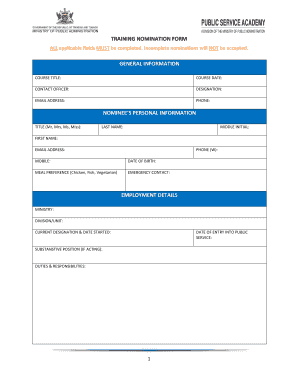
Get Training Nomination Form - Mpagovtt - Mpa Gov
How it works
-

Open form follow the instructions
-

Easily sign the form with your finger
-

Send filled & signed form or save
How to fill out the TRAINING NOMINATION FORM - Mpagovtt - Mpa Gov online
Filling out the TRAINING NOMINATION FORM is a crucial step for employees seeking training opportunities within their organization. This guide will provide a clear and step-by-step approach to ensure you complete the form accurately and effectively.
Follow the steps to complete the TRAINING NOMINATION FORM online.
- Click 'Get Form' button to access and open the form in your preferred document editor.
- Begin with the general information section. Enter the course title, course date, contact officer, and their designation. Ensure you provide a valid email address and phone number for communication purposes.
- Next, fill in the nominee’s personal information. Input the title (such as Mr, Mrs, Ms, or Miss), last name, middle initial, first name, email address, work phone number, mobile number, and date of birth. Choose a meal preference from the options provided: Chicken, Fish, or Vegetarian. Additionally, provide an emergency contact name and number.
- Proceed to the employment details section. Complete the ministry field, as well as the division or unit. Fill in your current designation and the date you began that role. Include your date of entry into public service, any substantive position (if acting), and a brief summary of your duties and responsibilities.
- In the training history section, list the course title and date for any training courses you have attended within the past two years. This section is essential for assessing your training needs.
- Next is the justification / supervisor’s comments part. Indicate the period of your last performance appraisal and identify any training needs. Include comments from your supervisor, ensuring to input their name for verification.
- Conclude by detailing how the knowledge acquired from the training will benefit your ministry or department. This is critical to justify the nomination.
- Finally, ensure that the approval section is signed by the Permanent Secretary or Head of Department, along with the date and official stamp where required.
- Once all applicable fields are completed, save your changes. You can also download, print, or share the form as needed.
Complete your forms online efficiently and ensure all required fields are filled out accurately.
In parliamentary procedure, a nomination is basically a motion to fill a blank in a motion "that _____ be elected." Nominations are used to provide choices of candidates for election to office. After nominations have been made, the assembly proceeds to its method of voting used for electing officers.
Industry-leading security and compliance
US Legal Forms protects your data by complying with industry-specific security standards.
-
In businnes since 199725+ years providing professional legal documents.
-
Accredited businessGuarantees that a business meets BBB accreditation standards in the US and Canada.
-
Secured by BraintreeValidated Level 1 PCI DSS compliant payment gateway that accepts most major credit and debit card brands from across the globe.