Loading
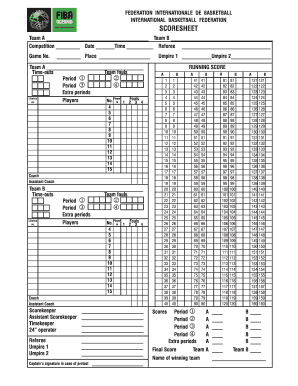
Get Fiba Oceania Scoresheet
How it works
-

Open form follow the instructions
-

Easily sign the form with your finger
-

Send filled & signed form or save
How to fill out the FIBA Oceania Scoresheet online
This guide provides clear and concise instructions on how to effectively fill out the FIBA Oceania Scoresheet online. Whether you are a first-time user or looking for a refresher, this guide will help you navigate each component of the scoresheet with ease.
Follow the steps to successfully complete the FIBA Oceania Scoresheet online.
- Click ‘Get Form’ button to access the scoresheet and open it in the online editor.
- Enter the names of Team A and Team B in the designated fields at the top of the scoresheet.
- Fill in the competition name, date, and time of the game in their respective sections.
- Complete the referee's name and game number in the provided spaces.
- Record the place of the game in the corresponding area.
- In the team sections, input the players' jersey numbers and names for both teams, ensuring accurate representation of each player's information.
- Document any time-outs and team fouls in the appropriate sections for each team.
- Fill out the rows for each period of the game, noting scores and fouls for the players as the game progresses.
- After the game, indicate the final score for Team A and Team B in the designated areas.
- Record the captain's signature in case of a protest in the provided space.
- Once all information is accurately entered, save any changes made to the scoresheet, then download, print, or share the completed form as needed.
Get started on filling out the FIBA Oceania Scoresheet online today!
Related links form
To write a basketball score sheet, start with the basic headings that identify teams and players' statistics. As the game progresses, you will fill in scoring, fouls, and timeouts in the pre-defined columns. Using the FIBA Oceania Scoresheet can help streamline this process, ensuring you capture all necessary details accurately and efficiently.