Loading
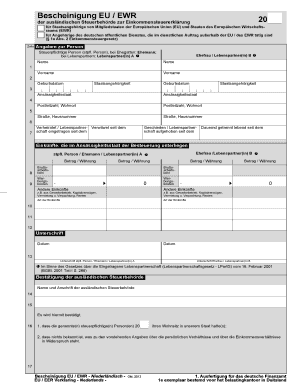
Get Eu Ewr Bescheinigung
How it works
-

Open form follow the instructions
-

Easily sign the form with your finger
-

Send filled & signed form or save
How to fill out the Eu Ewr Bescheinigung online
The Eu Ewr Bescheinigung is an important document for taxpayers from European Union (EU) member states and countries within the European Economic Area (EEA) who are required to declare their income. This guide provides clear and user-friendly instructions on how to complete the form online effectively.
Follow the steps to successfully fill out the form.
- To obtain the form, click the ‘Get Form’ button to access it and open it in the preparation interface.
- Next, fill in the personal information section. This includes the full name, date of birth, and nationality for the taxpayer and their spouse or partner. Make sure to enter the correct residency country, postal code, and home address.
- Indicate the marital status—whether married, widowed, divorced, or permanently separated—and provide the relevant dates for these statuses.
- In the income section, list all earnings that are taxable in the country of residence. This includes gross wages and any deductible expenses. Ensure amounts are listed correctly, specifying the currency.
- Complete any necessary fields concerning additional income sources, such as business income, capital gains, or rental income, making sure to note the type of income for clarity.
- Sign and date the form where indicated. It is essential that both the taxpayer and their spouse or partner sign the document if applicable.
- Provide the name and address of the foreign tax authority that certifies the information on the form.
- Review the completed form for accuracy to ensure all information is correct and compliant with requirements.
- Finally, save any changes, download, print, or share the form according to your needs.
Start filling out your documents online today to ensure a smooth filing process.
Dieses Informationsschreiben finden Sie unter .finanzamt.de (unter der Rubrik „Datenschutz") oder erhalten Sie bei Ihrem Finanzamt.