Loading
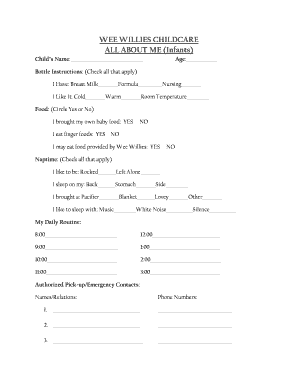
Get Wee Willies Childcare All About Me Infants
How it works
-

Open form follow the instructions
-

Easily sign the form with your finger
-

Send filled & signed form or save
How to fill out the WEE WILLIES CHILDCARE ALL ABOUT ME Infants online
Filling out the WEE WILLIES CHILDCARE ALL ABOUT ME Infants form is an essential step in ensuring that your child’s needs are met while in care. This guide provides a clear, step-by-step approach to accurately complete the form online.
Follow the steps to complete the form efficiently.
- Click ‘Get Form’ button to access the document and open it in the editor.
- Fill in your child’s name at the top of the form. It is important to provide the full name for accurate identification.
- Enter your child’s age in the designated field. This information helps the childcare staff understand developmental needs.
- Complete the bottle instructions section by checking all that apply for both 'I have' and 'I like it' fields regarding feeding preferences.
- Indicate whether you brought baby food and if your child eats finger foods by circling 'Yes' or 'No' appropriately.
- Specify if your child may eat food provided by Wee Willies by circling 'Yes' or 'No'.
- In the naptime section, select all preferences regarding how your child likes to sleep and what comforts they need.
- Fill out the daily routine section by outlining your child's schedule in the provided time slots. This helps caregivers maintain consistency.
- List authorized pick-up and emergency contacts, including names, relations, and phone numbers. Ensure that all information is accurate and up-to-date.
- After completing all sections, review the form for any inaccuracies or missing information.
- Once confirmed, save the changes made to the form. You can also download, print, or share it as necessary.
Begin filling out the WEE WILLIES CHILDCARE ALL ABOUT ME Infants form online now to ensure a smooth experience for your child.