Loading
Form preview
  • US Legal Forms
  • Form Library
  • More Forms
  • More Uncategorized Forms
  • Isa Transfer - Castle Trust

Get Isa Transfer - Castle Trust

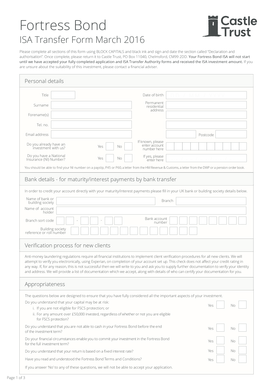
Fortress Bond ISA Transfer Form March 2016 Please complete all sections of this form using BLOCK CAPITALS and black ink and sign and date the section called Declaration and authorisation. Once complete,.

How it works

  1. Open form

    Open form follow the instructions

  2. Easily sign form

    Easily sign the form with your finger

  3. Share form

    Send filled & signed form or save

How to fill out the ISA Transfer - Castle Trust online

This guide provides comprehensive and user-friendly instructions on how to complete the ISA Transfer - Castle Trust form online. Whether you are a first-time user or have previously submitted similar forms, this step-by-step approach will ensure clarity and accuracy in your submission.

Follow the steps to complete the ISA Transfer - Castle Trust form online.

  1. Press the ‘Get Form’ button to obtain the ISA Transfer - Castle Trust form and open it in your preferred editor.
  2. Begin by filling in your personal details, including your title, date of birth, surname, forenames, and permanent residential address. Ensure this information is typed in block capital letters.
  3. Provide your telephone number and email address, then fill in your postcode. Indicate whether you already have an investment with Castle Trust by selecting 'Yes' or 'No'. If applicable, enter your existing account number.
  4. Complete the National Insurance section, indicating whether you have an NI number. If yes, enter the number as instructed.
  5. Input your bank details for maturity and interest payments. This includes the name of your bank or building society, the branch, account holder's name, branch sort code, and bank account number.
  6. For new clients, understand that verification may occur electronically. Familiarize yourself with the potential documentation required if verification fails.
  7. Review the appropriateness questions thoroughly. Confirm your understanding of investment risks and limitations before proceeding.
  8. Read the data protection statement carefully. It explains how your information will be used and your rights regarding data privacy.
  9. Complete the declaration and authorization section. Sign and date the form, confirming your agreement to the terms.
  10. Finally, ensure you save changes, download a copy for your records, and print the form if necessary. You may also share or submit it as needed.

Complete your ISA Transfer - Castle Trust form online today to secure your investment.

Get form

Experience a faster way to fill out and sign forms on the web. Access the most extensive library of templates available.
Get form

Related content

UNITED STATES SECURITIES AND EXCHANGE ......
Sep 14, 2020 — ownership of the ISAs transferred to the Company but instead entered into...
Learn more
Isas: still the best investment after nearly 20...
Mar 2, 2017 — As trust in pensions has been eroded, Isas have got better. Most...
Learn more
Hezekiah - Wikipedia
Hezekiah or Ezekias, was, according to the Hebrew Bible, the son of Ahaz and the 13th king...
Learn more

Related links form

Siemens Axiom Artis Manual 2020 Coagulation Requisition Form 2020 Spanish Facial Disability Index 2020 Kwhlaq Chart Pdf 2020

Questions & Answers

Get answers to your most pressing questions about US Legal Forms API.

Contact support

Transferring or consolidating your ISAs could give you a clearer picture of your wealth, better value for money, and less admin in the long run. With the tax year end almost upon us, you may be reviewing your ISAs and looking to tidy up your accounts, or even change providers.

These are the main government rules on transferring a cash ISA. You can only have one 'active' cash ISA every year. You can only have one 'active' cash ISA every year. ... Always follow the correct process. We'll tell you how to do this when you apply. ... Transfers don't affect allowance.

An ISA transfer is a process that lets you move money you've built up in your ISAs over previous tax years to a new provider and keep its tax-free benefits. The good news is there's no limit to the number of ISAs or Junior ISAs you can transfer between providers, and you can transfer them at any time.

Simply log into Online Banking and follow the instructions on the ISA Transfer screen. Most transfers can be completed online but in some cases you may need to print, sign and post your request to us. Call us on 0345 726 3646 if you are looking to transfer your existing Help to Buy: ISA to us from another provider.

Use this form when transferring a Cash ISA to another ISA manager. Give the form to the new ISA manager within 5 working days of the date of the acceptance of the transfer being received. If the form cannot be given to the new manager on the date of transfer inform them of the type of ISA and amount being transferred.

Steps for requesting an ISA Transfer from another provider: Find the Transfer Authority Form 📃 Fill in your personal details and read the declaration. ... Sign the form with your physical signature and send it as an attached file here by choosing ISA -> ISA Transfers as Category.

This is to confirm that you are eligible to subscribe to your ISA. If you haven't subscribed to your ISA for a whole tax year, then you need to declare your eligibility again and confirm that you haven't paid into another ISA of the same type in the current tax year.

You can transfer your Individual Savings Account ( ISA ) from one provider to another at any time. You can transfer your savings to a different type of ISA or to the same type of ISA . If you want to transfer money you've invested in an ISA during the current year, you must transfer all of it.

Get This Form Now!

Use professional pre-built templates to fill in and sign documents online faster. Get access to thousands of forms.
Get form
If you believe that this page should be taken down, please follow our DMCA take down processhere.

Industry-leading security and compliance

US Legal Forms protects your data by complying with industry-specific security standards.
  • In businnes since 1997
    25+ years providing professional legal documents.
  • Accredited business
    Guarantees that a business meets BBB accreditation standards in the US and Canada.
  • Secured by Braintree
    Validated Level 1 PCI DSS compliant payment gateway that accepts most major credit and debit card brands from across the globe.
Get ISA Transfer - Castle Trust
Get form
  • Adoption
  • Bankruptcy
  • Contractors
  • Divorce
  • Home Sales
  • Employment
  • Identity Theft
  • Incorporation
  • Landlord Tenant
  • Living Trust
  • Name Change
  • Personal Planning
  • Small Business
  • Wills & Estates
  • Packages A-Z
  • Affidavits
  • Bankruptcy
  • Bill of Sale
  • Corporate - LLC
  • Divorce
  • Employment
  • Identity Theft
  • Internet Technology
  • Landlord Tenant
  • Living Wills
  • Name Change
  • Power of Attorney
  • Real Estate
  • Small Estates
  • Wills
  • All Forms
  • Forms A-Z
  • Form Library
  • Legal Hub
  • About Us
  • Help Portal
  • Legal Resources
  • Blog
  • Affiliates
  • Contact Us
  • Delete My Account
  • Site Map
  • Industries
  • Forms in Spanish
  • Localized Forms
  • State-specific Forms
  • Forms Kit
  • Real Estate Handbook
  • All Guides
  • Notarize
  • Incorporation services
  • For Consumers
  • For Small Business
  • For Attorneys
  • USLegal
  • FormsPass
  • pdfFiller
  • signNow
  • altaFlow
  • DocHub
  • Instapage
Form Packages
  • Adoption
  • Bankruptcy
  • Contractors
  • Divorce
  • Home Sales
  • Employment
  • Identity Theft
  • Incorporation
  • Landlord Tenant
  • Living Trust
  • Name Change
  • Personal Planning
  • Small Business
  • Wills & Estates
  • Packages A-Z
Form Categories
  • Affidavits
  • Bankruptcy
  • Bill of Sale
  • Corporate - LLC
  • Divorce
  • Employment
  • Identity Theft
  • Internet Technology
  • Landlord Tenant
  • Living Wills
  • Name Change
  • Power of Attorney
  • Real Estate
  • Small Estates
  • Wills
  • All Forms
  • Forms A-Z
  • Form Library
Customer Service
  • Legal Hub
  • About Us
  • Help Portal
  • Legal Resources
  • Blog
  • Affiliates
  • Contact Us
  • Delete My Account
  • Site Map
  • Industries
  • Forms in Spanish
  • Localized Forms
  • State-specific Forms
  • Forms Kit
Legal Guides
  • Real Estate Handbook
  • All Guides
Prepared for you
  • Notarize
  • Incorporation services
Our Customers
  • For Consumers
  • For Small Business
  • For Attorneys
Our Sites
  • USLegal
  • FormsPass
  • pdfFiller
  • signNow
  • altaFlow
  • DocHub
  • Instapage
Social Media
Call us now toll free:
+1 833 426 79 33
As seen in:
© Copyright 1999-2026 airSlate Legal Forms, Inc. 3720 Flowood Dr, Flowood, Mississippi 39232
  • Your Privacy Choices
  • Terms of Service
  • Privacy Notice
  • Content Takedown Policy
  • Bug Bounty Program