Loading

Open form follow the instructions

Easily sign the form with your finger

Send filled & signed form or save
How to fill out the Pharmacy Fax Forms online
Filling out the Pharmacy Fax Forms online is an essential step for managing your prescription needs effectively. This guide provides a detailed walkthrough of each section to ensure that users can complete the form with confidence and accuracy.
Follow the steps to successfully complete the Pharmacy Fax Forms online.
- Click ‘Get Form’ button to access the Pharmacy Fax Forms and open it in your preferred editor.
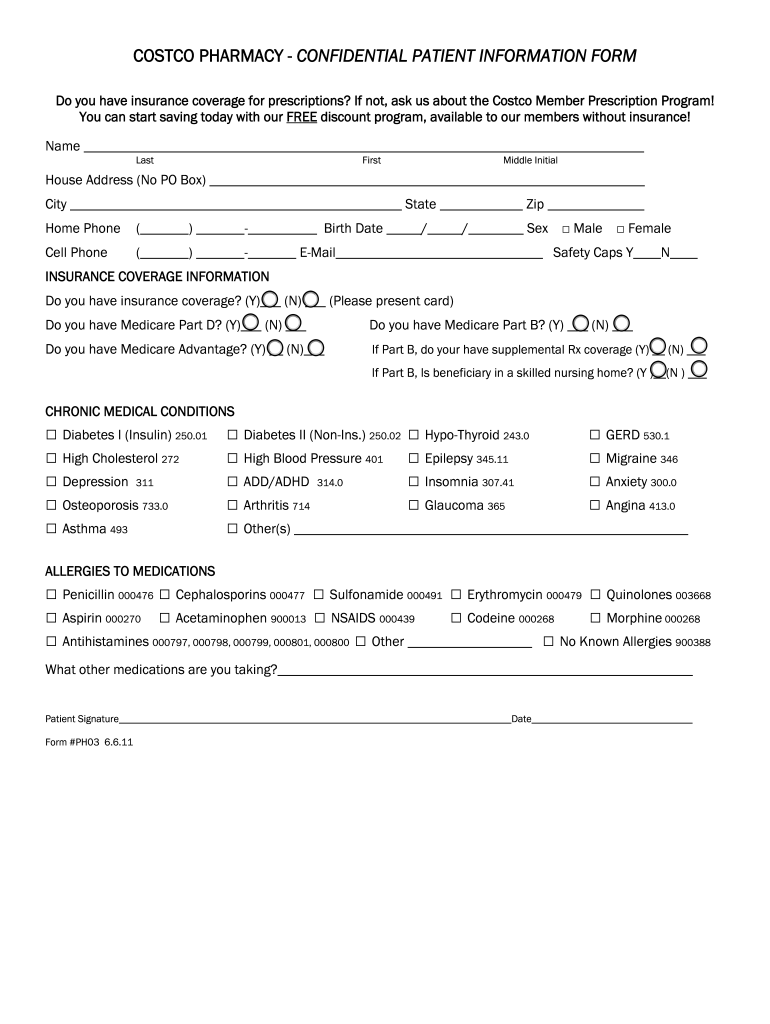
- Begin by entering your name in the designated fields, including last name, first name, and middle initial. Make sure to write clearly.
- Provide your home address without using a P.O. Box. Include the city, state, and zip code to ensure accurate delivery.
- Fill in your home phone number, birth date, and select your sex by ticking the appropriate box.
- If applicable, enter your cell phone number and email address in the provided spaces for contact purposes.
- Indicate your preference for safety caps by checking 'Y' for yes or 'N' for no.
- Answer the insurance coverage questions accordingly. Indicate whether you have insurance and provide the necessary details by presenting the card.
- Continue with the Medicare-related questions, marking 'Y' or 'N' for each coverage type.
- List any chronic medical conditions that apply to you by marking the appropriate boxes.
- Record any allergies to medications in the specified section, or indicate if there are no known allergies.
- Provide information on any other medications you are currently taking.
- Sign the form in the designated signature area and enter the date to validate the information provided.
- Once completed, you can save changes to the form, download it, print it, or share it as needed.
Start completing your Pharmacy Fax Forms online today to streamline your prescription management!
Experience a faster way to fill out and sign forms on the web. Access the most extensive library of templates available.
Related content
Fee-for-Service Pharmacy Prior Authorization Fax Forms · Statewide PDL Drugs/Drug...
Use this form to order a new mail service prescription by fax from the prescribing...
For immediate enrollment in the program, please fax to 1-877-243-4812. If you have any...
Get answers to your most pressing questions about US Legal Forms API.
What must never be sent by fax?
Certain sensitive information, such as credit card numbers and social security numbers, should never be sent via fax. It's essential to maintain confidentiality and protect personal information. Always use secure methods, like encrypted emails or secure portals, when transmitting sensitive data.
What is the fax number for CVS Caremark prior authorization?
PLEASE FAX COMPLETED FORM TO 1-888-836-0730. I further attest that the information provided is accurate and true, and t hat documentation supporting this inf ormation is available for review if requested by CVS Caremark™, the health plan sponsor, or, if applicable, a state or federal regulatory agency.
Can I fax my prescription to CVS?
Ask your doctor to send your prescription to CVS Specialty. Your doctor can e-prescribe, call 1‑800‑237-2767 or fax your prescription to 1-800-323-2445.
How do I fax a prescription to express scripts?
Your provider can also fax your prescription to Express Scripts® Pharmacy — they can call (888) 327-9791 for faxing instructions. Be sure to give them your member ID number. (Only providers can fax prescriptions.)
How do I scan my prescription to Walgreens?
0:00 0:30 Transfer Prescriptions by Scan on Walgreens Android App - YouTube YouTube Start of suggested clip End of suggested clip And health transfer prescriptions. Take a photo enter in some of your personal. Information. If you'MoreAnd health transfer prescriptions. Take a photo enter in some of your personal. Information. If you'd like to be notified by text when your prescriptions are ready select.
What is fax prescription?
Facsimile (FAX) prescription means a written prescription or order, which is transmitted by an electronic device over telephone lines that sends the exact image to the receiving pharmacy in hard copy form.
Can I fax my prescription to Walgreens?
PLEASE CONSIDER SENDING YOUR PRESCRIPTION ELECTRONICALLY. ALL OF OUR PHARMACY LOCATIONS ACCEPT ELECTRONIC PRESCRIPTIONS. Note: This form is intended for prescriber use only, if faxed, the fax must come from MD office or hospital (may not be faxed by patient).
Can you fax a prescription to CVS?
Ask your doctor to send your prescription to CVS Specialty. Your doctor can e-prescribe, call 1‑800‑237-2767 or fax your prescription to 1-800-323-2445.
How do I send my prescription to a different Walgreens?
Let your new pharmacy know that you want to transfer your prescriptions from your old pharmacy. You'll need to get them the name, strength, and prescription number of each prescription, along with the phone number and address of your old pharmacy.
Use professional pre-built templates to fill in and sign documents online faster. Get access to thousands of forms.
If you believe that this page should be taken down, please follow our DMCA take down process here.