Loading
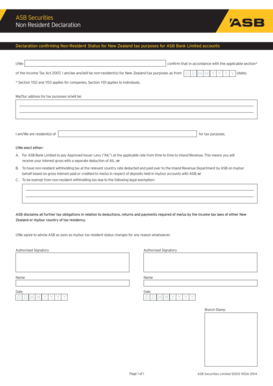
Get Asbecurities S Non Resident Declaration
How it works
-

Open form follow the instructions
-

Easily sign the form with your finger
-

Send filled & signed form or save
How to fill out the ASBecurities S Non Resident Declaration online
Filling out the ASBecurities S Non Resident Declaration form is a crucial step for users who wish to confirm their non-resident status for New Zealand tax purposes. This guide provides a step-by-step approach to help you complete the form accurately and efficiently.
Follow the steps to successfully complete the online form.
- Click ‘Get Form’ button to access the ASBecurities S Non Resident Declaration form and open it in your preferred document editor.
- In the section that requires you to confirm your non-resident status, provide the applicable section of the Income Tax Act 2007. Indicate whether you are a company or an individual.
- Fill in the date when your non-resident status begins using the format D D MM Y Y Y Y.
- Enter your address for tax purposes accurately to ensure proper identification.
- Specify your country of tax residency by filling in the relevant information.
- Choose one of the options regarding the tax arrangements: A for the Approved Issuer Levy, B for non-resident withholding tax, or C for claiming an exemption. Make sure to understand the implications of each option.
- Acknowledge your responsibility to inform ASB of any changes in your tax residency status.
- In the authorisation section, provide the names of the authorised signatories and the respective dates in the same D D MM Y Y Y Y format.
- Once all the requested information has been filled out, review the form for accuracy. After confirming all details are correct, you can save the changes, download, print, or share the form as needed.
Begin the process by obtaining and completing your ASBecurities S Non Resident Declaration online today.
Provide the sender with your ASB account details and ASB's SWIFT Code/BIC - ASBBNZ2A.