Get Teb Beneficiary 091211
How it works
-

Open form follow the instructions
-

Easily sign the form with your finger
-

Send filled & signed form or save
How to fill out the Teb Beneficiary 091211 online
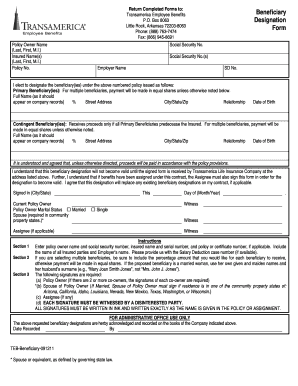
Filling out the Teb Beneficiary 091211 form online is an essential process for designating your beneficiaries under your insurance policy. This guide will provide you with a clear and comprehensive overview of how to complete the form accurately and efficiently.
Follow the steps to complete the form online.
- Click ‘Get Form’ button to access the Teb Beneficiary 091211 form and open it in your preferred online editor.
- Begin by entering the policy owner’s name, including last name, first name, and middle initial. Make sure to fill in the social security number accurately.
- Next, provide the name(s) of the insured individuals, again including their last names, first names, and middle initials.
- Enter the policy number associated with your insurance to ensure proper record-keeping.
- Designate primary beneficiaries by listing their full names as they should appear on company records. Include their street addresses, city, state, zip codes, relationship to the policy owner, and date of birth.
- If there are multiple primary beneficiaries, specify the percentage of proceeds each beneficiary should receive. If percentages are not noted, the payment will be made in equal shares.
- Repeat the process for contingent beneficiaries, who will receive proceeds only if all primary beneficiaries predecease the insured.
- Review the understanding and agreement section carefully. Confirm that the designation will not become valid until Transamerica Life Insurance Company receives the signed form.
- Complete the signature section, ensuring that the policy owner, spouse (if applicable), and assignee (if applicable) sign the form. Note that all signatures must be witnessed by a disinterested party.
- Once you have finished filling out the form, save your changes. You can then download, print, or share the form as needed.
Complete your beneficiary designation online by following these simple steps.
1:48 2:19 How To Insert Line Above And Below Text In Word - (Microsoft) - YouTube YouTube Start of suggested clip End of suggested clip First select over bar again go to the ascend tab. And select under bar now notice that the text isMoreFirst select over bar again go to the ascend tab. And select under bar now notice that the text is in italics if you want to remove italics just click on abc text here under the equation tab.