Loading
Form preview
  • US Legal Forms
  • Form Library
  • More Forms
  • More Uncategorized Forms
  • Banner Staffing Services Punch Correction

Get Banner Staffing Services Punch Correction

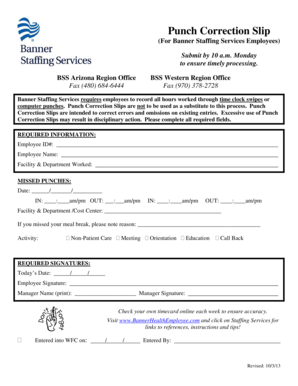
Punch Correction Slip (For Banner Staffing Services Employees) Submit by 10 a.m. Monday to ensure timely processing. BSS Arizona Region Office Fax (480) 6846444 BSS Western Region Office Fax (970).

How it works

  1. Open form

    Open form follow the instructions

  2. Easily sign form

    Easily sign the form with your finger

  3. Share form

    Send filled & signed form or save

How to fill out the Banner Staffing Services Punch Correction online

This guide provides comprehensive instructions on how to complete the Banner Staffing Services Punch Correction form online. By following these steps, users can ensure the accurate recording of their work hours and manage any corrections efficiently.

Follow the steps to correctly fill out the Punch Correction form.

  1. Click ‘Get Form’ button to access the Punch Correction form and open it for editing.
  2. Fill in your Employee ID number in the designated field.
  3. Enter your full name in the Employee Name section.
  4. Specify the Facility & Department where you worked.
  5. For missed punches, input the date in the format MM/DD/YYYY.
  6. Provide the time for IN and OUT entries, ensuring to note whether it is AM or PM.
  7. If you have multiple missed punches, continue filling in additional IN and OUT times as needed.
  8. Indicate the Facility & Department/Cost Center clearly.
  9. If applicable, note the reason for missing your meal break.
  10. Select the appropriate activity from the provided options: Non-Patient Care, Meeting, Orientation, Education, or Call Back.
  11. Enter today’s date in the required section.
  12. Sign the form with your signature in the designated area.
  13. Print your Manager’s name and obtain their signature upon completing the form.
  14. After filling out all necessary fields, review for accuracy. You can then save changes, download, print, or share the completed form as needed.

Complete your Punch Correction form online today to ensure timely processing of your hours.

Get form

Experience a faster way to fill out and sign forms on the web. Access the most extensive library of templates available.
Get form

Related content

Managing Timecards and Schedules - City of Houston
Signing off Timecards (ARA Payroll Services) . ... employees Punch Exceptions in your...
Learn more
Supervisor Instructions for Web Time Entry –...
After accessing Banner Self Service; Access "Employee"; Choose "Time Sheet"; Choose...
Learn more
Menus Guide - Avid
If you have comments, corrections, or ... Pro Tools banner, which includes the version...
Learn more

Related links form

Canada IMM 5484 E 2004 UHD Food Stamp/SNAP Verification Form 2012 OK Form 511 2011 Elks Hoop Shoot Participant Sign Up Sheet

Questions & Answers

Get answers to your most pressing questions about US Legal Forms API.

Contact support

The function name property of the javascript object is used to return the name of the function. This name property of the function is only readable and cannot be altered. The name of the function which was given when the function was created is returned by Function.name.

The <form> tag is used to create an HTML form for user input. The <form> element can contain one or more of the following form elements: <input> <textarea>

The name attribute specifies a name for an HTML element. This name attribute can be used to reference the element in a JavaScript. For a <form> element, the name attribute is used as a reference when the data is submitted. For an <iframe> element, the name attribute can be used to target a form submission.

The HTML <input> name Attribute is used to specify a name for an <input> element. It is used to reference the form-data after submitting the form or to reference the element in a JavaScript. Attribute Values: It contains a single value name which describes the name of the <input> element.

The name attribute specifies a name for an HTML element. This name attribute can be used to reference the element in a JavaScript. For a <form> element, the name attribute is used as a reference when the data is submitted. For an <iframe> element, the name attribute can be used to target a form submission.

Here is a brief summary: id is used to identify the HTML element through the Document Object Model (via JavaScript or styled with CSS). id is expected to be unique within the page. name corresponds to the form element and identifies what is posted back to the server.

The value attribute is what is going to get sent back to the server. For instance you can set the value of an input field in the html code, which is helpful for hidden or disabled inputs. The name attribute is how you reference the input, once the value from the input gets sent back to the server.

The name attribute specifies the name of an <input> element. The name attribute is used to reference elements in a JavaScript, or to reference form data after a form is submitted. Note: Only form elements with a name attribute will have their values passed when submitting a form.

Get This Form Now!

Use professional pre-built templates to fill in and sign documents online faster. Get access to thousands of forms.
Get form
If you believe that this page should be taken down, please follow our DMCA take down processhere.

Industry-leading security and compliance

US Legal Forms protects your data by complying with industry-specific security standards.
  • In businnes since 1997
    25+ years providing professional legal documents.
  • Accredited business
    Guarantees that a business meets BBB accreditation standards in the US and Canada.
  • Secured by Braintree
    Validated Level 1 PCI DSS compliant payment gateway that accepts most major credit and debit card brands from across the globe.
Get Banner Staffing Services Punch Correction
Get form
  • Adoption
  • Bankruptcy
  • Contractors
  • Divorce
  • Home Sales
  • Employment
  • Identity Theft
  • Incorporation
  • Landlord Tenant
  • Living Trust
  • Name Change
  • Personal Planning
  • Small Business
  • Wills & Estates
  • Packages A-Z
  • Affidavits
  • Bankruptcy
  • Bill of Sale
  • Corporate - LLC
  • Divorce
  • Employment
  • Identity Theft
  • Internet Technology
  • Landlord Tenant
  • Living Wills
  • Name Change
  • Power of Attorney
  • Real Estate
  • Small Estates
  • Wills
  • All Forms
  • Forms A-Z
  • Form Library
  • Legal Hub
  • About Us
  • Help Portal
  • Legal Resources
  • Blog
  • Affiliates
  • Contact Us
  • Delete My Account
  • Site Map
  • Industries
  • Forms in Spanish
  • Localized Forms
  • State-specific Forms
  • Forms Kit
  • Real Estate Handbook
  • All Guides
  • Notarize
  • Incorporation services
  • For Consumers
  • For Small Business
  • For Attorneys
  • USLegal
  • FormsPass
  • pdfFiller
  • signNow
  • altaFlow
  • DocHub
  • Instapage
Form Packages
  • Adoption
  • Bankruptcy
  • Contractors
  • Divorce
  • Home Sales
  • Employment
  • Identity Theft
  • Incorporation
  • Landlord Tenant
  • Living Trust
  • Name Change
  • Personal Planning
  • Small Business
  • Wills & Estates
  • Packages A-Z
Form Categories
  • Affidavits
  • Bankruptcy
  • Bill of Sale
  • Corporate - LLC
  • Divorce
  • Employment
  • Identity Theft
  • Internet Technology
  • Landlord Tenant
  • Living Wills
  • Name Change
  • Power of Attorney
  • Real Estate
  • Small Estates
  • Wills
  • All Forms
  • Forms A-Z
  • Form Library
Customer Service
  • Legal Hub
  • About Us
  • Help Portal
  • Legal Resources
  • Blog
  • Affiliates
  • Contact Us
  • Delete My Account
  • Site Map
  • Industries
  • Forms in Spanish
  • Localized Forms
  • State-specific Forms
  • Forms Kit
Legal Guides
  • Real Estate Handbook
  • All Guides
Prepared for you
  • Notarize
  • Incorporation services
Our Customers
  • For Consumers
  • For Small Business
  • For Attorneys
Our Sites
  • USLegal
  • FormsPass
  • pdfFiller
  • signNow
  • altaFlow
  • DocHub
  • Instapage
Social Media
Call us now toll free:
+1 833 426 79 33
As seen in:
© Copyright 1999-2026 airSlate Legal Forms, Inc. 3720 Flowood Dr, Flowood, Mississippi 39232
  • Your Privacy Choices
  • Terms of Service
  • Privacy Notice
  • Content Takedown Policy
  • Bug Bounty Program