Loading
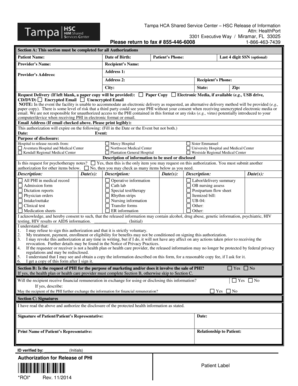
Get Shared Services Center 3301 Executive Way Miramar
How it works
-

Open form follow the instructions
-

Easily sign the form with your finger
-

Send filled & signed form or save
How to fill out the Shared Services Center 3301 Executive Way Miramar online
This guide provides step-by-step instructions for effectively completing the Shared Services Center 3301 Executive Way Miramar form online. Follow these guidelines to ensure that your submissions are accurate and prompt.
Follow the steps to successfully fill out the form online.
- Use the ‘Get Form’ button to access the form and open it for completion.
- In Section A, fill in all required fields: Patient Name, Date of Birth, Provider’s Name, Recipient’s Name, and both Address 1 and Address 2. Be sure to include the Patient’s Phone number and the Last 4 digits of the Social Security Number, if applicable.
- Complete the Request Delivery options by selecting your preferred method of receiving information: Paper Copy, Electronic Media, Encrypted Email, or Unencrypted Email. If you do not select a method, a paper copy will be sent.
- Indicate the Authorization Expiration by providing either a date or an event but not both. Clearly state the Purpose of Disclosure.
- Select the Hospital from which you are requesting records. You may choose from the provided list.
- Describe the information to be disclosed. If this request includes psychotherapy notes, check 'Yes' and remember that this is the only request allowed on this authorization.
- Review your acknowledgments regarding the risks and implications of releasing protected health information (PHI). Initial where indicated.
- In Section B, answer the questions about whether the request involves marketing or financial remuneration, only if applicable.
- In Section C, provide your signature, date, and print the name if signed by a representative. Indicate your relationship to the patient.
- After filling out the form, make sure to save changes. You can choose to download, print or share the form as required.
Complete your forms online easily and efficiently now!
Companies decide the warranty period for a product based on several factors, including the type of product, the cost of the product, the materials used to make the product, and the company's experience with similar products.