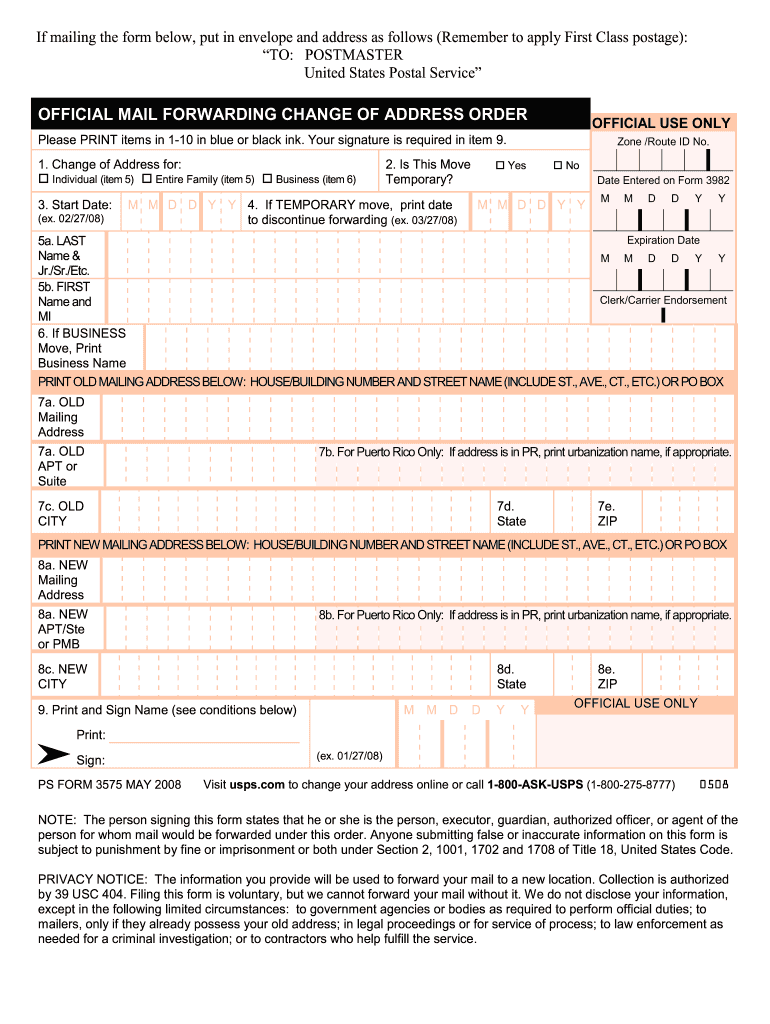
Sign PS FORM 3575 MAY 2008 Visit usps. com to change your address online or call 1-800-ASK-USPS 1-800-275-8777 NOTE The person signing this form states that he or she is the person executor guardian authorized officer or agent of the person for whom mail would be forwarded under this order. If mailing the form below put in envelope and address as follows Remember to apply First Class postage TO POSTMASTER United States Postal Service OFFICIAL MAIL FORWARDING CHANGE OF ADDRESS ORDER OFFICIAL USE ONLY Please PRINT items in 1-10 in blue or black ink. Your signature is required in item 9. 1. Change of Address for Individual item 5 3. Start Date ex. 02/27/08 Entire Family item 5 Business item 6 2. Is This Move Temporary M M D D Y Y 4. If TEMPORARY move print date to discontinue forwarding ex. 03/27/08 Zone /Route ID No* Yes No Date Entered on Form 3982 M M D D Y Y M D Y Expiration Date 5a* LAST Name Jr. /Sr. /Etc* 5b. FIRST Clerk/Carrier Endorsement Name and MI 6. If BUSINESS Move Print Bus....
Loading

Open form follow the instructions

Easily sign the form with your finger

Send filled & signed form or save
How to fill out the USPS PS 3575 online
This guide provides clear and supportive instructions on how to fill out the USPS PS 3575 form online. By following these steps, users will be able to efficiently complete their official mail forwarding change of address order.
Follow the steps to successfully complete the USPS PS 3575 form online.
- Press the 'Get Form' button to access the USPS PS 3575 form and open it in your online editor.
- In the first section, indicate whether this change of address is for an individual, an entire family, or a business, by selecting the appropriate checkbox.
- Provide the start date for the address change in the format MM/DD/YY.
- If the move is temporary, check the 'Yes' box and print the date to discontinue forwarding in the specified format.
- In the 'Old Mailing Address' section, fill in the house or building number, street name, apartment or suite number (if applicable), city, state, and ZIP code of your previous address.
- If applicable, for Puerto Rico addresses, include the urbanization name in the provided field.
- Next, in the 'New Mailing Address' section, fill out the same detailed information about your new address.
- Sign your name in the designated area and provide the date of the signature in the format MM/DD/YY.
- Review all filled information for accuracy.
- Upon completion, users can save changes, download the form, print it, or share it as needed.
Complete your paperwork online today by following these steps.
Experience a faster way to fill out and sign forms on the web. Access the most extensive library of templates available.
Related content
Fill out the PS Form 3575 found inside the packet, and give it to the retail associate...
The person signing this form states that he or she is the person, executor, guardian...
Oct 1, 2004 — “PS Form” and a form number, often near the bottom edge of the form...
Get answers to your most pressing questions about US Legal Forms API.
How do I fill out a customs clearance form?
To fill out a customs clearance form, provide a list of all items being shipped, their value, and the reason for shipment. Accuracy is key, as this information affects duty payments. If you are moving and need to update your address, ensure you include your new address on the USPS PS 3575 form to keep communications seamless.
What is the easiest way to change address for everything?
The easiest way to change your address for all your mail is to complete the USPS PS 3575 form online. This method allows you to submit your request from the comfort of your home, ensuring you don’t miss any crucial paperwork. Additionally, it can help you manage your address change across multiple services more efficiently.
How do I fill out USPS customs?
Filling out USPS customs forms involves detailing the contents of your package, including their values and how they will be used. Ensure each item's description is clear to avoid penalties or shipment delays. Consider using the USPS PS 3575 when changing your address for these shipments.
How do I list items in customs form?
To list items on your customs form, specify each item's description, quantity, and value. Indicate their intended use, such as personal goods or gifts. This clarity will help streamline customs processing and ensure accurate duty assessments.
How to fill out PS form 3575?
Filling out PS form 3575 requires you to provide your current address and the new address where you would like your mail forwarded. Include your contact information for any follow-up. This form is critical for stopping mail delivery to your old address and starting it at your new location.
How to fill out USPS customs form?
When filling out the USPS customs form, clearly state the content, value, and purpose of the shipment. Make sure to categorize the items correctly, as this impacts customs duties. Use the USPS PS 3575 form if you need to change your address related to the shipment.
How to submit PS form 3575?
Submitting the PS form 3575 is straightforward. You can complete the form online or fill it out on paper, and then you must submit it to your local post office. Be sure to verify that all information is accurate to avoid delays in processing your address change.
How to fill out a US customs form?
To fill out a US customs form, you need to provide details about the items you are shipping, including their value and weight. Use clear descriptions and specify if the items are gifts, commercial goods, or personal items. The USPS PS 3575 form has a section to include this information when applicable.
What is a PS form 3575?
The PS form 3575 is a document used by USPS to process change of address requests. When you complete this form, you inform USPS of your new residence, allowing them to forward your mail seamlessly. It is crucial for ensuring you continue receiving your correspondence without interruptions. Understanding its purpose can simplify your moving process significantly.
How do I get a PS form 3575?
Obtaining a PS form 3575 is straightforward. You can visit your local post office to request a physical copy or download it from the USPS website. This form is essential for initiating a change of address and will facilitate your transition. If you prefer digital solutions, platforms like US Legal Forms offer easy navigation and access to the necessary paperwork.
Use professional pre-built templates to fill in and sign documents online faster. Get access to thousands of forms.
If you believe that this page should be taken down, please follow our DMCA take down process here.