Mm/dd/yyyy) previous arrival (mm/dd/yyyy) Yes No 20. What is your spouse's current status? 24. If in the U.S., is your spouse to be included in this application? (Check the appropriate box.) Yes (Attach one photograph of your spouse in the upper right corner of Page 9 on the extra copy of the application submitted for this person.) No Your children. Please list all of your children, regardless of age, location or marital status. I do not have any children. (Skip to Part A. III., Information ab.
Loading

Open form follow the instructions

Easily sign the form with your finger

Send filled & signed form or save
How to fill out the USCIS I-589 online
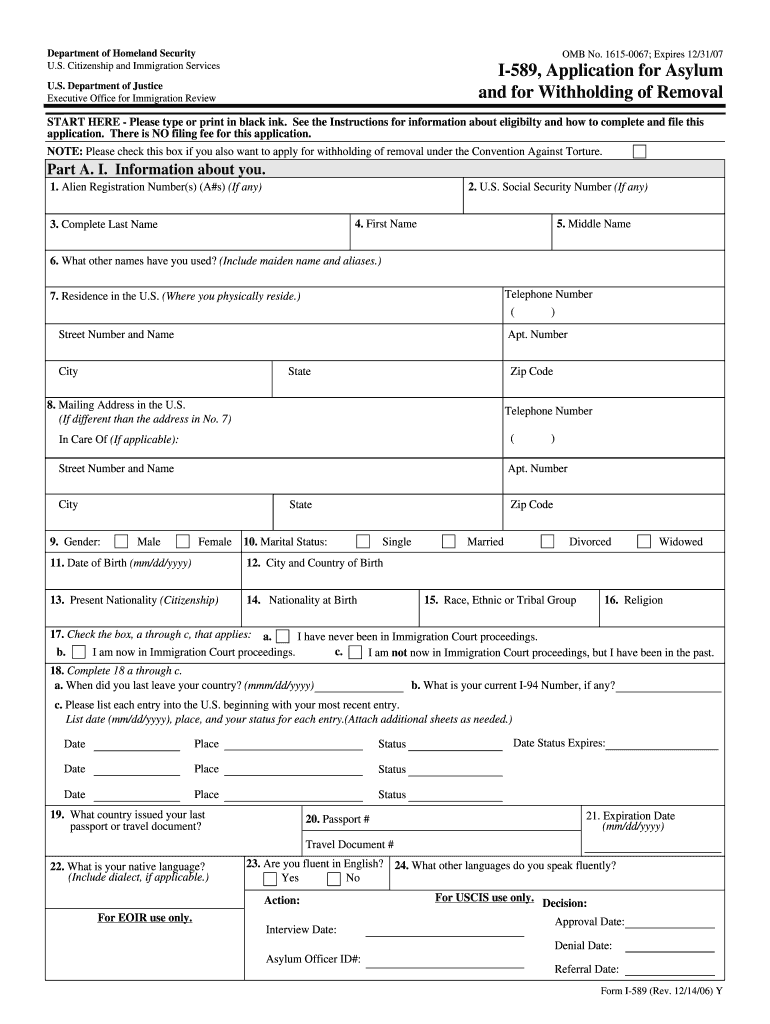
The USCIS I-589, Application for Asylum and for Withholding of Removal, is a critical document for individuals seeking asylum in the United States. This guide provides clear, step-by-step instructions on how to fill out the form online, ensuring you provide all necessary information accurately.
Follow the steps to successfully complete the USCIS I-589 online.
- Press the ‘Get Form’ button to access the online version of the USCIS I-589. This will open the form in your editor, allowing you to begin filling it out.
- Begin with Part A. I., providing your personal information. Fill in your Alien Registration Number, if applicable, along with your Social Security Number, full name, and any other names you have used. Include your telephone number, residential address, and mailing address if different.
- Continue to provide demographic information, including your gender, marital status, date of birth, nationality at birth, city and country of birth, current nationality, race, ethnic or tribal group, and religion.
- Indicate if you have ever been in Immigration Court proceedings by checking the relevant box and providing details regarding your past and current entries into the United States. Make sure to include your I-94 number if available.
- In Part A. II., provide information about your spouse and children if applicable. If you are not married, you can skip this section. If you have a spouse or children, fill out their details, including Alien Registration Numbers, social security numbers, birth dates, and current status.
- Proceed to Part A. III. and list your last address before arriving in the U.S. and any residences you have occupied in the past five years, documenting your educational history and employment records.
- In Part B., describe the basis for your asylum application. Provide detailed accounts of past harm or mistreatment you or your family may have experienced, and explain your fear of returning to your home country.
- Continue providing any additional information in Part C related to previous applications for refugee status, lawful status inquiries, or incidences of involvement in organizations that may affect your application.
- Finally, review your entire application for accuracy. Once complete, you can save changes to your application, download it for your records, and print a copy for submission. Be prepared to upload it or send it according to further instructions.
Begin your application today by completing the USCIS I-589 online.
Experience a faster way to fill out and sign forms on the web. Access the most extensive library of templates available.
Related content
Applicants determined to have knowingly made a frivolous application for asylum will be...
I-539, Application to Extend/Change Nonimmigrant Status. Humanitarian Based Forms. I-589...
For example, if the asylum application (Form I-589), appellate brief, and. EOIR-33/BIA...
Get answers to your most pressing questions about US Legal Forms API.
Can form I-589 be filed electronically?
Indeed, you can file form I-589 electronically through the USCIS online portal. This electronic filing streamlines your submission and allows for easier management of your application process. Make sure to gather all necessary documents beforehand to ensure a smooth filing experience.
What documents do I need to submit with I-589?
When submitting the USCIS I-589, it is essential to include various supporting documents, such as your personal identification, proof of your current immigration status, and any evidence supporting your asylum claim. Make sure to provide a clear narrative of your story along with any relevant documentation that substantiates your need for protection.
Can form I-589 be filed online?
Yes, you can file form I-589 online through the USCIS website. By using the online application process, you complete your form at your convenience and submit it electronically. This option helps streamline your application, making it a preferred choice for many applicants.
Is it better to file online or by mail with USCIS?
Filing online for the USCIS I-589 can often be more efficient and quicker than mailing your application. Online submissions allow you to receive immediate confirmation of your application and track its status easily. Additionally, the online system minimizes the chances of your documents being lost during mail processing.
How long does it take for form I-589 to be approved?
The processing time for the USCIS I-589 can vary significantly based on several factors, including the caseload of the asylum office and your specific circumstances. Generally, it may take several months to over a year for a decision. For a clearer timeline, you can check the USCIS website for updates on processing times specific to your location.
What to say when applying for asylum?
When applying for asylum using the USCIS I-589 form, clarity and honesty are crucial. Clearly present your reasons for seeking asylum and detail any persecution you have faced or fear in your home country. Consider including specific examples and personal stories to illustrate your situation thoroughly. It may be beneficial to seek legal assistance to ensure your narrative is effectively communicated.
What documents do I need to send with form I-589?
When submitting the USCIS I-589 form, you will need to include a number of supporting documents. This typically includes proof of your identity, evidence supporting your claim for asylum, and any other relevant documents like personal statements or witness letters. Double-check the document checklist provided by USCIS to avoid missing any critical information that can strengthen your case.
How do I file form I-589?
To file the USCIS I-589 form, first complete the form accurately by providing all necessary information. Next, gather the required supporting documents and make copies. Finally, send the completed form and documents via mail to the specified address provided in the instructions. You may want to use certified mail for tracking purposes, ensuring that your application arrives safely.
How many copies of I-589 should I submit?
When submitting the USCIS I-589 form, it’s generally recommended to prepare two copies of the completed form. One copy will go to the authorities, while you should keep another for your records. Staying organized by maintaining your copy ensures that you have a reference point for your case. Always check the latest USCIS guidelines to confirm submission requirements.
Can I file asylum form on my own?
Yes, you can file the USCIS I-589 form on your own. However, understanding the complexities of asylum law can be challenging. Filing independently may increase the chances of making errors or omissions that could impact your case. Many people find it helpful to consult with an immigration attorney or a legal expert to guide them through the process.
Use professional pre-built templates to fill in and sign documents online faster. Get access to thousands of forms.
If you believe that this page should be taken down, please follow our DMCA take down process here.
This form is available in several versions. Select the version you need from the drop-down list below.