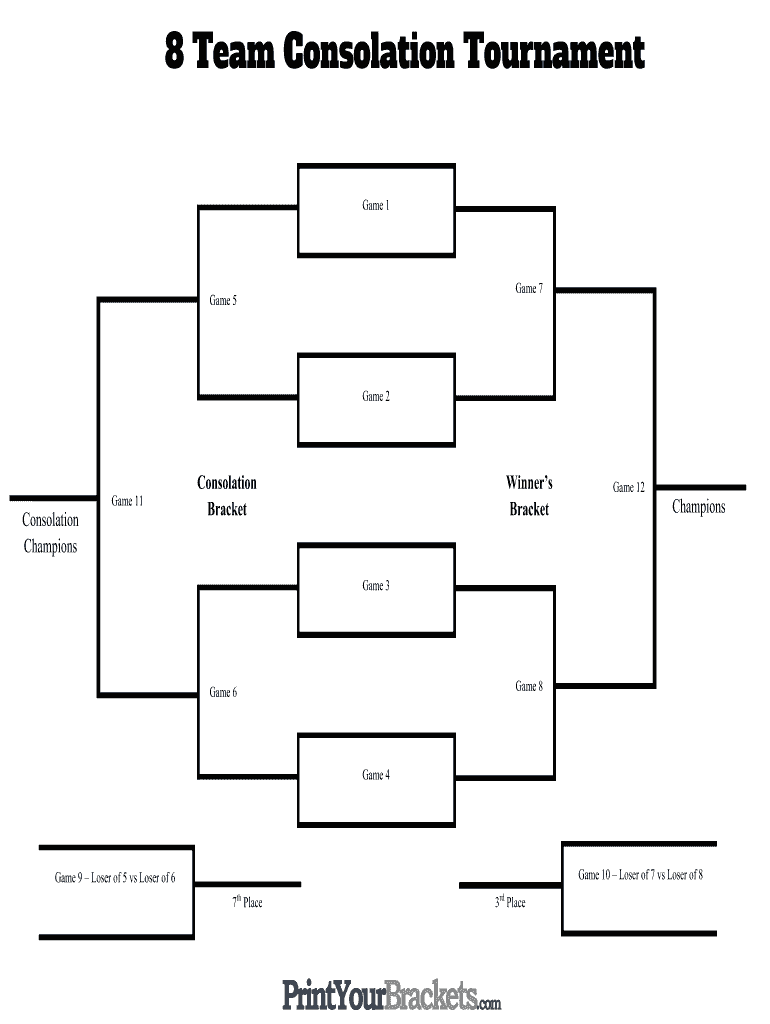
F 7 vs Loser of 8 Game 9 – Loser of 5 vs Loser of 6 th 7 Place rd 3 Place .
Loading

Open form follow the instructions

Easily sign the form with your finger

Send filled & signed form or save
How to fill out the Print Your Brackets 8 Team Consolation Tournament online
This guide provides clear and concise instructions for completing the Print Your Brackets 8 Team Consolation Tournament form online. Whether you are new to tournament management or simply need a refresh, following these steps will help ensure a smooth process.
Follow the steps to successfully complete your tournament brackets
- Click the ‘Get Form’ button to access the tournament form and open it in your preferred editing tool.
- Begin by filling out the names of the teams participating in the tournament. Enter each team's name in the designated fields. Ensure accuracy to avoid confusion during the tournament.
- Proceed to the bracket layout. Fill in the matchups for each game listed, starting from Game 1 to Game 12. Ensure you place the teams in the correct positions according to the tournament rules.
- For the consolation bracket, identify and fill in the games designated for eliminated teams, clearly noting any necessary match pairings.
- Once all teams and matchups are included, review the bracket for accuracy. Make sure all fields are properly filled without any errors.
- After confirming all details are correct, you may choose to save changes, download the completed form, print it for physical distribution, or share it electronically with participants.
Begin your tournament management by completing your document online today.
Experience a faster way to fill out and sign forms on the web. Access the most extensive library of templates available.
Related content
Winner's Bracket. Consolation Bracket. L2. (4. (5. (9. (6. (11. (12. (10. (8. L1. L8. L7...
Jul 1, 2016 — A single-elimination tournament with a consolation bracket ... Eight...
Aug 15, 2025 — The competition period there is only about two weeks,[8] Since the Round...
Get answers to your most pressing questions about US Legal Forms API.
What is the 8 team tournament with losers bracket?
An 8 team tournament with a losers bracket, often called a double-elimination format, allows teams losing in the main bracket a chance to compete in a separate bracket. This ensures that teams can play multiple games and have a fair shot at winning. To simplify your planning, consider using our service to print and structure your Brackets 8 Team Consolation Tournament.
What is the format for the 8 team tournament?
The common format for an 8 team tournament is a single-elimination setup, where teams are paired off to compete in each round. The winners proceed to the next round until a champion emerges. If you choose to implement a consolation bracket, it provides teams with additional matches to gain experience. Utilize our platform to Print Your Brackets 8 Team Consolation Tournament and enhance your event.
How do you organize a tournament with 8 teams?
Organizing a tournament with 8 teams requires clear planning. Start by selecting dates and locations, then decide on your tournament format, such as single-elimination or double-elimination. Our platform can assist in structuring the tournament effectively, so you can Print Your Brackets 8 Team Consolation Tournament without any hurdles.
How many games are in an 8 team bracket?
In a standard 8 team single-elimination bracket, there are a total of 7 games played. Each round eliminates half the teams until a champion is determined. However, if you incorporate a consolation bracket, you might see additional games for those who didn't advance. To simplify this, use our service to Print Your Brackets 8 Team Consolation Tournament and stay organized.
What is the 8 team baseball tournament format?
The 8 team baseball tournament format usually follows a double-elimination setup. This means each team has to lose two games before being eliminated. Such a format allows for a more extended play, giving teams a second chance. With our platform, you can easily plan and Print Your Brackets 8 Team Consolation Tournament, simplifying the process.
How to make a schedule with 8 teams?
Making a schedule for 8 teams involves determining match times and venues. Begin with the first round, and ensure every team plays without overlaps, allowing for rest between games. Using our service, you can quickly organize the schedule and Print Your Brackets 8 Team Consolation Tournament, making the experience smooth for everyone involved.
How to do a tournament bracket with 8 teams?
To create a tournament bracket for 8 teams, start by identifying the teams. Next, arrange them in a single-elimination format, where teams face off in each round. The winners advance while the losers are placed into a consolation bracket. You can easily manage this process and Print Your Brackets 8 Team Consolation Tournament using our user-friendly platform.
How do losers brackets work in tournaments?
Losers brackets allow teams that lose their initial matchup to continue competing instead of being eliminated. These brackets give teams a second chance to fight for the championship, adding excitement and engagement to the tournament. Essentially, the losers bracket runs parallel to the main bracket until a final winner is determined. Use our service to print your brackets for the 8 team consolation tournament and enhance your event’s organization.
How to make a single elimination bracket with 8 teams?
To make a single elimination bracket with 8 teams, list the teams in pairs for the first round, where the winners advance and the losers are eliminated. Continue this process through the rounds until a champion is declared. This format is efficient and keeps the tournament flowing smoothly. Remember, you can print your brackets for the 8 team consolation tournament using our user-friendly tools.
What is a consolation bracket?
Teams that miss the playoffs are entered into a consolation bracket (up to 8 teams with the worst records). You can choose between the Consolation Bracket or Toilet Bowl. In the Consolation Bracket, the winner advances to the next round, until there becomes the consolation winner.
Use professional pre-built templates to fill in and sign documents online faster. Get access to thousands of forms.
If you believe that this page should be taken down, please follow our DMCA take down process here.