Loading
Form preview
  • US Legal Forms
  • Form Library
  • More Forms
  • More Uncategorized Forms
  • Wacb-n 91913 - Pcit

Get Wacb-n 91913 - Pcit

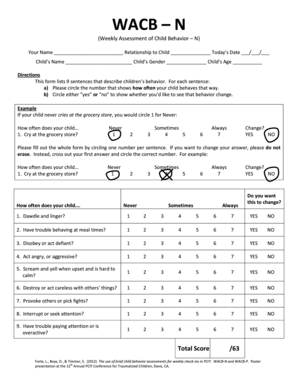
WACB N (Weekly Assessment of Child Behavior N) Your Name Relationship to Child Todays Date / / Childs Name Childs Gender Childs Age Directions This form lists 9 sentences that describe childrens behavior.

How it works

  1. Open form

    Open form follow the instructions

  2. Easily sign form

    Easily sign the form with your finger

  3. Share form

    Send filled & signed form or save

How to fill out the WACB-N 91913 - PCIT online

The WACB-N 91913 - PCIT is an online form designed for the weekly assessment of child behavior. This guide will walk you through each section of the form, ensuring that you understand how to accurately report your child's behaviors and any desired changes.

Follow the steps to complete the WACB-N 91913 - PCIT online.

  1. Click ‘Get Form’ button to obtain the form and open it in the editor.
  2. Enter your name and your relationship to the child in the appropriate fields at the top of the form.
  3. Input today’s date in the specified format (MM/DD/YYYY).
  4. Fill in the child’s name, gender, and age, which are essential for identifying the assessment.
  5. Review the list of behaviors provided in the form. For each behavior, circle the number that indicates how often your child exhibits that behavior, using the scale from 1 (Never) to 7 (Always).
  6. Next to each behavior, circle either ‘yes’ or ‘no’ to indicate whether you would like to see a change in that behavior.
  7. If you wish to change an answer, cross out your previous number and circle the new one instead of erasing.
  8. Once you have filled in all the behaviors and their corresponding responses, ensure you check the total score section at the bottom of the form.
  9. Finally, save your changes, download, print, or share the completed form as needed.

Complete your WACB-N 91913 - PCIT form online today for an efficient assessment!

Get form

Experience a faster way to fill out and sign forms on the web. Access the most extensive library of templates available.
Get form

Related content

adjutant general - State Government Credit Card...
by A JAMES · Cited by 4 — FORMS AND SUPPLY - AOPD. 11/02/2018. $233.84. BROOKE HORTON...
Learn more
The Annual PCIT Conference Archive: 2010-2014
Sep 9, 2014 — Forte, L. A. – The Use of Brief Child Behavior Assessments for Weekly...
Learn more

Related links form

OK 04MP033E 2006 OK 07LC002T 2008 OK 07LC093E 2009 OK 08TW013E (TWS-13) 2010

Questions & Answers

Get answers to your most pressing questions about US Legal Forms API.

Contact support

In your document, click where you want to insert the note reference mark. On the Insert menu, click Footnote. Under Location, click Footnotes or Endnotes, and then on the Footnotes or Endnotes pop-up menu, click the location that you want. Under Format, select the numbering options that you want, and then click Insert.

Method 2: Show the Note Pane To begin with, click “View” tab. Then choose “Draft” view. Next click “References” tab. And then click “Show Notes” option in “Footnotes” group. Now there shall be a note pane at the bottom of the screen whose size you can adjust. Make sure you select “All Footnotes”.

5 Answers Go into Draft view. Select References. Find the "Show footnotes" icon (unhelpfully it's not labelled!) Scroll through the bottom pane until you find reach the "missing" reference numbers (e.g. I was missing "61", so I went to 60 and then read on from there) u.

In the Desktop application, if you switch to Draft View and then click on Show Notes in the Footnotes section of the References tab of the ribbon, you can then see all of the footnotes in the Footnote Pane.

Searching for Footnote and Endnote Marks Press Ctrl+F to display the Find tab of the Find and Replace dialog box. (See Figure 1.) In the Find What box, enter the text for which you want to search. To search for a footnote mark, enter ^f. ... Set other searching parameters, as desired. Click on Find Next.

To turn Track Changes on, click on the Review tab, then click on the icon above Track Changes. To turn Track Changes off, just click this icon again. You can also toggle Track Changes on and off by clicking on the "Track Changes" menu arrow and then clicking Track Changes in the list.

0:00 2:10 Word Count Excluding Footnotes in MS Word - YouTube YouTube Start of suggested clip End of suggested clip So if I uncheck that it will drop my word count from 321. Down to 291. And then I don't have toMoreSo if I uncheck that it will drop my word count from 321. Down to 291. And then I don't have to worry about it.

In Find/Change dialog, search for ^F in Text tab, or ~F in Grep. To apply formatting to the footnote itself you could use grep ^~F, and apply your 'footnote' paragraph style to it.

Get This Form Now!

Use professional pre-built templates to fill in and sign documents online faster. Get access to thousands of forms.
Get form
If you believe that this page should be taken down, please follow our DMCA take down processhere.

Industry-leading security and compliance

US Legal Forms protects your data by complying with industry-specific security standards.
  • In businnes since 1997
    25+ years providing professional legal documents.
  • Accredited business
    Guarantees that a business meets BBB accreditation standards in the US and Canada.
  • Secured by Braintree
    Validated Level 1 PCI DSS compliant payment gateway that accepts most major credit and debit card brands from across the globe.
Get WACB-N 91913 - PCIT
Get form
  • Adoption
  • Bankruptcy
  • Contractors
  • Divorce
  • Home Sales
  • Employment
  • Identity Theft
  • Incorporation
  • Landlord Tenant
  • Living Trust
  • Name Change
  • Personal Planning
  • Small Business
  • Wills & Estates
  • Packages A-Z
  • Affidavits
  • Bankruptcy
  • Bill of Sale
  • Corporate - LLC
  • Divorce
  • Employment
  • Identity Theft
  • Internet Technology
  • Landlord Tenant
  • Living Wills
  • Name Change
  • Power of Attorney
  • Real Estate
  • Small Estates
  • Wills
  • All Forms
  • Forms A-Z
  • Form Library
  • Legal Hub
  • About Us
  • Help Portal
  • Legal Resources
  • Blog
  • Affiliates
  • Contact Us
  • Delete My Account
  • Site Map
  • Industries
  • Forms in Spanish
  • Localized Forms
  • State-specific Forms
  • Forms Kit
  • Real Estate Handbook
  • All Guides
  • Notarize
  • Incorporation services
  • For Consumers
  • For Small Business
  • For Attorneys
  • USLegal
  • FormsPass
  • pdfFiller
  • signNow
  • altaFlow
  • DocHub
  • Instapage
Form Packages
  • Adoption
  • Bankruptcy
  • Contractors
  • Divorce
  • Home Sales
  • Employment
  • Identity Theft
  • Incorporation
  • Landlord Tenant
  • Living Trust
  • Name Change
  • Personal Planning
  • Small Business
  • Wills & Estates
  • Packages A-Z
Form Categories
  • Affidavits
  • Bankruptcy
  • Bill of Sale
  • Corporate - LLC
  • Divorce
  • Employment
  • Identity Theft
  • Internet Technology
  • Landlord Tenant
  • Living Wills
  • Name Change
  • Power of Attorney
  • Real Estate
  • Small Estates
  • Wills
  • All Forms
  • Forms A-Z
  • Form Library
Customer Service
  • Legal Hub
  • About Us
  • Help Portal
  • Legal Resources
  • Blog
  • Affiliates
  • Contact Us
  • Delete My Account
  • Site Map
  • Industries
  • Forms in Spanish
  • Localized Forms
  • State-specific Forms
  • Forms Kit
Legal Guides
  • Real Estate Handbook
  • All Guides
Prepared for you
  • Notarize
  • Incorporation services
Our Customers
  • For Consumers
  • For Small Business
  • For Attorneys
Our Sites
  • USLegal
  • FormsPass
  • pdfFiller
  • signNow
  • altaFlow
  • DocHub
  • Instapage
Social Media
Call us now toll free:
+1 833 426 79 33
As seen in:
© Copyright 1999-2026 airSlate Legal Forms, Inc. 3720 Flowood Dr, Flowood, Mississippi 39232
  • Your Privacy Choices
  • Terms of Service
  • Privacy Notice
  • Content Takedown Policy
  • Bug Bounty Program