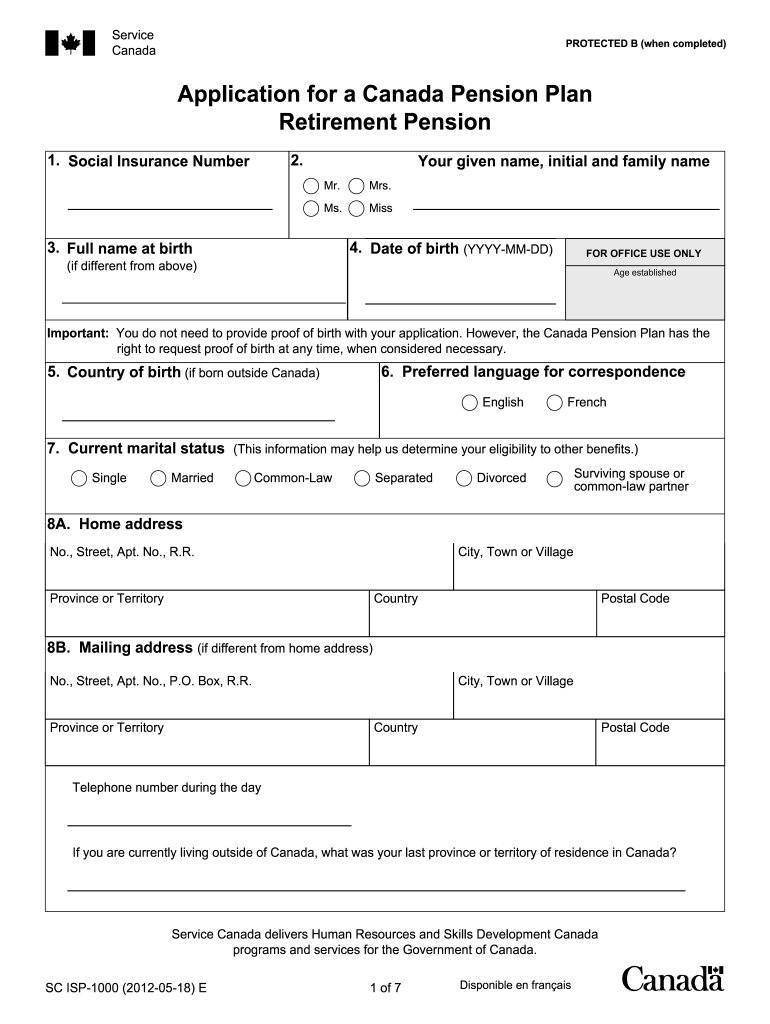
3. Full name at birth 4. Date of birth (YYYY-MM-DD) FOR OFFICE USE ONLY (if different from above) Age established Important: You do not need to provide proof of birth with your application. However, the Canada Pension Plan has the right to request proof of birth at any time, when considered necessary. 5. Country of birth (if born outside Canada) 6. Preferred language for correspondence English French 7. Current marital status (This information may help us determine your eligibility to .
Loading

Open form follow the instructions

Easily sign the form with your finger

Send filled & signed form or save
How to fill out the Canada SC ISP-1000 online
Filling out the Canada SC ISP-1000 form online can be a straightforward process when you have clear guidelines. This guide will provide you with step-by-step instructions to help you accurately complete your application for the Canada Pension Plan retirement pension.
Follow the steps to successfully complete your application.
- Click ‘Get Form’ button to obtain the form and open it in your preferred editing tool.
- Enter your Social Insurance Number in the designated field. This number is essential for identifying your application.
- Fill in your given name, initials, and family name. You may choose your title (Mr., Mrs., Ms., Miss) from the provided options.
- Provide your full name at birth for accurate identification.
- Enter your date of birth in the format YYYY-MM-DD.
- If born outside Canada, state your country of birth. Otherwise, leave this blank.
- Select your preferred language for correspondence from the options: English or French.
- Indicate your current marital status to help determine eligibility for other benefits.
- Complete your home address and, if different, your mailing address, including city, street number, province, and postal code.
- Input your daytime telephone number and mention your last province or territory of residence in Canada if currently living outside the country.
- Decide if you want your monthly payments to be deposited directly into your bank account. If yes, provide the branch number, institution number, and account number as well as the name(s) on the account.
- Select when you want your pension to start — as soon as you qualify, at age 65, or specify another date.
- If applicable, provide details about any children born after 1958 to explore potential pension adjustments.
- Fill out questions pertaining to primary caregiving and additional benefit information, if necessary.
- Decide on voluntary income tax deduction preferences for your pension payments.
- If eligible, indicate whether you wish to share your pension with a spouse or common-law partner.
- Provide details about any benefits you might have received from other countries.
- Answer whether you have stopped working due to a disability.
- Carefully read and sign the declaration section, confirming the accuracy of the information provided.
- Once finished, review your application, then save changes, download, print, or share the completed form as needed.
Take action now and complete your Canada SC ISP-1000 form online.
Experience a faster way to fill out and sign forms on the web. Access the most extensive library of templates available.
Related content
by JA Baughman · 1997 · Cited by 10 — ... 1,000 arm) MHD-augmented unseeded airflows...
The 2018 Elections Modernization Act amended the federal Elections Act to include several...
Sep 6, 2013 — ministère des Communications du Canada. Cet appareil numérique de la...
Get answers to your most pressing questions about US Legal Forms API.
Who qualifies for the child rearing provision in Canada?
The child rearing provision in Canada is designed for parents who have taken time off work to care for their children. To qualify, individuals must have been away from work, receiving little or no income, while raising their child under the age of seven. The Canada SC ISP-1000 feature can assist you in determining your eligibility and provide guidance on how to apply for this provision effectively.
Can I still get CPP if I live outside Canada?
Yes, you can still receive your Canada Pension Plan (CPP) benefits while living outside Canada. Payments are made through direct deposit to your foreign bank account, provided you inform Service Canada of your new address. The Canada SC ISP-1000 can help you understand the necessary steps to ensure you continue to receive your CPP benefits without interruption.
Can I collect Canada pension outside of Canada?
Yes, you can collect your Canada pension even if you are living outside of Canada. The Canadian government allows you to receive payments to a bank account in your current country. With the guidance of Canada SC ISP-1000, you can navigate any potential challenges related to international payment setup.
How do I apply for Canada pension from the USA?
To apply for your Canada pension from the USA, start by confirming your eligibility and gathering the relevant information. You can then fill out the application form online or seek help through the Canadian consulate. Using the Canada SC ISP-1000 feature simplifies the entire procedure, ensuring you submit a complete and accurate application.
What is the easiest way to apply for CPP?
The easiest way to apply for the Canada Pension Plan (CPP) is online through the Service Canada portal. You will need to create an account and follow the step-by-step instructions provided on the website. The Canada SC ISP-1000 feature can provide you with specific insights and answers to common questions about the CPP application, making the process smoother.
How do I apply for Canadian pension from USA?
To apply for your Canadian pension from the USA, you first need to gather all necessary documents, such as your Social Security number, Canadian pension number, and identification. After you have your paperwork ready, you can apply online through the Service Canada website or contact the nearest Canadian embassy for assistance. Utilizing the Canada SC ISP-1000 feature can guide you through the detailed application process, ensuring you do not miss any important steps.
What documents do I need for a CPP application?
When applying for the Canada Pension Plan (CPP), you typically need your Social Insurance Number (SIN), birth certificate, and employment history outlining your contributions. For those considering the Canada SC ISP-1000, it is wise to keep thorough records to ensure a smooth application process. You should also review the specific requirements on the Service Canada website for any additional documentation needed.
How many years do you have to work in Canada to get a pension?
To qualify for a pension in Canada, you generally need to have contributed for at least 40 years; however, you can receive reduced benefits with fewer years of contributions. The Canada SC ISP-1000 is designed to help individuals accumulate these required years of contributions effectively. Thus, starting early and staying informed about your earnings and contributions will play a key role in securing your financial future.
What is ISP 1000?
ISP 1000 refers to a specific retirement savings plan tailored for Canadians, making it easier to prepare for retirement. This plan combines features that promote consistent savings and investment growth. If you are considering retirement options, the Canada SC ISP-1000 can serve as a solid foundation for your long-term financial strategy. Learn more about it to maximize its benefits.
What is an ISP retirement plan?
An ISP retirement plan stands for Individual Savings Plan, designed to offer individuals a way to save and invest for their retirement. The Canada SC ISP-1000 is a specific plan that helps Canadians manage their retirement savings efficiently. This plan allows flexible contributions while providing tax advantages, ensuring you have resources during retirement. It is essential to understand its features to make informed decisions.
Use professional pre-built templates to fill in and sign documents online faster. Get access to thousands of forms.
If you believe that this page should be taken down, please follow our DMCA take down process here.
This form is available in several versions. Select the version you need from the drop-down list below.