Loading
Form preview
  • US Legal Forms
  • Other Templates
  • More Forms
  • More Uncategorized Forms
  • Sudoku Level A 1 Easy Cheesy

Get Sudoku Level A 1 Easy Cheesy

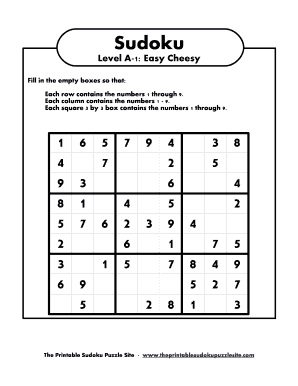
Sudoku Level A1: Easy Cheesy Fill in the empty boxes so that: Each row contains the numbers 1 through 9. Each column contains the numbers 1 9. Each square 3 by 3 box contains the numbers 1 through.

How it works

  1. Open form

    Open form follow the instructions

  2. Easily sign form

    Easily sign the form with your finger

  3. Share form

    Send filled & signed form or save

How to fill out the Sudoku Level A 1 Easy Cheesy online

This guide provides detailed instructions on how to complete the Sudoku Level A 1 Easy Cheesy puzzle online. Users of all experience levels can follow this step-by-step process to fill in the Sudoku grid accurately.

Follow the steps to successfully complete your Sudoku puzzle.

  1. Click ‘Get Form’ button to obtain the form and open it in an editor.
  2. Identify the empty boxes on the grid. Each box should be filled with numbers 1 through 9.
  3. Ensure that each row contains the numbers 1 through 9 without repetition. Check each row as you fill it in.
  4. Confirm that each column contains the numbers 1 through 9, avoiding any duplicate numbers in that column.
  5. Fill in each 3 by 3 box with the numbers 1 through 9, ensuring that there are no repeated numbers within that box.
  6. Once all boxes are filled correctly, review your entries to ensure compliance with the Sudoku rules.
  7. You can save changes, download, print, or share the completed puzzle as desired.

Start completing your Sudoku puzzles online today!

Get form

Experience a faster way to fill out and sign forms on the web. Access the most extensive library of templates available.
Get form

Related content

March/April Texas WIC News 2017 - Texas Health and...
and making small steps one at a time can add up to meaningful health rewards. There is no...
Learn more
Large Print Sudoku | pixels.heights.edu
large-print-sudoku. 1/3. Downloaded from pixels.heights.edu on October 31, 2020 by...
Learn more
Foods that say ب> adkZ ndjة - Palo Alto Online
Feb 13, 2009 — cheddar and the grated cheddar cheese; stir until it is melted ... SAN...
Learn more

Related links form

OneExchange OEF-14-248 Paychex 159450 2013 SF-329C 1998 Space Coast Credit Union Loan Extension Application 2011

Questions & Answers

Get answers to your most pressing questions about US Legal Forms API.

Contact support

To be able to judge the difficulty of a Sudoku, you first need to define "difficulty". The most useful definition seems to rely on the question: How long does it take an "average" solver to solve the puzzle? Making this precise will involve fixing the population of solvers, and setting up some reference.

Expert level Sudoku Expert Sudoku is a game for experienced Sudoku players with a very high level of difficulty. This hardest Sudoku puzzle is characterized by the fact that only a few numbers are shown in the Sudoku square, which consists of 9 small squares, where the cells are located 3x3.

To choose a tag for the release, select the Choose a tag dropdown menu. To use an existing tag, click the tag. To create a new tag, type a version number for your release, then click Create new tag.

Semantic Releases for Automation If you use semantic versioning, you can put in a very simple regular expression to track that change and trigger actions only on tags matching the structure of a semantic version. You can do this in other systems like Bitbucket Pipelines, Jenkins, or Travis CI as well.

Create a Git Release From the Releases page, click Draft New Release. ... Next, click Choose a tag to open a dropdown menu and select the Git tag release. ... Skip this step if you're using an existing tag. ... Then, add a title and a description for the release. ... Attach any additional files and binaries in the next section.

Branches allow you to code features or fix bugs without impacting the main code branch. Tags are essential for marking a point in time in your code, such as a new release of your application. Branches and tags work together to optimize your workflow.

Git tags are commonly used to mark release points in a project, such as v1. 0 or v2. 0. Tagged Git releases can be easily distributed, making it easier for users to download and manage the code.

They are very similar, the difference being that tags are just the repository frozen in time and are part of Git (you can make a tag inside of Git), but releases are tags accompanied with a binary file and are not part of Git (you need to go to your Codeberg repository page to create a release).

A best practice is to consider Annotated tags as public, and Lightweight tags as private. Annotated tags store extra meta data such as: the tagger name, email, and date. This is important data for a public release.

Tags are ref's that point to specific points in Git history. Tagging is generally used to capture a point in history that is used for a marked version release (i.e. v1. 0.1). A tag is like a branch that doesn't change. Unlike branches, tags, after being created, have no further history of commits.

Get This Form Now!

Use professional pre-built templates to fill in and sign documents online faster. Get access to thousands of forms.
Get form
If you believe that this page should be taken down, please follow our DMCA take down processhere.
Get Sudoku Level A 1 Easy Cheesy
Get form
  • Adoption
  • Bankruptcy
  • Contractors
  • Divorce
  • Home Sales
  • Employment
  • Identity Theft
  • Incorporation
  • Landlord Tenant
  • Living Trust
  • Name Change
  • Personal Planning
  • Small Business
  • Wills & Estates
  • Packages A-Z
  • Affidavits
  • Bankruptcy
  • Bill of Sale
  • Corporate - LLC
  • Divorce
  • Employment
  • Identity Theft
  • Internet Technology
  • Landlord Tenant
  • Living Wills
  • Name Change
  • Power of Attorney
  • Real Estate
  • Small Estates
  • Wills
  • All Forms
  • Forms A-Z
  • Other Templates
  • Legal Hub
  • About Us
  • Help Portal
  • Legal Resources
  • Blog
  • Affiliates
  • Contact Us
  • Delete My Account
  • Site Map
  • Industries
  • Forms in Spanish
  • Localized Forms
  • State-specific Forms
  • Forms Kit
  • Real Estate Handbook
  • All Guides
  • Notarize
  • Incorporation services
  • For Consumers
  • For Small Business
  • For Attorneys
  • USLegal
  • FormsPass
  • pdfFiller
  • signNow
  • altaFlow
  • DocHub
  • Instapage
Form Packages
  • Adoption
  • Bankruptcy
  • Contractors
  • Divorce
  • Home Sales
  • Employment
  • Identity Theft
  • Incorporation
  • Landlord Tenant
  • Living Trust
  • Name Change
  • Personal Planning
  • Small Business
  • Wills & Estates
  • Packages A-Z
Form Categories
  • Affidavits
  • Bankruptcy
  • Bill of Sale
  • Corporate - LLC
  • Divorce
  • Employment
  • Identity Theft
  • Internet Technology
  • Landlord Tenant
  • Living Wills
  • Name Change
  • Power of Attorney
  • Real Estate
  • Small Estates
  • Wills
  • All Forms
  • Forms A-Z
  • Other Templates
Customer Service
  • Legal Hub
  • About Us
  • Help Portal
  • Legal Resources
  • Blog
  • Affiliates
  • Contact Us
  • Delete My Account
  • Site Map
  • Industries
  • Forms in Spanish
  • Localized Forms
  • State-specific Forms
  • Forms Kit
Legal Guides
  • Real Estate Handbook
  • All Guides
Prepared for you
  • Notarize
  • Incorporation services
Our Customers
  • For Consumers
  • For Small Business
  • For Attorneys
Our Sites
  • USLegal
  • FormsPass
  • pdfFiller
  • signNow
  • altaFlow
  • DocHub
  • Instapage
Social Media
Call us now toll free:
+1 833 426 79 33
As seen in:
© Copyright 1999-2026 airSlate Legal Forms, Inc. 17 Station Street, Ste. 203, Brookline, MA 02445
  • Your Privacy Choices
  • Terms of Service
  • Privacy Notice
  • Content Takedown Policy
  • Bug Bounty Program