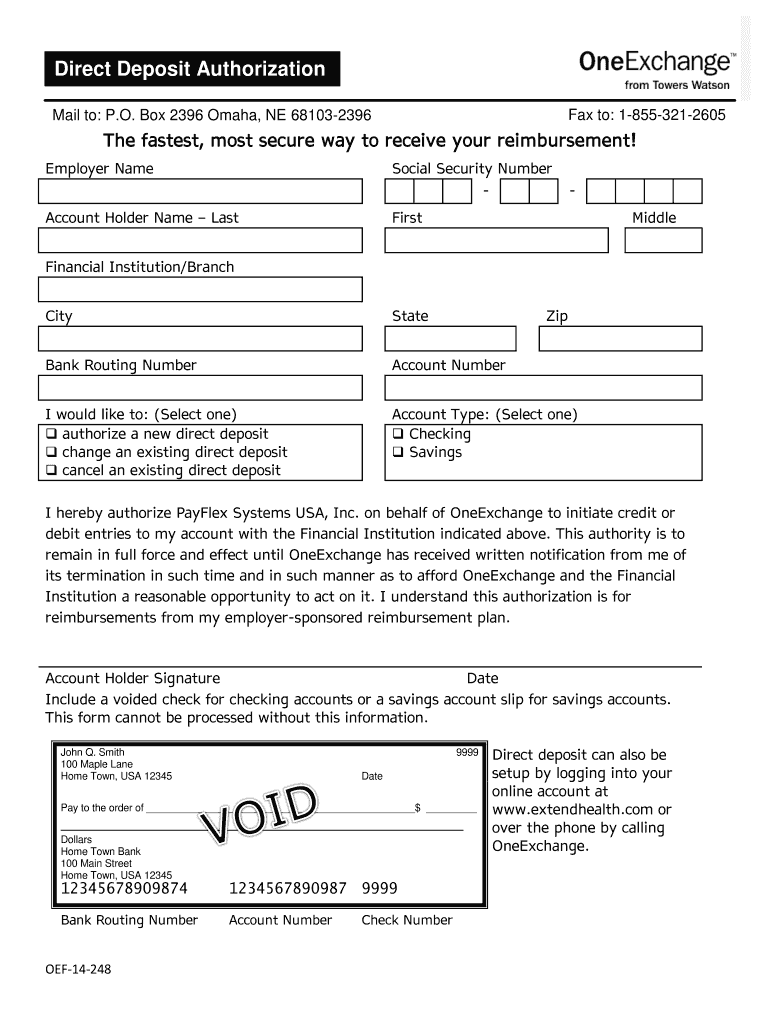
Ity Number - Account Holder Name – Last - First Middle Financial Institution/Branch City State Zip Bank Routing Number Account Number I would like to: (Select one) authorize a new direct deposit change an existing direct deposit cancel an existing direct deposit Account Type: (Select one) Checking Savings I hereby authorize PayFlex Systems USA, Inc. on behalf of OneExchange to initiate credit or debit entries to my account with the Financial Institution indicate.
Loading

Open form follow the instructions

Easily sign the form with your finger

Send filled & signed form or save
How to fill out the OneExchange OEF-14-248 online
Filling out the OneExchange OEF-14-248 form is an essential step for setting up or modifying your direct deposit information. This guide provides clear instructions to help you complete the form accurately and efficiently.
Follow the steps to complete the OneExchange OEF-14-248 form.
- Press the ‘Get Form’ button to access the OneExchange OEF-14-248 form and open it in your online editor.
- Begin by entering the employer's name in the designated field. Make sure this is accurate as it relates to your reimbursement plan.
- Input your Social Security Number in the provided format, ensuring it is recorded correctly for identification purposes.
- Fill out the account holder's name by specifying the last name, first name, and middle name in the respective sections.
- Provide the name of your financial institution and the branch, followed by the city, state, and zip code.
- Enter your bank routing number, which can usually be found at the bottom left of your checks, ensuring accuracy to avoid issues with deposits.
- Fill in your account number, located next to the routing number on your checks.
- Select one option regarding your request: authorize a new direct deposit, change an existing deposit, or cancel an existing deposit.
- Choose the account type by selecting either 'Checking' or 'Savings' to specify the type of account for the deposit.
- Read the authorization statement carefully, which allows PayFlex Systems USA, Inc. to process transactions on your behalf. Ensure you understand the terms and conditions stated.
- Sign the form in the designated area, confirming your authorization to proceed with the direct deposit changes.
- Input the date next to your signature to indicate when the authorization is made.
- Attach a voided check for checking accounts or a savings account slip for savings accounts, as this is necessary for the processing of your request.
- Once all fields are filled, save your changes. You can download, print, or share the completed form as needed for submission.
Get started with your direct deposit authorization today by completing the OneExchange OEF-14-248 form online.
Experience a faster way to fill out and sign forms on the web. Access the most extensive library of templates available.
Related content
OEF-14-248. Direct Deposit Authorization. Agreement. Mail to: P.O. Box 2396 Omaha, NE...
Retirees enrolled in a medical plan through GW or through Via Benefits. (formerly...
This catalogue presents the range of Modicon Quantum PLCs and includes new products, such...
Get answers to your most pressing questions about US Legal Forms API.
How to fill out a life insurance claim?
Filling out a life insurance claim involves understanding the specific guidelines of your insurance provider alongside the relevant details needed for OneExchange OEF-14-248. Start by contacting your insurance company for their specific claim form and instructions. Carefully provide the requested information, ensuring that you avoid any omissions or inaccuracies. Our US Legal Forms service provides templates and guidance, simplifying this process and helping you complete your claim efficiently.
How to fill out a life insurance claim form?
To fill out a life insurance claim form, start by gathering all necessary documents, such as the policy details and the death certificate. Ensure that you completely fill in the required information, including the insured's data and the claimant's details, reflecting the accuracy needed for OneExchange OEF-14-248. After completing the form, double-check for any errors before submission. Using our US Legal Forms platform can help streamline this process, making it easier to navigate the requirements.
What is the new name for Alliance Healthcare?
Alliance Healthcare is now called OneExchange OEF-14-248, aligning with the rebranding strategy of various healthcare services. This transition represents a commitment to providing comprehensive health solutions to users. By leveraging OneExchange OEF-14-248, you can explore the benefits previously offered by Alliance Healthcare.
Does Via Benefits have an app?
Yes, Via Benefits offers a mobile app that allows you to manage your benefits conveniently on the go. Through this app, you can access your OneExchange OEF-14-248 account, view your plan details, and check your account balance. The app enhances usability, making it easier to stay on top of your health benefits.
What is Medicare One Exchange?
Medicare One Exchange refers to the health benefits exchange platform where users can access a variety of Medicare-related plans. With OneExchange OEF-14-248, users can compare options that best fit their health needs. This program simplifies the process of finding and selecting the perfect coverage.
How to check via benefits account balance?
To check your Via Benefits account balance, log in to your account on the Via Benefits website. Once logged in, navigate to the account summary section, where you will find detailed information on your balance. For users in the OneExchange OEF-14-248 program, this feature helps you monitor your available benefits effectively.
What is the new name for LHI?
LHI has rebranded and is now known as OneExchange OEF-14-248. This change aims to provide streamlined benefits and services for those enrolled. By using OneExchange OEF-14-248, you gain full access to all features previously associated with LHI.
What is the new name for Via Benefits?
Via Benefits is now known as OneExchange OEF-14-248, reflecting a broad range of health and benefit services available to users. The name change signifies a commitment to enhancing your experience while accessing various benefits. Whether you're a new or current user, the transition emphasizes improved service and integration.
How do I access my Via Benefits account?
To access your Via Benefits account, visit the official Via Benefits website. After entering your personal details, you will need your account credentials to log in. If you're part of the OneExchange OEF-14-248 program, ensure your information is up-to-date for a smooth experience.
Is Via Benefits available to anyone?
Via Benefits is available to eligible individuals who meet specific criteria set by their employers or organizations. Generally, if your employer provides health benefits, you may access Via Benefits. For those looking to leverage the OneExchange OEF-14-248 program, exploring Via Benefits is a good step.
Use professional pre-built templates to fill in and sign documents online faster. Get access to thousands of forms.
If you believe that this page should be taken down, please follow our DMCA take down process here.