Loading
Form preview
  • US Legal Forms
  • Form Library
  • More Forms
  • More Uncategorized Forms
  • Depletion To Renewal Grid

Get Depletion To Renewal Grid

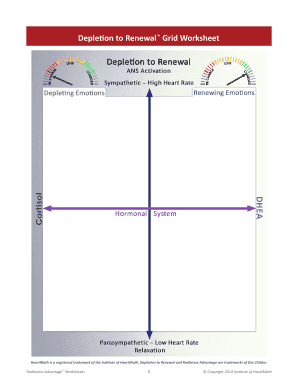
Domains of Resilience (reproduced with permission Institute of HeartMath) The Depletion to Renewal Grid Coherent Respiration, HRV and Blood Pressure.

How it works

  1. Open form

    Open form follow the instructions

  2. Easily sign form

    Easily sign the form with your finger

  3. Share form

    Send filled & signed form or save

How to fill out the Depletion To Renewal Grid online

The Depletion To Renewal Grid is a valuable tool designed to facilitate personal growth and resilience. This guide will provide clear, step-by-step instructions on how to effectively fill out this form online, ensuring that users can navigate each component with ease.

Follow the steps to fill out the Depletion To Renewal Grid online.

  1. Click the ‘Get Form’ button to access the Depletion To Renewal Grid and open it in the editing interface.
  2. Begin by entering your name and the date at the top of the form. This helps in identifying your submission and tracking progress over time.
  3. Move to the sections labeled 'Depletion Factors' where you will identify and list the factors that contribute to feelings of depletion in your life. Take your time to reflect on both physical and emotional aspects.
  4. Next, transition to the 'Renewal Actions' section. Here, you will outline specific actions or strategies that can help you counteract the depleting factors you identified previously.
  5. In the following section titled 'Resilience Practices', list techniques or practices you can implement to enhance your resilience over time. Think about what has worked for you in the past or new methods you wish to explore.
  6. Review all the information you have provided throughout the form to ensure accuracy and completeness.
  7. Once you have filled out the form, you can save your changes, download a copy for your records, print it for personal use, or share it with a trusted individual for support.

Start completing the Depletion To Renewal Grid online today to enhance your personal growth and resilience.

Get form

Experience a faster way to fill out and sign forms on the web. Access the most extensive library of templates available.
Get form

Related content

Guide to Purchasing Green Power - US EPA
The electricity coming through the utility grid can be generated from many different...
Learn more
Science-Backed Tools to Thriving when Stressed...
A discussion on the physiology of coherence from a scientific perspective; Understanding...
Learn more
Strategic management - Wikipedia
In the field of management, strategic management involves the formulation and...
Learn more

Related links form

Lithium Battery Safety Document MSC Multimodal Dangerous Goods Form/Packing Certificate National Motor Freight Classification 100-Z Uniform Straight Bill of Lading SE Bill of Lading

Questions & Answers

Get answers to your most pressing questions about US Legal Forms API.

Contact support

How to Set up 's Conditional Logic Overview Choose a trigger field. Rename the label of the trigger field (optional) Select which fields are to be displayed when the condition is met. Delete or edit conditions. Set up advanced conditions with formula fields.

Conditional routing lets you route an envelope to different people based on envelope data. This eliminates the need to manually configure the envelope routing or to use separate templates, each with their own routing.

Conditional fields only appear to the recipient when a specified condition is met. You can hide conditional fields until the recipient makes an entry in your documents that triggers the fields to show, such as selecting a dropdown option or marking a checkbox.

Conditional routing must be enabled on your account. Your account administrator can enable the feature from the eSignature Settings view, under Sending Settings > Fields and Properties: The option will only be present if the feature is available for your account.

Add or Edit Rules for Web Forms Select the field on the web form for which you want to add a rule and select the Rules tab on the right panel. ... To create a new rule, select Create Rule in the right panel. ... At IF, select an operator. ... Select a response for the rule at the Select value field.

For your conditional recipient, you set up conditional routing by defining a routing rule set. There is one rule set per envelope, and the rules are based off of one or more recipient fields. The recipient's actions on the fields determine how the envelope will be routed.

**Note** if you want to include someone to receive a copy of the completed but they are. not required to sign, you can add them as a "CC" by changing the option under the "Needs to Sign" drop down to "Receives a Copy". You can list them in any signing order, but please be aware they.

You can customize a signature workflow to have a different set of recipients sign a document only if specific conditions are met. This feature, called conditional recipients, is one of a suite of eSignature platform features collectively known as Advanced Recipient Routing (ARR).

Get This Form Now!

Use professional pre-built templates to fill in and sign documents online faster. Get access to thousands of forms.
Get form
If you believe that this page should be taken down, please follow our DMCA take down processhere.
Get Depletion To Renewal Grid
Get form
  • Adoption
  • Bankruptcy
  • Contractors
  • Divorce
  • Home Sales
  • Employment
  • Identity Theft
  • Incorporation
  • Landlord Tenant
  • Living Trust
  • Name Change
  • Personal Planning
  • Small Business
  • Wills & Estates
  • Packages A-Z
  • Affidavits
  • Bankruptcy
  • Bill of Sale
  • Corporate - LLC
  • Divorce
  • Employment
  • Identity Theft
  • Internet Technology
  • Landlord Tenant
  • Living Wills
  • Name Change
  • Power of Attorney
  • Real Estate
  • Small Estates
  • Wills
  • All Forms
  • Forms A-Z
  • Form Library
  • Legal Hub
  • About Us
  • Help Portal
  • Legal Resources
  • Blog
  • Affiliates
  • Contact Us
  • Delete My Account
  • Site Map
  • Industries
  • Forms in Spanish
  • Localized Forms
  • State-specific Forms
  • Forms Kit
  • Real Estate Handbook
  • All Guides
  • Notarize
  • Incorporation services
  • For Consumers
  • For Small Business
  • For Attorneys
  • USLegal
  • FormsPass
  • pdfFiller
  • signNow
  • altaFlow
  • DocHub
  • Instapage
Form Packages
  • Adoption
  • Bankruptcy
  • Contractors
  • Divorce
  • Home Sales
  • Employment
  • Identity Theft
  • Incorporation
  • Landlord Tenant
  • Living Trust
  • Name Change
  • Personal Planning
  • Small Business
  • Wills & Estates
  • Packages A-Z
Form Categories
  • Affidavits
  • Bankruptcy
  • Bill of Sale
  • Corporate - LLC
  • Divorce
  • Employment
  • Identity Theft
  • Internet Technology
  • Landlord Tenant
  • Living Wills
  • Name Change
  • Power of Attorney
  • Real Estate
  • Small Estates
  • Wills
  • All Forms
  • Forms A-Z
  • Form Library
Customer Service
  • Legal Hub
  • About Us
  • Help Portal
  • Legal Resources
  • Blog
  • Affiliates
  • Contact Us
  • Delete My Account
  • Site Map
  • Industries
  • Forms in Spanish
  • Localized Forms
  • State-specific Forms
  • Forms Kit
Legal Guides
  • Real Estate Handbook
  • All Guides
Prepared for you
  • Notarize
  • Incorporation services
Our Customers
  • For Consumers
  • For Small Business
  • For Attorneys
Our Sites
  • USLegal
  • FormsPass
  • pdfFiller
  • signNow
  • altaFlow
  • DocHub
  • Instapage
Social Media
Call us now toll free:
+1 833 426 79 33
As seen in:
© Copyright 1999-2026 airSlate Legal Forms, Inc. 3720 Flowood Dr, Flowood, Mississippi 39232
  • Your Privacy Choices
  • Terms of Service
  • Privacy Notice
  • Content Takedown Policy
  • Bug Bounty Program