Loading
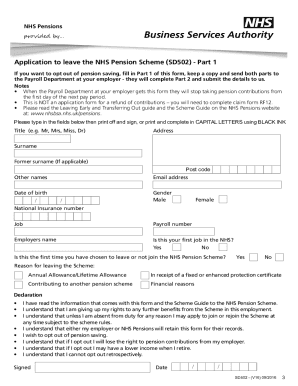
Get Application To Leave The Nhs Pension Scheme (sd502)
How it works
-

Open form follow the instructions
-

Easily sign the form with your finger
-

Send filled & signed form or save
How to fill out the Application To Leave The NHS Pension Scheme (SD502) online
Filling out the Application To Leave The NHS Pension Scheme (SD502) online is a crucial step for users considering opting out of their NHS pension. This guide will provide clear, step-by-step instructions on how to accurately complete this essential form.
Follow the steps to complete your application online:
- Click 'Get Form' button to download the form and open it in your browser.
- Fill out Part 1 of the form, which includes your personal information such as title, name, address, date of birth, and National Insurance number. Use capital letters and black ink if printing.
- Indicate whether this is your first job in the NHS and if this is the first time you are choosing to leave the NHS Pension Scheme. Provide your reason for leaving from the available options.
- Read and agree to the declaration by checking each statement to confirm your understanding of opting out of the pension scheme.
- Sign and date the form at the bottom. Ensure all information is accurate before submission.
- Send Part 1 of the completed form to your Payroll Department as soon as possible. Keep a copy for your records.
- Your employer will complete Part 2 of the form and handle the necessary submissions to NHS Pensions. If you have multiple employers, repeat this process for each employer.
Begin completing your NHS Pension Scheme Application online today.
Related links form
To opt out, you must complete the application to leave the NHS Pension Scheme (SD502) form (PDF: 219KB). You and your NHS employer must complete the form. This is the only way to opt out of the NHS Pension Scheme.