Loading
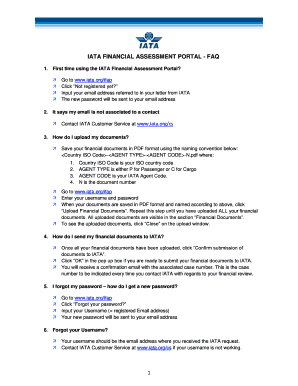
Get Ifap Iata
How it works
-

Open form follow the instructions
-

Easily sign the form with your finger
-

Send filled & signed form or save
How to fill out the Ifap Iata online
Filling out the Ifap Iata form can seem daunting, but with the right guidance, the process can be straightforward and efficient. This guide will provide you with step-by-step instructions to help you complete the form online successfully.
Follow the steps to complete the Ifap Iata form effectively.
- Click ‘Get Form’ button to obtain the form and open it in the editor.
- Enter your email address as prompted in the instructions. This email address should be the one referenced in your communication from IATA.
- Set your password as instructed. Once you receive it, ensure you keep it secure.
- Log in using your username and the new password you created. Be careful to input this information correctly.
- Prepare your financial documents in PDF format. Use the naming convention: <Country ISO Code>-<AGENT TYPE>-<AGENT CODE>-N.pdf. Ensure all documents are named correctly based on this format.
- Once your documents are ready, click 'Upload Financial Documents' and upload each document one by one until all required documents are submitted.
- Verify that all uploaded documents are visible in the 'Financial Documents' section. To view them, click 'Close' on the upload window.
- After confirming all documents have been uploaded, click 'Confirm submission of documents to IATA'.
- A pop-up will appear; click 'OK' to finalize your submission.
- You will receive a confirmation email that includes a case number. Keep this number handy for any future correspondence with IATA regarding your financial review.
Complete your Ifap Iata documents online today for a streamlined submission experience.
Related links form
For any commercial requests relating to products and services, please contact us at MACSAmericas@iata.org.
Industry-leading security and compliance
US Legal Forms protects your data by complying with industry-specific security standards.
-
In businnes since 199725+ years providing professional legal documents.
-
Accredited businessGuarantees that a business meets BBB accreditation standards in the US and Canada.
-
Secured by BraintreeValidated Level 1 PCI DSS compliant payment gateway that accepts most major credit and debit card brands from across the globe.