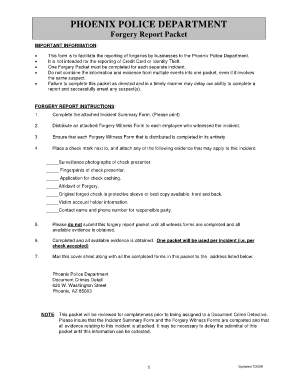
This form is to facilitate the reporting of forgeries by businesses to the ... Do not combine the information and evidence from multiple events into one packet, even if ... practices which in turn.

How it works
  • Open form

    Open form follow the instructions

  • Easily sign form

    Easily sign the form with your finger

  • Share form

    Send filled & signed form or save

How to fill out the Phoenix Police Reports online

This guide provides clear instructions on how to complete the Phoenix Police Reports online, specifically the forgery report packet. It aims to support users through the process of reporting forgery incidents effectively and accurately.

Follow the steps to complete the forgery report packet online.

  1. Press the ‘Get Form’ button to access the forgery report packet, opening it in a digital editor for easy completion.
  2. Carefully review the Incident Summary Form, ensuring all relevant details about the incident are provided. This includes specific information such as the date, time, and location of the forgery.
  3. Distribute the attached Forgery Witness Form to every individual who witnessed the incident. Ensure that they understand the importance of completing the form accurately.
  4. Confirm that each witness fills out their Forgery Witness Form completely, capturing critical details related to the incident.
  5. Attach any available evidence pertinent to the case, including photographs, fingerprints, and original documents. Mark each type of evidence clearly.
  6. Once all forms and evidence are compiled, ensure that they are checked for completeness and clarity.
  7. Save your changes to the completed report, and then download or print the form for submission.
  8. Mail the completed forgery report packet to the specified address for the Phoenix Police Department, ensuring it includes all attached evidence and witness forms.

Begin your online document submission today.

Get form

Experience a faster way to fill out and sign forms on the web. Access the most extensive library of templates available.

Related content

City of Phoenix Public Records

Thank you for visiting Phoenix.gov. Police. Department. Public Records and Services Unit...

Learn more
phoenix police department report original page...

OFFICER MCBRIDE #8259- FIRST OFFICERS ON SCENE. OFFICER CHARLEY #7569-FIRST OFFICERS ON...

Learn more
#shooting

The Phoenix Police Department released video contains body-worn and cell phone footage...

Learn more
Questions & Answers

Get answers to your most pressing questions about US Legal Forms API.

Contact support

How do I get a copy of a police report in Phoenix AZ?

Go to the police department in person and ask for a copy of your Police Report. You may make your request in person at the Phoenix Police Department anytime during normal business hours. The local address for the Phoenix Police Department is 1717 North Grant Street, Suite 100, Phoenix, AZ 85034.

By state law, public agencies must release public documents within a reasonable amount of time. ... Here is how it works: In the city of Phoenix, if you want a police report or to request another public document, you have to fill out a form through its online records portal here.

OFFENSE REPORTS REQUESTS FOR LAW ENFORCEMENT AGENCIES Requests can be received via email at dru@azdps.gov or via fax at (602) 223-2915. Note: If you are NOT a Law Enforcement Agency, and are requesting an Arrest/Offense/Incident Report, contact the DPS Public Records Unit.

Police records thus are not part of the court system, and documents like arrest reports or crime/incident reports kept at police departments are not presumed to be open to the public as court records are. Thus almost no police investigative records are posted online.

Get This Form Now!

Use professional pre-built templates to fill in and sign documents online faster. Get access to thousands of forms.

If you believe that this page should be taken down, please follow our DMCA take down process here.

Get Phoenix Police Reports