Loading
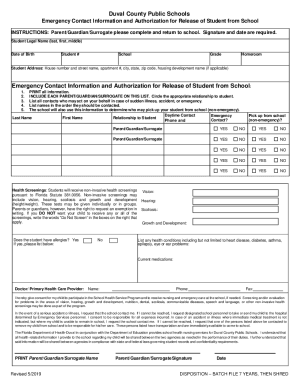
Get Fl Duval County Public Schools Emergency Contact Information And Authorization For Release Of 2019-2025
How it works
-

Open form follow the instructions
-

Easily sign the form with your finger
-

Send filled & signed form or save
How to fill out the Duval County Public Schools Emergency Contact Information And Bb - Duvalschools online
Filling out the Duval County Public Schools Emergency Contact Information form is a crucial step in ensuring that your child's school has up-to-date and accurate emergency contact information. This guide will walk you through each step to complete the form effectively and efficiently.
Follow the steps to complete your emergency contact form accurately.
- Press the ‘Get Form’ button to access the document and display it in your editor.
- Begin by entering the student’s number, school name, grade, and date of birth in the relevant fields. This information helps identify your child within the school's system.
- Proceed to complete the student's legal name by filling in the last, first, and middle names as required. Ensure all names are printed clearly.
- Input the student’s local address, including the house number, street name, apartment number (if applicable), city, state, and zip code. If your housing development is applicable, please include that information as well.
- In the Emergency Contact Information section, list individuals who can be contacted in the event of an emergency or sudden illness. Include parents or guardians on this list. Make sure to enter names in the order of preference for contact.
- Indicate whether the student has any allergies by checking 'Yes' or 'No.' If 'Yes,' provide details in the designated area below.
- Describe any other health conditions your student may have, such as heart disease or diabetes, in the respective section. Also, list any current medications your child is taking.
- Complete the section regarding health insurance, answering if your student has health insurance. If applicable, indicate if you would like to be contacted about affordable health insurance options.
- Sign and print your name in the designated area as the parent, guardian, or surrogate, along with the date of completion. This signature provides consent for your child's participation in health services at school.
- Once you have completed all fields of the form, save your changes, and consider printing or sharing the completed document as necessary.
Ensure your child's safety and well-being by completing the Emergency Contact Information form online today.
Enrollment Hotline: Support Technicians are available to answer your questions. Email: Send an email to School_choice@duvalschools.org.
Industry-leading security and compliance
US Legal Forms protects your data by complying with industry-specific security standards.
-
In businnes since 199725+ years providing professional legal documents.
-
Accredited businessGuarantees that a business meets BBB accreditation standards in the US and Canada.
-
Secured by BraintreeValidated Level 1 PCI DSS compliant payment gateway that accepts most major credit and debit card brands from across the globe.