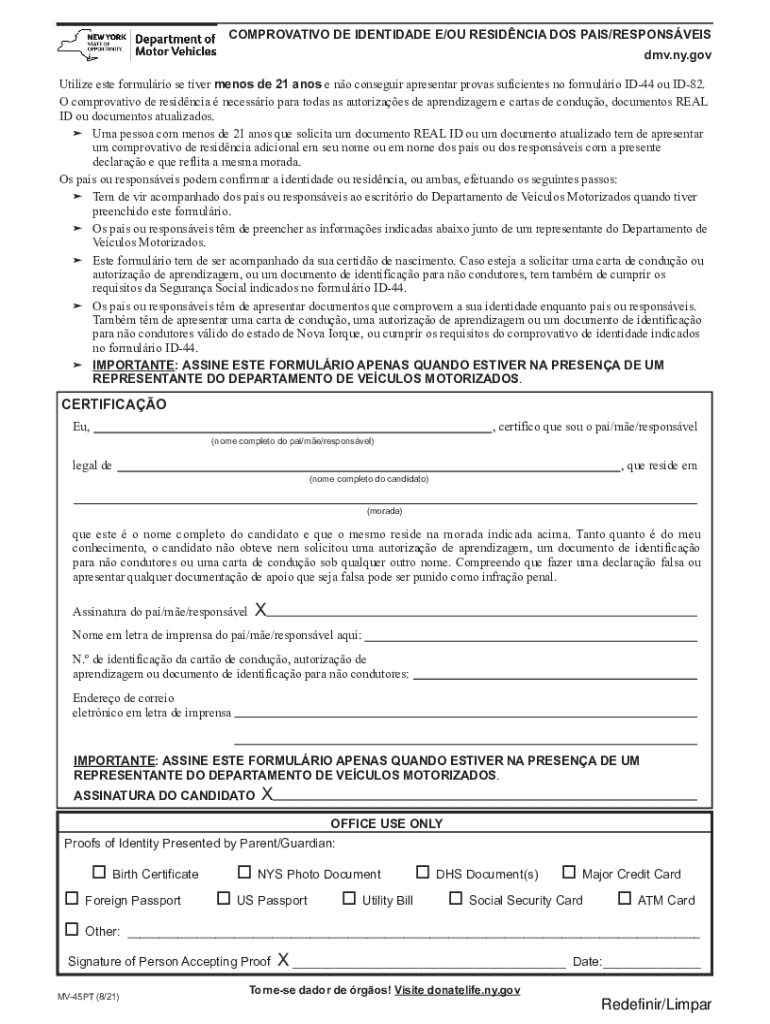
82. O comprovativo de resid ncia necess rio para todas as autoriza es de aprendizagem e cartas de condu o, documentos REAL ID ou documentos atualizados. Uma pessoa com menos de 21 anos que solicita um documento REAL ID ou um documento atualizado tem de apresentar um comprovativo de resid ncia adicional em seu nome ou em nome dos pais ou dos respons veis com a presente declara o e que reflita a mesma morada. Os pais ou respons veis podem confirmar a identidade ou resid ncia,.
Loading

Open form follow the instructions

Easily sign the form with your finger

Send filled & signed form or save
How to fill out and sign NY MV-45PT online?
Get your online template and fill it in using progressive features. Enjoy smart fillable fields and interactivity.Follow the simple instructions below:
Experience all the benefits of completing and submitting legal forms on the internet. With our solution completing NY MV-45PT only takes a couple of minutes. We make that achievable by giving you access to our feature-rich editor capable of changing/fixing a document?s initial text, adding unique fields, and putting your signature on.
Execute NY MV-45PT in several moments by using the instructions listed below:
- Find the document template you require from the library of legal forms.
- Select the Get form button to open it and move to editing.
- Submit all of the required fields (they will be yellowish).
- The Signature Wizard will enable you to put your electronic signature as soon as you?ve finished imputing info.
- Add the relevant date.
- Check the whole template to make certain you have completed everything and no corrections are required.
- Hit Done and save the filled out document to the computer.
Send your new NY MV-45PT in a digital form right after you are done with completing it. Your information is securely protected, as we keep to the latest security standards. Become one of numerous happy users who are already filling out legal documents right from their houses.
Tips on how to fill out, edit and sign NY MV-45PT online
How to fill and sign NY MV-45PT
Get your online template and fill it in using progressive features. Enjoy smart fillable fields and interactivity.Follow the simple instructions below:
Experience all the benefits of completing and submitting legal forms on the internet. With our solution completing NY MV-45PT only takes a couple of minutes. We make that achievable by giving you access to our feature-rich editor capable of changing/fixing a document?s initial text, adding unique fields, and putting your signature on.
Execute NY MV-45PT in several moments by using the instructions listed below:
- Find the document template you require from the library of legal forms.
- Select the Get form button to open it and move to editing.
- Submit all of the required fields (they will be yellowish).
- The Signature Wizard will enable you to put your electronic signature as soon as you?ve finished imputing info.
- Add the relevant date.
- Check the whole template to make certain you have completed everything and no corrections are required.
- Hit Done and save the filled out document to the computer.
Send your new NY MV-45PT in a digital form right after you are done with completing it. Your information is securely protected, as we keep to the latest security standards. Become one of numerous happy users who are already filling out legal documents right from their houses.
How to edit NY MV-45PT
Take advantage of the user friendliness of the multi-featured online editor while filling out your NY MV-45PT. Make use of the range of tools to rapidly fill out the blanks and provide the required data right away.
Preparing documentation is time-taking and pricey unless you have ready-to-use fillable templates and complete them electronically. The most effective way to deal with the NY MV-45PT is to use our professional and multi-functional online editing solutions. We provide you with all the important tools for prompt form fill-out and enable you to make any adjustments to your forms, adapting them to any needs. Aside from that, you can comment on the changes and leave notes for other parties involved.
Here’s what you can do with your NY MV-45PT in our editor:
- Complete the blanks utilizing Text, Cross, Check, Initials, Date, and Sign tools.
- Highlight important information with a preferred color or underline them.
- Hide confidential details with the Blackout tool or simply remove them.
- Import images to visualize your NY MV-45PT.
- Replace the original text with the one corresponding with your needs.
- Add comments or sticky notes to communicate with others about the updates.
- Place additional fillable areas and assign them to particular people.
- Protect the sample with watermarks, place dates, and bates numbers.
- Share the document in various ways and save it on your device or the cloud in different formats once you finish editing.
Dealing with NY MV-45PT in our robust online editor is the quickest and most productive way to manage, submit, and share your paperwork the way you need it from anywhere. The tool works from the cloud so that you can access it from any location on any internet-connected device. All forms you create or complete are safely stored in the cloud, so you can always open them whenever needed and be assured of not losing them. Stop wasting time on manual document completion and eliminate papers; make it all on the web with minimum effort.
How to fill and sign NY MV-45PT
Get your online template and fill it in using progressive features. Enjoy smart fillable fields and interactivity.Follow the simple instructions below:
Experience all the benefits of completing and submitting legal forms on the internet. With our solution completing NY MV-45PT only takes a couple of minutes. We make that achievable by giving you access to our feature-rich editor capable of changing/fixing a document?s initial text, adding unique fields, and putting your signature on.
Execute NY MV-45PT in several moments by using the instructions listed below:
- Find the document template you require from the library of legal forms.
- Select the Get form button to open it and move to editing.
- Submit all of the required fields (they will be yellowish).
- The Signature Wizard will enable you to put your electronic signature as soon as you?ve finished imputing info.
- Add the relevant date.
- Check the whole template to make certain you have completed everything and no corrections are required.
- Hit Done and save the filled out document to the computer.
Send your new NY MV-45PT in a digital form right after you are done with completing it. Your information is securely protected, as we keep to the latest security standards. Become one of numerous happy users who are already filling out legal documents right from their houses.
Experience a faster way to fill out and sign forms on the web. Access the most extensive library of templates available.
Related content
dmv.ny.gov. Utilize este formulário se tiver menos de 21 anos e não conseguir apresentar...
by JM Schloss · 2018 · Cited by 286 — Citation: Schloss, Jennifer M. et al...
Get answers to your most pressing questions about US Legal Forms API.
How long are NY temporary plates valid?
NY temporary plates, associated with the NY MV-45PT form, are generally valid for up to 30 days. This provides you with a suitable timeframe to finalize your vehicle registration and obtain permanent plates. Remember, if you need assistance during this process, USLegalForms offers helpful resources that can guide you along the way.
How to get temporary tags in New York?
Getting temporary tags in New York involves filling out the NY MV-45PT form and providing necessary documentation at the DMV. This includes proof of identity, vehicle ownership, and any fees associated with the temporary tag. For a smoother experience, consider using resources like USLegalForms that streamline the paperwork process and offer guidance on what to bring.
How to get a NY temp tag?
To obtain a NY temp tag, you will need to complete the NY MV-45PT form at your local DMV. Ensure you have your vehicle paperwork, identification, and any applicable fees ready when you arrive. Platforms like USLegalForms provide support and templates that can simplify the form-filling process, ensuring you don’t miss any crucial details.
What is a NY MV-907A?
The NY MV-907A is a form used in New York for specific vehicle registration purposes. While the NY MV-45PT is focused on temporary tags, the MV-907A addresses other important aspects of vehicle documentation. Familiarizing yourself with both forms can help you understand the entire registration landscape in New York.
Can you get same day plates in NY?
Yes, you can obtain same-day plates in New York under certain conditions. When applying for a NY MV-45PT, you may be able to receive your plates onsite at the DMV if you complete your paperwork efficiently and meet all necessary requirements. It’s wise to arrive prepared with all essential documents to expedite this process.
How to fill out NY Tap?
Filling out the NY Tap requires you to gather your personal information, including your address and social security number. You also need to provide details about your vehicle and transaction. The NY MV-45PT can help guide you through this process, making it simpler to complete the necessary forms required for your transaction.
What are the 6 points needed for DMV NY?
The 6 points of identification for the DMV in New York consist of documents that prove your identity and residency. Generally, this includes a combination of primary and secondary documents, such as your birth certificate and utility bills. Ensuring you have all required documents, including information from the NY MV-45PT, makes visits to the DMV faster and more efficient.
What form do I need to fill out to register a car in NY?
To register a car in New York, you must complete the MV-82 form, which is the Vehicle Registration/Title Application. This form collects essential information regarding the vehicle and its owner. Moreover, knowing about the NY MV-45PT will be advantageous, as it may help you understand additional requirements for a smooth registration process.
What documents do I need to renew my NY state ID?
To renew your NY State ID, you will typically need proof of identity, such as a birth certificate or passport. Additionally, you'll require your current ID and possibly proof of residency. It's also beneficial to refer to the NY MV-45PT during your application to make the process more straightforward and efficient.
What is the mv 45 form for nys DMV?
The MV-45 form is essential for DMV transactions in New York. This form assists in documenting vehicle transfers and provides necessary details regarding the ownership. If you are navigating the process of buying or selling a vehicle, the NY MV-45PT can simplify your transactions and ensure compliance with state laws.
Use professional pre-built templates to fill in and sign documents online faster. Get access to thousands of forms.
If you believe that this page should be taken down, please follow our DMCA take down process here.