Loading
Get Www Rol Frs State Fl Us
How it works
-

Open form follow the instructions
-

Easily sign the form with your finger
-

Send filled & signed form or save
How to fill out the Www Rol Frs State Fl Us online
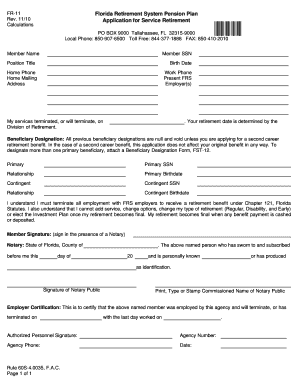
Filling out the Www Rol Frs State Fl Us form is an essential step in applying for service retirement through the Florida Retirement System. This guide will provide you with clear instructions to ensure that your application is completed accurately and submitted on time.
Follow the steps to complete your application effortlessly.
- Click 'Get Form' button to access the form online, making it easy for you to begin the application process.
- Fill in your full name as it appears on official documents. Ensure that all provided details are accurate.
- Enter your Social Security Number (SSN). This information is crucial for processing your retirement benefits.
- Provide your position title at the time of retirement, as this helps in validating your employment status.
- Input your birth date. Make certain this aligns with the documentation you will submit later.
- Include your home phone number and mailing address to facilitate communication from the retirement division.
- List your work phone number and present employer(s) to complete your employment information.
- Indicate the date your services have terminated or will terminate, which is important for retirement processing.
- Fill out the beneficiary designation section. If you are designating more than one primary beneficiary, be sure to attach the Beneficiary Designation Form (FST-12).
- Sign the application in the presence of a notary public and ensure the notary completes their section.
- Secure a certification from your employer confirming your employment details and the termination date.
- Once all fields are accurately filled, review your application for completeness, then proceed to save changes, download, print, or share the form as necessary.
Take control of your retirement today by completing the Www Rol Frs State Fl Us form online.
The CHOICE SERVICE gives you personalized estimates of your retirement benefit for both plans. Or call 1-866-446-9377, Option 1 (TRS 711). The MyFRS Financial Guidance Line has financial planners to help you with any questions you may have, including walking you through the CHOICE SERVICE.