Loading
Get Worksheet 46a Form
How it works
-

Open form follow the instructions
-

Easily sign the form with your finger
-

Send filled & signed form or save
How to fill out the Worksheet 46a Form online
Filling out the Worksheet 46a Form online can streamline your process of documenting health care expenses. This guide provides step-by-step instructions to ensure that you complete the form accurately and efficiently.
Follow the steps to fill out the Worksheet 46a Form online successfully.
- Click ‘Get Form’ button to access the Worksheet 46a Form and open it in the editing interface.
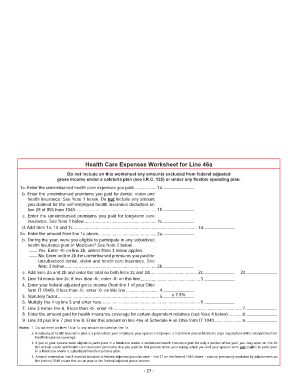
- Begin with section 1a by entering the total unreimbursed health care expenses you personally paid. Ensure that these amounts are not included in any cafeteria or flexible spending plan.
- Continue to section 1b, where you need to input the unreimbursed premiums paid for dental, vision, and health insurance. Remember, do not include any amounts claimed for the self-employed health insurance deduction.
- In section 1c, enter the unreimbursed premiums you have paid for long-term care insurance.
- Add the totals from lines 1a, 1b, and 1c, and enter this sum in section 1d.
- Move to section 2a and enter the amount from line 1c from above.
- In section 2b, indicate whether you were eligible for participation in any subsidized health insurance plan or Medicare during the year. If 'Yes', enter -0-. If 'No', enter the unreimbursed premiums paid for unsubsidized insurance.
- Calculate section 2c by adding the amounts from lines 2a and 2b.
- In section 3, subtract line 2c from line 1d; if the result is less than -0-, enter -0-.
- For section 4, enter your federal adjusted gross income as reported on line 1 of your Ohio form IT 1040. Again, if it is less than -0-, enter -0-.
- Calculate the statutory factor in section 5 by multiplying by 7.5%.
- In section 6, multiply the amount from line 4 by the statutory factor from line 5.
- In section 7, subtract the amount from line 6 from line 3. If this is less than -0-, enter -0-.
- Enter in section 8 any amount paid for coverage for certain dependent relatives.
- Finally, total the amounts from section 2d, line 7, and section 8 in section 9. Transfer this total to line 46a of Schedule A on Ohio form IT 1040.
Complete your Worksheet 46a Form online today and ensure accurate documentation of your health care expenses.
Industry-leading security and compliance
US Legal Forms protects your data by complying with industry-specific security standards.
-
In businnes since 199725+ years providing professional legal documents.
-
Accredited businessGuarantees that a business meets BBB accreditation standards in the US and Canada.
-
Secured by BraintreeValidated Level 1 PCI DSS compliant payment gateway that accepts most major credit and debit card brands from across the globe.