Loading
Form preview
  • US Legal Forms
  • Form Library
  • More Forms
  • More Uncategorized Forms
  • Ncic Initial Entry Report - Txdps State Tx

Get Ncic Initial Entry Report - Txdps State Tx

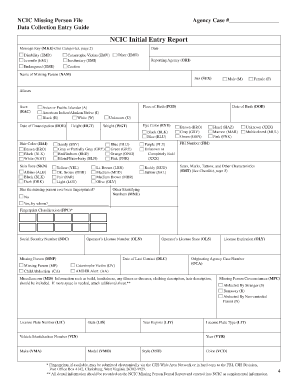
NCIC Missing Person File Data Collection Entry Guide Agency Case # NCIC Initial Entry Report Message Key (MKE) (See Categories, page 2) Date Disability (EMD) Juvenile (EMJ) Catastrophe Victim (EMV).

How it works

  1. Open form

    Open form follow the instructions

  2. Easily sign form

    Easily sign the form with your finger

  3. Share form

    Send filled & signed form or save

How to fill out the NCIC Initial Entry Report - Txdps State Tx online

The NCIC Initial Entry Report is a critical document used to report missing persons to the National Crime Information Center. This guide provides a detailed, step-by-step approach to accurately completing the form online, ensuring you understand each section and can provide necessary information.

Follow the steps to complete the NCIC Initial Entry Report online.

  1. Click ‘Get Form’ button to obtain the form and open it in your chosen editor for completion.
  2. Begin by entering the agency case number and the message key (MKE), which categorizes the type of entry. Review the provided categories on the second page for guidance.
  3. Input the date of the report and specify the nature of the missing person by selecting the appropriate category (e.g., disability, juvenile, catastrophe victim) from the options available.
  4. Fill in the name of the missing person in the 'Name of Missing Person' section and indicate their sex by selecting male (M) or female (F).
  5. Provide any aliases used by the missing person, and select their race from the provided options, ensuring to mark the place of birth accurately.
  6. Enter additional identifying information, including height, weight, eye color, hair color, and skin tone. For eye and hair colors, select the colors from the list available.
  7. Record the date of birth and indicate whether the missing person has ever been fingerprinted, supplying additional details if necessary.
  8. Document identifying features such as scars, marks, tattoos, and any other characteristics. Use the checklist provided in the report to ensure completeness.
  9. Enter the reporting agency information, including the ORI, and provide the date of last contact with the missing person.
  10. Furnish information about the circumstances of the disappearance, selecting from options like abducted by a stranger, runaway, or abduction by a non-custodial parent.
  11. Complete the sections related to vehicle details if applicable, including the license plate number, state, and vehicle identification number.
  12. Finalize your report by saving your changes, ensuring all required fields are completed, and you can then download, print, or share the completed form as needed.

Complete your documents online to ensure timely and accurate reporting.

Get form

Experience a faster way to fill out and sign forms on the web. Access the most extensive library of templates available.
Get form

Related content

NCIC Initial Entry Report - Texas DPS
NCIC Missing Person File. Agency Case #. Data Collection Entry Guide. NCIC Initial Entry...
Learn more
view the Annual Security Report - Alvin Community...
recognized property in any county in the State of Texas in which the Alvin Community...
Learn more
NCIC Initial Entry Report - Texas DPS
NCIC Missing Person File. Agency Case #. Data Collection Entry Guide. NCIC Initial Entry...
Learn more

Related links form

Best Value Bid - Purchasing Department - University Of South Carolina 5th Year M GRADUATE STUDENT HANDBOOK Department Of ... Performance Feedback Assessment For Non-Covered Employees

Questions & Answers

Get answers to your most pressing questions about US Legal Forms API.

Contact support

Settlements vary in size and type. They range from a hamlet to metropolitan cities. With size, the economic character and social structure of settlements changes and so do its ecology and technology. Settlements could be small and sparsely spaced; they may also be large and closely spaced.

Size. Shows the number of objects that have been placed by the player character within the settlement, as well as the maximum amount of objects that can be placed through the Settlement interface. Every existing or user-built item takes up settlement size.

A settlement's population size, its geographic area, its status, and the availability of services can all affect this hierarchy.

What you do is simple, instead of scrapping weapons and armor at the benches, drop it on the ground in your desired settlement. Go into build model, and start scrapping. The game will take this as if you were scrapping objects in the settlement, and thus lowering the size meter.

Urban settlements can be classified into different types based on population: Town- Small urban centres having a population of less than 1 lakh. City- Urban centres having a population between 1 lakh and 10 lakhs. Metropolis- Big cities having a population of more than 10 lakh.

Village (100-1,000 people) Small town (1,000-20,000 people) Large town (20,000-100,000 people) City (100,000-one million people)

A village is a small settlement usually found in a rural setting. It is generally larger than a "hamlet" but smaller than a "town." Some geographers specifically define a village as having between 500 and 2,500 inhabitants. In most parts of the world, villages are settlements of people clustered around a central point.

Open up the console command by pressing ~ and click on any given object. Then type "setscale" followed by an integer between 0.1 and 10. The command scales in increments of tenths, so "setscale 0.1" would shrink something down to 1/10 of its size, where as "setscale 10" would magnify it by tenfold. 2.

Get This Form Now!

Use professional pre-built templates to fill in and sign documents online faster. Get access to thousands of forms.
Get form
If you believe that this page should be taken down, please follow our DMCA take down processhere.

Industry-leading security and compliance

US Legal Forms protects your data by complying with industry-specific security standards.
  • In businnes since 1997
    25+ years providing professional legal documents.
  • Accredited business
    Guarantees that a business meets BBB accreditation standards in the US and Canada.
  • Secured by Braintree
    Validated Level 1 PCI DSS compliant payment gateway that accepts most major credit and debit card brands from across the globe.
Get NCIC Initial Entry Report - Txdps State Tx
Get form
  • Adoption
  • Bankruptcy
  • Contractors
  • Divorce
  • Home Sales
  • Employment
  • Identity Theft
  • Incorporation
  • Landlord Tenant
  • Living Trust
  • Name Change
  • Personal Planning
  • Small Business
  • Wills & Estates
  • Packages A-Z
  • Affidavits
  • Bankruptcy
  • Bill of Sale
  • Corporate - LLC
  • Divorce
  • Employment
  • Identity Theft
  • Internet Technology
  • Landlord Tenant
  • Living Wills
  • Name Change
  • Power of Attorney
  • Real Estate
  • Small Estates
  • Wills
  • All Forms
  • Forms A-Z
  • Form Library
  • Legal Hub
  • About Us
  • Help Portal
  • Legal Resources
  • Blog
  • Affiliates
  • Contact Us
  • Delete My Account
  • Site Map
  • Industries
  • Forms in Spanish
  • Localized Forms
  • State-specific Forms
  • Forms Kit
  • Real Estate Handbook
  • All Guides
  • Notarize
  • Incorporation services
  • For Consumers
  • For Small Business
  • For Attorneys
  • USLegal
  • FormsPass
  • pdfFiller
  • signNow
  • altaFlow
  • DocHub
  • Instapage
Form Packages
  • Adoption
  • Bankruptcy
  • Contractors
  • Divorce
  • Home Sales
  • Employment
  • Identity Theft
  • Incorporation
  • Landlord Tenant
  • Living Trust
  • Name Change
  • Personal Planning
  • Small Business
  • Wills & Estates
  • Packages A-Z
Form Categories
  • Affidavits
  • Bankruptcy
  • Bill of Sale
  • Corporate - LLC
  • Divorce
  • Employment
  • Identity Theft
  • Internet Technology
  • Landlord Tenant
  • Living Wills
  • Name Change
  • Power of Attorney
  • Real Estate
  • Small Estates
  • Wills
  • All Forms
  • Forms A-Z
  • Form Library
Customer Service
  • Legal Hub
  • About Us
  • Help Portal
  • Legal Resources
  • Blog
  • Affiliates
  • Contact Us
  • Delete My Account
  • Site Map
  • Industries
  • Forms in Spanish
  • Localized Forms
  • State-specific Forms
  • Forms Kit
Legal Guides
  • Real Estate Handbook
  • All Guides
Prepared for you
  • Notarize
  • Incorporation services
Our Customers
  • For Consumers
  • For Small Business
  • For Attorneys
Our Sites
  • USLegal
  • FormsPass
  • pdfFiller
  • signNow
  • altaFlow
  • DocHub
  • Instapage
Social Media
Call us now toll free:
+1 833 426 79 33
As seen in:
© Copyright 1999-2026 airSlate Legal Forms, Inc. 3720 Flowood Dr, Flowood, Mississippi 39232
  • Your Privacy Choices
  • Terms of Service
  • Privacy Notice
  • Content Takedown Policy
  • Bug Bounty Program