Loading
Get Curanova
How it works
-

Open form follow the instructions
-

Easily sign the form with your finger
-

Send filled & signed form or save
How to fill out the Curanova online
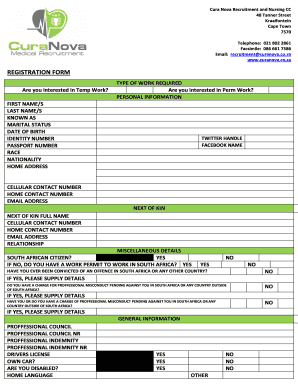
This guide provides detailed instructions on how to complete the Curanova registration form online. By following these steps, you can ensure your submission is accurate and complete, facilitating a smooth recruitment process.
Follow the steps to successfully complete the Curanova registration form.
- Click the ‘Get Form’ button to access the registration form and open it in the editor.
- Indicate your interest in temporary and/or permanent work by checking the appropriate boxes for 'Temp Work' and 'Perm Work'.
- Fill in your personal information: First name(s), last name(s), known as, marital status, date of birth, identity number, passport number, race, nationality, and home address.
- Provide your social media details, including your Twitter handle and Facebook name, if applicable.
- Enter your contact details: cellular contact number, home contact number, and email address.
- Provide information about your next of kin, including their full name, contact numbers, email address, and relationship to you.
- Complete the miscellaneous details. Indicate whether you are a South African citizen, and if not, whether you have a work permit. Answer questions regarding any criminal convictions or charges of professional misconduct.
- Fill out the general information section including professional council registration details, professional indemnity information, driver’s license status, and any disabilities.
- Select your specialties and areas of experience by ticking the relevant boxes that reflect your qualifications and expertise.
- List your qualifications by detailing your degree(s), institution(s), year(s) of qualification, and any relevant additional courses or achievements.
- Provide banking details, including the name of the account holder, bank name, branch, account type, and account number.
- Detail your work experience, starting with your present employer and working backward. Include employment dates, positions held, contact person, and reasons for leaving.
- Read and acknowledge the declaration section stating that the information provided is accurate and that you have understood the contract services and pay rate information.
- Finally, sign and date the application form, and ensure all sections are filled out completely.
- Once finished, save your changes, download, print, or share the form as needed to complete the submission process.
Complete your Curanova application online today to take the next step in your career.
In Adobe Acrobat Pro, select the range of pages you want to renumber, then go to Options > Page Labels to change the page numbering. In Preview for macOS, go to Settings > PDF > Use logical page numbers.
Industry-leading security and compliance
US Legal Forms protects your data by complying with industry-specific security standards.
-
In businnes since 199725+ years providing professional legal documents.
-
Accredited businessGuarantees that a business meets BBB accreditation standards in the US and Canada.
-
Secured by BraintreeValidated Level 1 PCI DSS compliant payment gateway that accepts most major credit and debit card brands from across the globe.