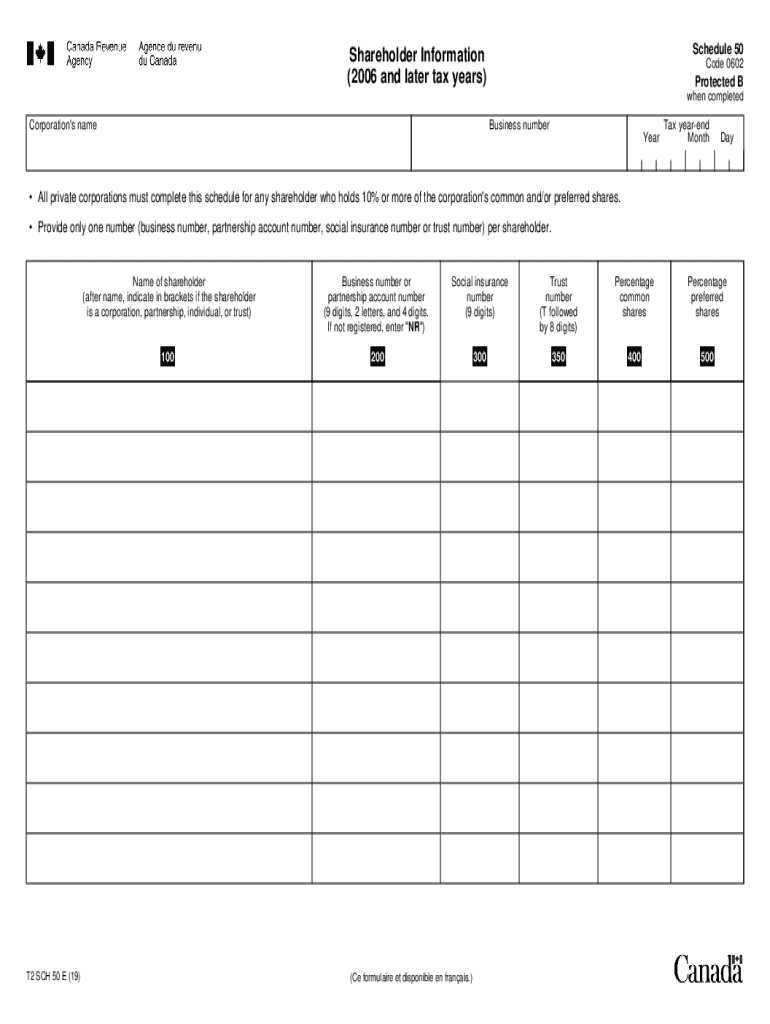
S must complete this schedule for any shareholder who holds 10% or more of the corporation's common and/or preferred shares. Provide only one number (business number, partnership account number, social insurance number or trust number) per shareholder. T2 SCH 50 E (19) Name of shareholder (after name, indicate in brackets if the shareholder is a corporation, partnership, individual, or trust) Business number or partnership account number (9 digits, 2 letters, and 4 digits. If not register.
Loading

Open form follow the instructions

Easily sign the form with your finger

Send filled & signed form or save
How to fill out the CA T2 SCH 50 online
Filling out the CA T2 SCH 50 is essential for private corporations with shareholders holding 10% or more of common and/or preferred shares. This guide provides clear, step-by-step instructions to assist you in completing this form accurately online.
Follow the steps to complete the CA T2 SCH 50 efficiently.
- Click ‘Get Form’ button to obtain the form and open it in your browser.
- Identify the corporation's name at the top of the form. Ensure the name corresponds with registration documents to avoid discrepancies.
- Enter the business number, ensuring it is the correct format of 9 digits, 2 letters, and 4 digits. If your corporation is not registered, input 'NR'.
- Fill in the tax year and specify the month and the day of the year-end date for the corporation.
- Provide shareholder information. For each shareholder holding 10% or more of shares, include their name. Indicate their status in brackets (corporation, partnership, individual, or trust).
- Enter the relevant numbers for each shareholder: either the business number, partnership account number, social insurance number, or trust number, ensuring only one number is provided per shareholder.
- Indicate the percentage of common shares owned by the shareholder in the designated field.
- Specify the percentage of preferred shares held by the shareholder in the corresponding field.
- Review all entered information for accuracy. Once confirmed, save your changes and proceed to download or print the form for your records.
Complete your CA T2 SCH 50 online today for accurate and timely submissions.
Experience a faster way to fill out and sign forms on the web. Access the most extensive library of templates available.
Related content
For California purposes, if a corporation is required to file Schedule UTP (Form ... IRC...
Please refer to the Course Schedule and Costs page for more information. ... civilian...
Prostate cancer is the development of cancer in the prostate, a gland in the male...
Get answers to your most pressing questions about US Legal Forms API.
Can I file my own t2?
You can file your corporate income tax return using three different methods: Using the CRA's Corporation Internet Filing service, or. Using the CRA's My Business Account; or. Printing the T2 Bar Code Return and mailing or delivering it to the CRA.
What is a t2 tax return?
All resident corporations (except tax-exempt Crown corporations, Hutterite colonies and registered charities) have to file a corporation income tax (T2) return every tax year even if there is no tax payable. ...
How long does Revenue Canada have to audit you?
The CRA audit time limit states that the agency has four years from the date on your Notice of Assessment to go back and conduct an audit. This means if you file your 2017 tax return in April 2018 and receive your assessment in June 2018, the CRA can audit this return until June 2022.
Can you negotiate with Revenue Canada?
The reality is that, the CRA does not negotiate. It wants the money that is owed to it. No matter how good of a negotiator you are, the CRA will not lower the overall amount of tax debt that you owe. You owe this money and the CRA wants to receive it.
What is a Schedule 50 Revenue Canada?
Schedule 50, Shareholder Information Complete Schedule 50 if you are a private corporation and if any shareholder holds 10% or more of your common and/or preferred shares. Give a maximum of the 10 top shareholders and the requested information.
Who can use the t2 Short Return?
You can also use this return for a tax-exempt corporation (such as a non-profit organization) that has a permanent establishment in only one province or territory. (Vous pouvez obtenir ce formulaire en français à www.arc.gc.ca ou au 1-800-959-3376.)
Who can file a t2 Short Return?
T2 Short Return Two categories of corporations are eligible to use this return: You can use this return if the corporation is a Canadian-controlled private corporation (CCPC) throughout the tax year and this year, it has either a nil net income or a loss for income tax purposes.
What is a t2 Short Return?
The T2 Short Return is a simpler version of the T2 Corporation Income Tax Return. There are two categories of corporations. that are eligible to use this return. You can use this return if the corporation is: a Canadian-controlled private corporation throughout the tax year and has either a loss or a nil.
What is a Schedule 5 CRA?
The Canada Revenue Agency's (CRA) Schedule 5 is used when taxpayer's want to claim an amount for an eligible dependent, the amount for an infirm dependent age 18 or older, a caregiver amount, or an amount for a spouse or common-law partner.
How do I fill out a t2 Short Return?
0:43 15:07 Suggested clip Filing Nil T2 Return for Corporations - YouTubeYouTubeStart of suggested clipEnd of suggested clip Filing Nil T2 Return for Corporations - YouTube
Use professional pre-built templates to fill in and sign documents online faster. Get access to thousands of forms.
If you believe that this page should be taken down, please follow our DMCA take down process here.