Loading
Form preview
  • US Legal Forms
  • Other Templates
  • More Forms
  • More Multi-State Forms
  • Tx Daily Food Production Record For Onsite Kitchen 2015

Get Tx Daily Food Production Record For Onsite Kitchen 2015-2026

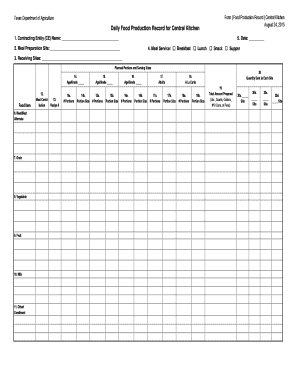
5. Date: 4. Meal Service: Breakfast Lunch Snack Supper 2. Meal Preparation Site: 3. Receiving Sites: Planned Portions and Serving Sizes 14. Age/Grade Food Item 6. Meat/Meat Alternate 7. Grain 8. Vegetable 9. Fruit 10. Milk 11. Other/ Condiment 12. Meal Contri13. bution Recipe # 14a. # Portions 14b. Portion Size 15. Age/Grade 15a. # Portions.

How it works

  1. Open form

    Open form follow the instructions

  2. Easily sign form

    Easily sign the form with your finger

  3. Share form

    Send filled & signed form or save

How to fill out the TX Daily Food Production Record for Onsite Kitchen online

The TX Daily Food Production Record for Onsite Kitchen is essential for documenting meal preparations and serving details in various meal service programs. This guide provides clear, step-by-step instructions to help you fill out the form correctly and efficiently, ensuring accurate records are maintained online.

Follow the steps to fill out the form online.

  1. Press the ‘Get Form’ button to obtain the form and open it in your preferred editor.
  2. Begin by entering the Contracting Entity (CE) Name in the designated field at the top of the form.
  3. Next, fill in the Site Name to specify the location of the onsite kitchen.
  4. Select the Meal Service type by checking the appropriate box for either Breakfast, Lunch, Snack, or Supper.
  5. Indicate the Type of Service, choosing ‘Serve Only’ or ‘OVS’ (Offer vs. Serve) as applicable.
  6. Enter the date the meals are being recorded in the provided date field.
  7. Complete the Number of Meals Served by specifying the total for Students and Adults separately in the given fields.
  8. You will then need to document planned portions and serving sizes for various food items, including Meat/Meat Alternate, Grain, Vegetable, Fruit, Milk, and Other/Condiments.
  9. For each food category, fill in the Meal Contribution Recipe Number along with the Number of Portions and Portion Size.
  10. Ensure that you document any A La Carte items if applicable, following the same format of portions and sizes.
  11. In the Total Amount Prepared section, record the total weight or volume for the meals prepared.
  12. Enter details about leftovers if any, and include any optional comments in the designated field.
  13. Once all fields are completed and reviewed for accuracy, save your changes, and download or print the completed form as needed.

Start filling out the TX Daily Food Production Record online today to ensure your meal preparation documentation is precise and thorough.

Get form

Experience a faster way to fill out and sign forms on the web. Access the most extensive library of templates available.
Get form

Related content

Texas Food Establishment Rules
Aug 1, 2021 — (1) Foods that are not prepared on-site or that require extensive...
Learn more
FOOD SERVICES REVIEW
FOOD PRODUCTION (REC. 7). Daily food production records indicate that the. Food Services...
Learn more
at the "New Era for Smarter Food Safety" Public...
Nov 25, 2019 — So, let's work together to foster support and strengthen food safety...
Learn more

Related links form

Caldwell University I-20 Document Application 2023 California State University Sacramento Combination Resume Sample Accounting 2009 Georgia College Transient Permission Form 2019 Stanford University Hepatitis B Vaccine Declaration Form 2016

Questions & Answers

Get answers to your most pressing questions about US Legal Forms API.

Contact support

To write food production effectively, focus on listing all the menu items along with the ingredients and quantities needed for preparation. Document the intended number of servings, and after serving, include the actual amounts prepared and served. By using a TX Daily Food Production Record For Onsite Kitchen, you can create a structured and clear food production record that supports operational goals.

A daily meal production record is a comprehensive document that indicates what meals were prepared, the quantities produced, and the actual consumption rates. This record serves as a reliable reference for future meal planning, budgeting, and inventory control. By adopting a TX Daily Food Production Record For Onsite Kitchen, operators can enhance accountability and streamline their processes.

An example of a production record could include daily logs of all menu items, including ingredients, quantities prepared, and servings left afterward. This ensures transparency in kitchen operations and assists in planning for future meals. Using a TX Daily Food Production Record For Onsite Kitchen will enable staff to consistently track these metrics.

The purpose of a meal production record is to provide a detailed account of food items prepared, serving sizes, and actual servings. This record supports kitchen staff in analyzing food waste and adjusting future meal plans. Implementing a TX Daily Food Production Record For Onsite Kitchen enhances efficiency and helps maintain nutrition standards.

Many people consider breakfast to be the most important meal of the day. This meal kick-starts your metabolism and provides necessary energy for daily activities. For onsite kitchens, monitoring breakfast production is crucial, and a TX Daily Food Production Record For Onsite Kitchen can help track these details effectively.

The kitchen or food production department in a hotel is responsible for preparing and serving meals to guests. This department plays a vital role in enhancing guest satisfaction by ensuring high-quality food is available. By using the TX Daily Food Production Record For Onsite Kitchen, hotels can streamline their operations, optimize meal preparation, and maintain quality standards.

The daily production record captures all food items prepared and served in a kitchen daily. This documentation helps track efficiency and ensures that meals align with dietary regulations. Implementing the TX Daily Food Production Record For Onsite Kitchen simplifies the process, making it easier to document and manage food service operations.

To efficiently record food intake, start by using a dated log where you note each meal and its corresponding ingredients. The TX Daily Food Production Record For Onsite Kitchen is an ideal resource for this purpose, providing a clear and organized way to manage your food documentation. By keeping consistent records, you can ensure that nutritional needs are met.

In California, MPR stands for Meal Production Record. This is a vital tool used in schools to document the meals prepared and served. The TX Daily Food Production Record For Onsite Kitchen serves a similar function, ensuring that schools comply with nutritional standards and keep accurate records of food offerings.

Recording food intake involves entering data into a designated system or form. The TX Daily Food Production Record For Onsite Kitchen simplifies this process by providing a structured format for logging served meals. Regular updates to this record enhance the accuracy of your food intake tracking.

Get This Form Now!

Use professional pre-built templates to fill in and sign documents online faster. Get access to thousands of forms.
Get form
If you believe that this page should be taken down, please follow our DMCA take down processhere.
Get TX Daily Food Production Record For Onsite Kitchen
Get form
  • Adoption
  • Bankruptcy
  • Contractors
  • Divorce
  • Home Sales
  • Employment
  • Identity Theft
  • Incorporation
  • Landlord Tenant
  • Living Trust
  • Name Change
  • Personal Planning
  • Small Business
  • Wills & Estates
  • Packages A-Z
  • Affidavits
  • Bankruptcy
  • Bill of Sale
  • Corporate - LLC
  • Divorce
  • Employment
  • Identity Theft
  • Internet Technology
  • Landlord Tenant
  • Living Wills
  • Name Change
  • Power of Attorney
  • Real Estate
  • Small Estates
  • Wills
  • All Forms
  • Forms A-Z
  • Other Templates
  • Legal Hub
  • About Us
  • Help Portal
  • Legal Resources
  • Blog
  • Affiliates
  • Contact Us
  • Delete My Account
  • Site Map
  • Industries
  • Forms in Spanish
  • Localized Forms
  • State-specific Forms
  • Forms Kit
  • Real Estate Handbook
  • All Guides
  • Notarize
  • Incorporation services
  • For Consumers
  • For Small Business
  • For Attorneys
  • USLegal
  • FormsPass
  • pdfFiller
  • signNow
  • altaFlow
  • DocHub
  • Instapage
Form Packages
  • Adoption
  • Bankruptcy
  • Contractors
  • Divorce
  • Home Sales
  • Employment
  • Identity Theft
  • Incorporation
  • Landlord Tenant
  • Living Trust
  • Name Change
  • Personal Planning
  • Small Business
  • Wills & Estates
  • Packages A-Z
Form Categories
  • Affidavits
  • Bankruptcy
  • Bill of Sale
  • Corporate - LLC
  • Divorce
  • Employment
  • Identity Theft
  • Internet Technology
  • Landlord Tenant
  • Living Wills
  • Name Change
  • Power of Attorney
  • Real Estate
  • Small Estates
  • Wills
  • All Forms
  • Forms A-Z
  • Other Templates
Customer Service
  • Legal Hub
  • About Us
  • Help Portal
  • Legal Resources
  • Blog
  • Affiliates
  • Contact Us
  • Delete My Account
  • Site Map
  • Industries
  • Forms in Spanish
  • Localized Forms
  • State-specific Forms
  • Forms Kit
Legal Guides
  • Real Estate Handbook
  • All Guides
Prepared for you
  • Notarize
  • Incorporation services
Our Customers
  • For Consumers
  • For Small Business
  • For Attorneys
Our Sites
  • USLegal
  • FormsPass
  • pdfFiller
  • signNow
  • altaFlow
  • DocHub
  • Instapage
Social Media
Call us now toll free:
+1 833 426 79 33
As seen in:
© Copyright 1999-2026 airSlate Legal Forms, Inc. 17 Station Street, Ste. 203, Brookline, MA 02445
  • Your Privacy Choices
  • Terms of Service
  • Privacy Notice
  • Content Takedown Policy
  • Bug Bounty Program