Get Ks Worksheet For Marriage Registration 2010-2026
How it works
-

Open form follow the instructions
-

Easily sign the form with your finger
-

Send filled & signed form or save
How to fill out the KS Worksheet For Marriage Registration online
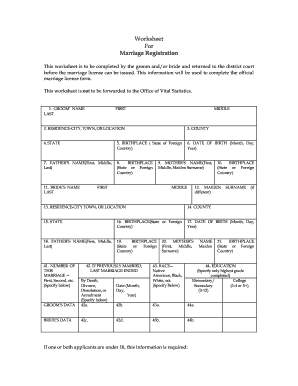
The KS Worksheet For Marriage Registration is an important document that gathers essential information from the partners intending to marry. Completing this worksheet accurately ensures a smooth process for obtaining a marriage license.
Follow the steps to successfully complete the KS worksheet for marriage registration
- Click ‘Get Form’ button to obtain the worksheet and open it in your preferred online editor.
- Begin by filling out the groom's name in the designated fields. This includes their last name, first name, and middle name.
- Provide the groom's residence by entering the city, town, or location in the specified field.
- Indicate the county where the groom resides.
- Select the state of residence for the groom.
- Fill in the birthplace of the groom, specifying the state or foreign country.
- Enter the groom's date of birth in the format of month, day, and year.
- Complete the father's name fields, ensuring to include first, middle, and last names.
- Provide the birthplace of the groom's father by selecting the state or foreign country.
- Similarly, fill in the bride's name fields with their last name, first name, and middle name.
- Enter the mother's name for the bride, including first, middle, and maiden surname.
- Indicate the birthplace of the bride's mother in the form provided.
- Fill in the bride's maiden surname, if different from the name provided earlier.
- Input the residence of the bride, specifying city, town, or location.
- Indicate the county of the bride's residence.
- Select the state of the bride's residence.
- Provide the birthplace of the bride as required in the form.
- Fill in the bride's date of birth, using the format month, day, and year.
- Complete the bride's father's name fields, ensuring to include first, middle, and last names.
- Indicate the birthplace of the bride's father accordingly.
- Specify the number of this marriage for both the groom and bride, explaining if it's the first, second, etc.
- If previously married, indicate how the last marriage ended, whether by death, divorce, dissolution, or annulment.
- Select the race category for both parties, ensuring to specify if required.
- Complete the education fields, noting only the highest grade completed for both partners.
- If one or both applicants are under 18, provide the name of the parent or guardian consenting, if applicable.
- Indicate the person performing the ceremony by entering their name.
- Provide the address of the person performing the ceremony, including street and number or rural route, city or state, and zip code.
- Finally, both partners should sign the document in the fields designated for their signatures.
- After completing all sections, save your changes, download your form, print it, or share it as needed.
Complete your KS worksheet for marriage registration online promptly to ensure a smooth process.
Getting a copy of your marriage certificate in Kansas involves a simple process. You can visit the local vital records office or request it online through authorized websites. Make sure to fill out the KS Worksheet For Marriage Registration accurately, as it helps expedite your request. For additional assistance and to ensure you meet all requirements, consider using uslegalforms, which provides detailed guidance tailored to your needs.